To create SysML v2 API Querying indexing configurations
In the right-side menu of the Settings application, select Indexing management.
Select tab SysML v2 API Queryingat the top.
Click on the bottom right corner of the screen as shown in the figure above.
In the open wizard, make sure that the indexing configuration type SysML v2 API Querying is selected.
Select the resource you want to create an indexing configuration for and click Next.
Note
You can index only one resource at a time. Note that only indexed resources can be queried.
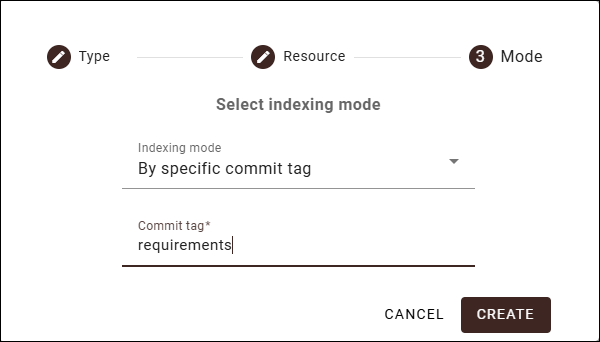
In the last step of the wizard, select one of the following indexing modes:
Automatic (default) - the resource is automatically indexed every time new project versions are committed in the indexing scope.
Manual - the resource is indexed only when indexing is initiated by an authorized user.
By specific commit tag - the resource is indexed only when new project versions are committed with a specified commit tag in the indexing scope. If you select this indexing mode, the Commit tag box appears where you need to specify the desired commit tag.
Click the Create button.
The created indexing configuration automatically appears in the Indexing configurations list on the SysML v2 API Querying tab. To refresh the indexing status, reload the web page.