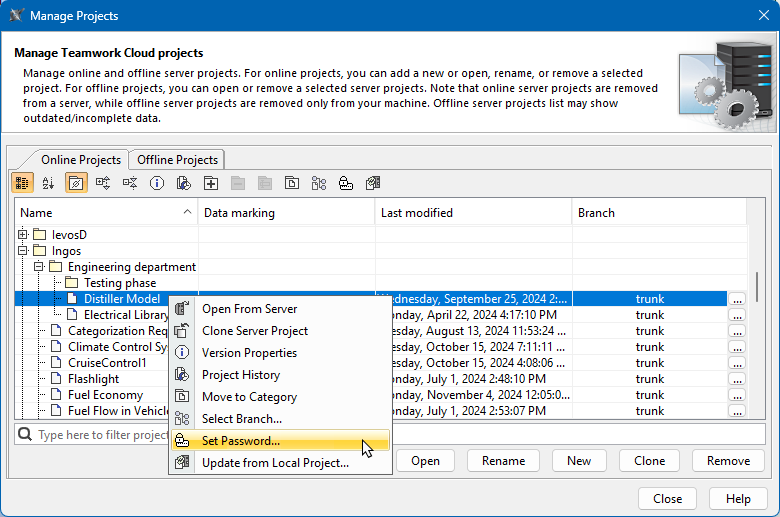
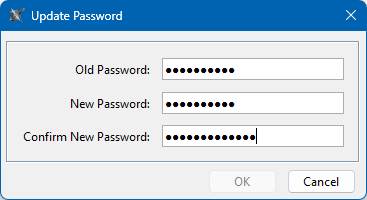
SysML v2 Client-Side Collaboration 2026x Managing server projects Current: Password-protected projects Password-protected projects You can protect server projects with a password. The password protects all project versions. Prerequisites To set, update, and remove project passwords, you need the Administer Resources permission. Setting a project passwordTo set a project passwordIn the main menu, select Collaborate > Projects.In the Manage Projects dialog, do one of the following:Select a project and click .Right-click a project and select Set Password.In the Set Password dialog, enter and confirm the project password.Click OK.Password-protected projects are indicated by icon.Updating project passwordTo update a project passwordIn the main menu, select Collaborate > Projects.In the Manage Projects dialog, do one of the following:Select a password-protected project and click .Right-click a password-protected project and click Set Password.In the Update Password dialog, enter an old password, then enter and confirm a new password.Click OK.Removing project passwordTo remove a project passwordIn the main menu, select Collaborate > Projects.In the Manage Projects dialog, do one of the following:Select a password-protected project and click .Right-click a password-protected project and click Set Password.In the Update Password dialog, enter an old password and leave the New Password and Confirm New Password boxes empty.Click OK. ×