Evaluating model elements
`This chapter describes how you can evaluate model elements, e.g., attributes, expressed through general mathematical calculations. When you evaluate a model element, all of its owned and inherited attributes are evaluated as well.
Evaluating model elements via the textual notation
To evaluate a model element via the textual notation
- In the Textual Editor, place the cursor on the element you want to evaluate.
- In the Textual Editor toolbar, click
 .
.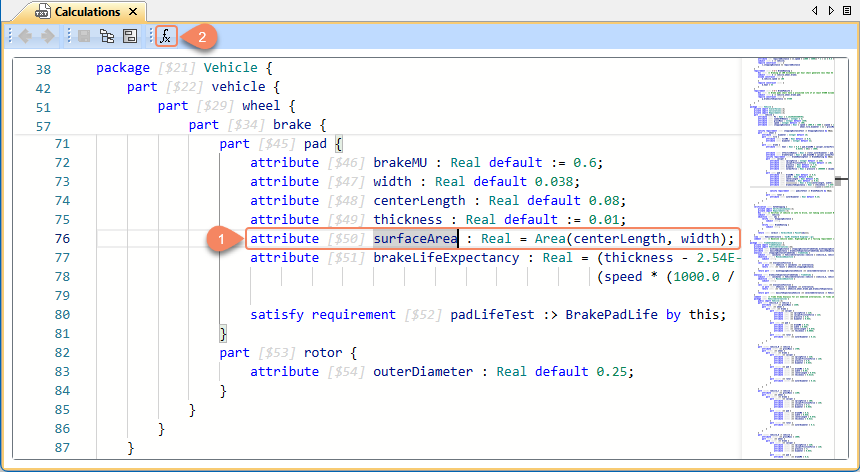
The evaluation results are displayed in the SysML v2 Model Evaluation console.
Evaluating model elements via the Containment tree
To evaluate a model element via the Containment tree
- Right-click an element in the Containment tree and select Evaluate.
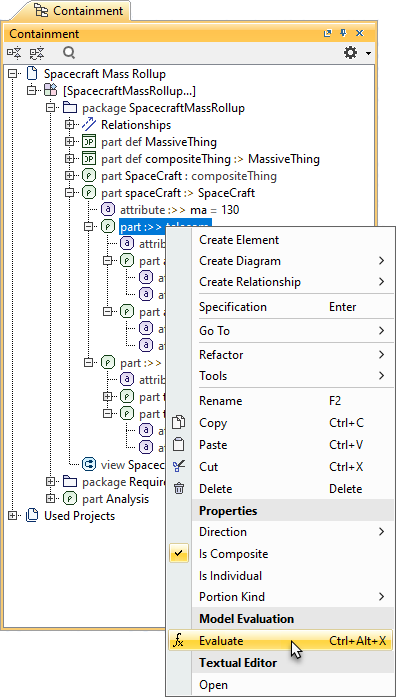
The evaluation results are displayed in the SysML v2 Model Evaluation console.
Evaluating model elements in views
You can use views to evaluate individual model elements or all the elements displayed in a view.
To evaluate a model element in a view
- Open the view displaying the model elements you want to evaluate.
- Do one of the following:
- Optionally, select the shapes of the elements you want to evaluate and, in the view toolbar, click .

If you do not select any shapes, all the elements displayed in the view are evaluated.
- Right-click an element shape and select Evaluate.
- Select an element shape and, in the smart manipulator, click .
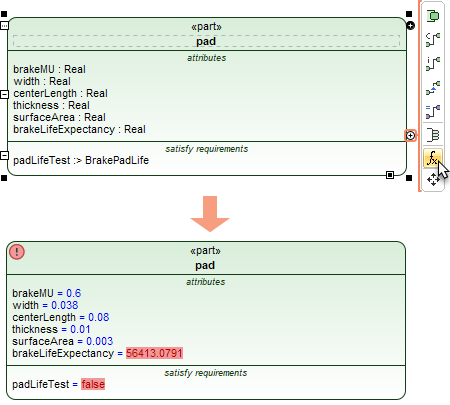
- Optionally, select the shapes of the elements you want to evaluate and, in the view toolbar, click
The evaluation results of the element attributes are displayed on the element shape. The attributes that pass or fail related requirements or constraints are highlighted in green or red. Learn more about requirement and constraint evaluation.
Evaluating elements via the SysML v2 Model Evaluation console
You can evaluate model elements by writing an expression directly in the SysML v2 Model Evaluation console. However, you need to call the element you want to evaluate directly, because the console will not display the evaluation results of the owned and inherited elements.
To evaluate an element via the SysML v2 Model Evaluation console
- Select Window > SysML v2 Model Evaluation to open the SysML v2 Model Evaluation console.
- In the input box of the console, type the qualified name of the element you want to evaluate and press Enter.
To save time, click
 in the toolbar of the SysML v2 Model Evaluation console to enable context selection in the Containment tree. When context selection is enabled, select the owner of the element you want to evaluate and enter only the element's name to evaluate it.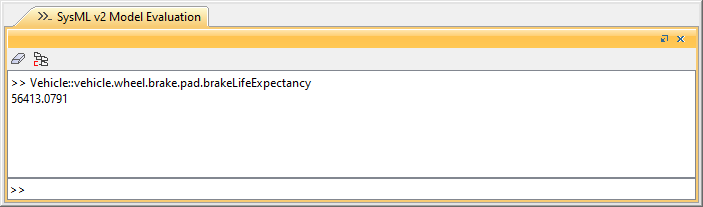
The evaluation results are displayed in the SysML v2 Model Evaluation console as shown in the above figure.