Libraries & samples
Libraries
Each SysML v2 project is automatically loaded with used projects:
- Standard Libraries. It contains standard SysML v2 libraries.
- 3DS SysML Customization. It contains concepts designed for view creation and customization, symbol style customization, creation dialogs' customization, and model validation.

3DS SysML Customization structure
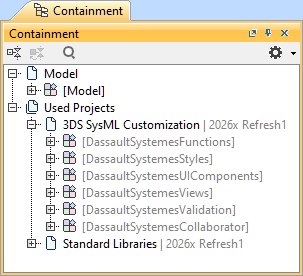
- <DS_Functions> DassaultSystemesFunctions. Contains various functions used for customization elements.
- <DS_Styles> DassaultSystemesStyles
- CoreStylesComponents
- Contains style sheet modeling and configuration concepts.
- KerMLStyles. Contains primary style definitions that can be reused (subclassified) for style sheet rules.
- SysMLStyles. Contains compartment style view definitions for style sheet rules.
- Predicates. Contains condition part definitions for style sheet rules.
- StyleSheets. Contains predefined style sheets.
- ColorDefinitions. Contains color definitions for style sheet rules.
- CompartmentVisibilityDefinitions. Contains compartment visibility definitions for style sheet rules.
- CoreStylesComponents
- <DS_UIComponents> DassaultSystemesUIComponents
- CoreUIComponents
- Operations. Contains concepts for view palette creation and Creation dialog customization.
- Components. Contains concepts for view palette creation and Creation dialog customization.
- Palette. Contains concepts for view palette creation.
- Dialogs. Contains concepts for Creation dialog customization.
- UIComponents.
- Contains a predefined view creation dialog.
- ViewsTemplates. Contains model elements used to define the actions of templated buttons for creation dialogs, which in turn duplicate the template into the model.
- CoreUIComponents
- <DS_Views> DassaultSystemesViews
- CoreViews. Contains abstract view definitions for symbolic and tabular view definition creation; tabular view column and cell modeling concepts, their rendering definitions and usages; style sheet activation concepts.
- SymbolicViews. Contains predefined symbolic views.
- SymbolicViewsByExpression. Contains predefined symbolic views by expression.
- TabularViews. Contains predefined tabular views.
- ViewPalettes. Contains predefined view palettes.
- CodeActionIdentifiers. Contains action IDs for the predefined buttons used in the symbolic view palettes of all predefined symbolic view definitions. They can also be used for custom view palettes. The predefined buttons contain names, descriptions, and actions for specific element creation.
- ElementTemplates. Contains certain element templates for view palettes.
- <DS_Validation>DassaultSystemesValidation
- CoreValidationComponents. Contains concepts for creating custom validation suites and validation rules.
- Suites. Contains predefined validation suite instances.
- CoreValidationComponents. Contains concepts for creating custom validation suites and validation rules.
- <DS_Collaborator>DassaultSystemesCollaborator. Contains customization concepts for MagicLab.
Samples
You can review the SysML v2 project samples provided with the installation, found at:
- <modeling tool installation directory>\samples
Opening sample projects
To open a sample project
- In the Main toolbar, select Help, in the dropdown menu, click Show Samples. A new tab opens displaying all available sample projects.
Click an appropriate sample project under the SysML v2 section.
Use the shortcut keys Ctrl+F to open the Find dialog. Enter the desired keyword to locate specific samples.
The sample project is opened.