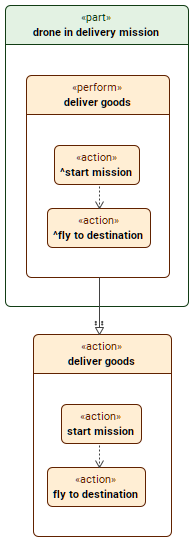
A reference subsetting is a kind of subsetting relationship. While a subsetting usage can have multiple subsetted usages, a reference subsetting usage can only have one specific subsetted usage.

Reference subsetting

Reference subsetting a usage via the Textual Editor

To reference subset a usage via the Textual Editor


  1. In the Textual Editor, identify the usage element that you want to be the referencing one.
  2. Follow the element name with either one of the following:
    1. keyword references
    2. textual symbol ::>
  3. Follow the keyword with the name of the referenced usage element. 

  4. Click the Synchronize button.

    part 'drone in delivery mission' {
       perform action ::> 'deliver goods';
       /* or */
       perform action references 'deliver goods';
    }
    action 'deliver goods' {
       action 'start mission';
       action 'fly to destination';
       first 'start mission' then 'fly to destination' ;
    }
Reference subsetting a usage via the view palette

To reference subset a usage via the view palette


  1. In the view palette, under the Specializations group, select reference subsetting
  2. Draw the line with the arrowhead going from the referencing usage to the referenced one.

Reference subsetting a usage via the Create Relation command

To reference subset a usage via the Create Relation command


  1. Right-click the element that you want to be the subsetting one.
  2. In the shortcut menu, click Create Relation, then in the submenu, under Outgoing, click reference subsetting. The Create... dialog opens.
  3. In the Create... dialog, do one of the following:
    1. In a view, click the element symbol you want to subset. Hold Shift to select multiple elements. 
    2. Click the Add button. The element selection dialog opens. In the element selection dialog, select the element you want to subset and click OK.
    3. Drag and drop the needed element you want to subset from the Containment tree onto the Create... dialog.
  4. In the Create... dialog, click OK