Interface
An interface is a connection whose ends are ports. As such, an interface facilitates the specification and reuse of compatible connections between parts. An interface definition is a kind of connection definition whose ends are restricted to be port definitions, while an interface usage is a kind of connection that is a usage of an interface definition with ends restricted to be port usages. As such, an interface usage connects compatible ports.

- The ends of an interface definition or usage must be port usages.
- The port keyword is optional for interface ends. The keyword is mandatory if the ends have owned cross features.
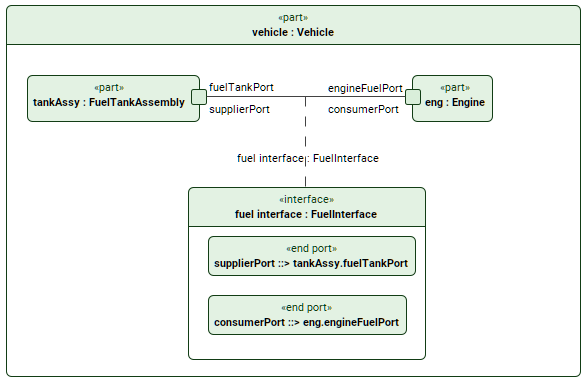
The image displays the 'fuel interface' interface connector where supplierPort reference subsets tankAssy.fuelTankPort connecting to consumerPort which reference subsets eng.engineFuelPort.
Additionally, the connector is also elaborated.
Creating interface usage and definition elements
Creating interface usage elements via the Textual Editor
To create interface usage elements via the Textual Editor
- In the Textual Editor, place the cursor where you want to create the element and declare the interface keyword.
- Specify the element name (optional), specialization (optional), then the connect keyword, then state the feature ports explicitly (using the connect...to syntax) or in a comma-separated list of related features.
- If the interface has no name and no specialization, the keyword connect can be omitted.
- You can also name interface end ports, associating them to feature ports via reference subsetting.
- Click the Synchronize button.
interface def FuelInterface {
end port supplierPort : FuelOutPort;
end port consumerPort : FuelInPort;
}
part vehicle {
part tankAssy { port fuelTankPort; }
part eng { port engineFuelPort; }
// unnamed unspecialized interface usage connecting feature ports with explicit declaration:
interface tankAssy.fuelTankPort to eng.engineFuelPort;
// unnamed unspecialized interface usage connecting feature ports in a comma-separated list:
interface (tankAssy.fuelTankPort, eng.engineFuelPort);
// unnamed unspecialized interface usage with named end ports connecting feature ports in a comma-separated list:
interface (sPort ::> tankAssy.fuelTankPort, cPort ::> eng.engineFuelPort);
// unnamed specialized (feature typing) interface usage with named end ports connecting feature ports with explicit declaration:
interface : FuelInterface connect sPort ::> tankAssy.fuelTankPort to cPort ::> eng.engineFuelPort;
// named unspecialized interface usage connecting feature ports with explicit declarations:
interface fuelInterface connect tankAssy.fuelTankPort to eng.engineFuelPort;
// named specialized (feature typing) interface usage with named end ports connecting feature ports with explicit declaration:
interface 'fuel interface' : FuelInterface connect sPort ::> tankAssy.fuelTankPort to cPort ::> eng.engineFuelPort;
// named specialized (feature typing) interface usage with named end ports connecting feature ports in a comma-separated list:
interface 'fuel interface' : FuelInterface connect (sPort ::> tankAssy.fuelTankPort, cPort ::> eng.engineFuelPort);
}
Creating interface usage elements via the smart manipulator in a view
To create interface usage elements via the smart manipulator in a view
- In a view, select an element symbol, and in its smart manipulator, click the interface command.
- Click on the element you want to connect via an interface. An interface connector is created between the elements with ports on both ends.
Creating interface usage elements via the Create Relationship command
To create interface usage elements via the Create Relationship command
- Right-click one of the elements you want to connect.
- In the shortcut menu, click Create Relationship, then in the submenu, click Outgoing, and then in the submenu, click interface. The Element Picker dialog opens.
- In the Element Picker dialog, do one of the following:
- In a view, click the element symbol you want to connect. Hold Shift to select multiple elements.
- Click the Add
 button. The element selection dialog opens. In the element selection dialog, select the element you want to connect and click OK.
 - Drag and drop the needed element you want to connect from the Containment tree onto the Element Picker.
- In the Element Picker dialog, click OK.
Creating interface usage and definition elements via the view palette
To create interface usage and definition elements via the view palette
- To create an interface definition:
- In the view palette, under the Connectors group, click the interface def button to create an interface definition element.
- Click in the view pane where you want the interface definition symbol to be created.
- To create an interface usage:
- In the view palette, under the Connectors group, click the interface button to create an interface usage.
- In a view, click on the first of the two element symbols you want to connect, then on the second. An interface connector is created between the elements with ports on both ends.
If the needed button is not displayed, click the down-facing arrow next to either the interface, n-ary interface or the interface def button and select the needed button in the dropdown menu.
Creating interface definition elements via the Textual Editor
To create interface definition elements via the Textual Editor
- In the Textual Editor, place the cursor where you want to create the element and declare the keyword interface def.
- Name the element, then specify the interface definition features in the element body:
- Specify the interface definition ends by declaring the end keyword, followed by the end name and/or specialization of the needed port.
- Click the Synchronize button.
interface def FuelInterface { // interface definition
end port supplierPort : FuelOutPort;
end port consumerPort : FuelInPort;
}
Creating interface definition elements via the Create Element command
To create interface definition elements via the Create Element command
In the Containment tree, right-click an element, and in the shortcut menu, click Create Element.
- In the Create Element submenu, click interface def for interface definition.
Auto-creating interface definition elements via the Extract Definition command
To auto-create an interface definition element via the Extract Definition command
- See the Extract Definition and Usage page.