Succession
A succession is a binary connection that requires its two related usages to have values that are occurrences that happen completely separated in time. A succession asserts that the first action must complete before the second can begin. Successions can be used to assert the ordering of any kind of occurrences in time, but are particularly useful for event occurrences and performances of actions.
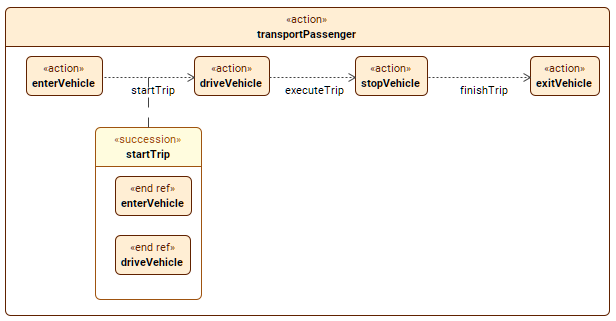
The image displays succession connectors, where one action succeeds another. Additionally, the startTrip succession connector is also elaborated.
Creating succession usage elements
Creating succession usage elements via the Textual Editor
To create succession usage elements via the Textual Editor
- In the Textual Editor, place the cursor where you want to create the element and declare the succession keyword.
- Specify the element name (optional), specialization (optional), then the keyword first, followed by the name of the first element you want to connect via a succession, then the keyword then, followed by the name of the second element you want to connect.

If the succession has no name and no specialization, the keyword succession can be omitted.
- Click the Synchronize button.
// The two related features of a succession are identified after its declaration part and before its body, following the keyword succession and separated by the keyword then. Actions can be declared separately from the successions:
action transportPassenger {
action enterVehicle; // action declarations
action driveVehicle;
action stopVehicle;
action exitVehicle;
succession startTrip first enterVehicle then driveVehicle; // named successions with source (first) and target (then)
succession executeTrip first driveVehicle then stopVehicle;
succession finishTrip first stopVehicle then exitVehicle;
// OR
// The keyword succession may be omitted for unnamed successions:
first enterVehicle then driveVehicle; // unnamed successions with source (first) and target (then)
first driveVehicle then stopVehicle;
first stopVehicle then exitVehicle;
}
// Action declarations can be combined with successions:
action transportPassenger {
action enterVehicle; // action declaration
then action driveVehicle; // unnamed successions (then) with action declarations (action <action_name>)
then action stopVehicle;
then action exitVehicle;
}
// If a succession is placed lexically directly between the two occurrence usages that are its related elements, then the declaration of the succession can be shortened to just the keyword then, prepended to the declaration of the second occurrence usage:
action transportPassenger {
action enterVehicle; // action declaration
first enterVehicle then driveVehicle; // unnamed succession with source (first) and target (then)
action driveVehicle; // action declaration
first driveVehicle then stopVehicle;
action stopVehicle;
first stopVehicle then exitVehicle;
action exitVehicle;
}
In addition to the regular full notation for successions, you can also use textual notation succession shorthands within the body of an action definition or usage.
// The source and target actions can be specified separately (first ...; then...;) instead of a single single succession (first ... then...;):
action transportPassenger {
action enterVehicle; // action declarations
action driveVehicle;
action stopVehicle;
action exitVehicle;
first enterVehicle;
then driveVehicle; // unnamed successions
first driveVehicle;
then stopVehicle;
first stopVehicle;
then exitVehicle;
}
// The then keyword may also be followed by a complete action usage declaration if source and target actions are specified separately:
action transportPassenger {
action enterVehicle;
first enterVehicle;
then action driveVehicle;
first driveVehicle;
then action stopVehicle;
first stopVehicle;
then action exitVehicle;
}
// The action preceding the then keyword is the source of the succession:
action transportPassenger {
action enterVehicle;
first enterVehicle;
then action driveVehicle;
then action stopVehicle;
then action exitVehicle;
}
Creating succession usage elements via the smart manipulator in a view
To create succession usage elements via the smart manipulator in a view
- In a view, select an element symbol, and in its smart manipulator, click the succession command.
- Click on the element you want to connect via a succession. A succession path is created between the elements.
Creating succession usage elements via the view palette
To create succession usage elements via the view palette
- In the view palette, under the Connectors group, click the succession button to create a succession usage.
- In a view, click on the first of the two elements you want to connect via a succession, then on the second. A succession is created between the elements.
Creating succession usage elements via the Create Relationship command
To create succession usage elements via the Create Relationship command
- Right-click one of the elements you want to connect via a succession.
- In the shortcut menu, click Create Relationship, then in the submenu, click Outgoing, and then in the submenu, click succession. The Element Picker dialog opens.
- In the Element Picker dialog, do one of the following:
- In a view, click the element symbol you want to connect. Hold Shift to select multiple elements.
- Click the Add
 button. The element selection dialog opens. In the element selection dialog, select the element you want to connect and click OK.
 - Drag and drop the needed element you want to connect from the Containment tree onto the Element Picker.
- In the Element Picker dialog, click OK.