You can validate the model against enabled validation suites using the following options:

  • Validate elements recursively via the Validate command.
  • Elements that fail validation are automatically highlighted in views. You can review the validation results in the Validation Results panel.
  • Elements that fail validation are automatically highlighted in the Textual Editor when the Run Validation environment option is enabled. You can view the validation results in the Validation Results panel.

    Currently, only active validation is supported in the modeling tool. Active validation runs automatically, i.e., elements are automatically checked against enabled validation suites without user input, and failing elements' symbols are highlighted in views.

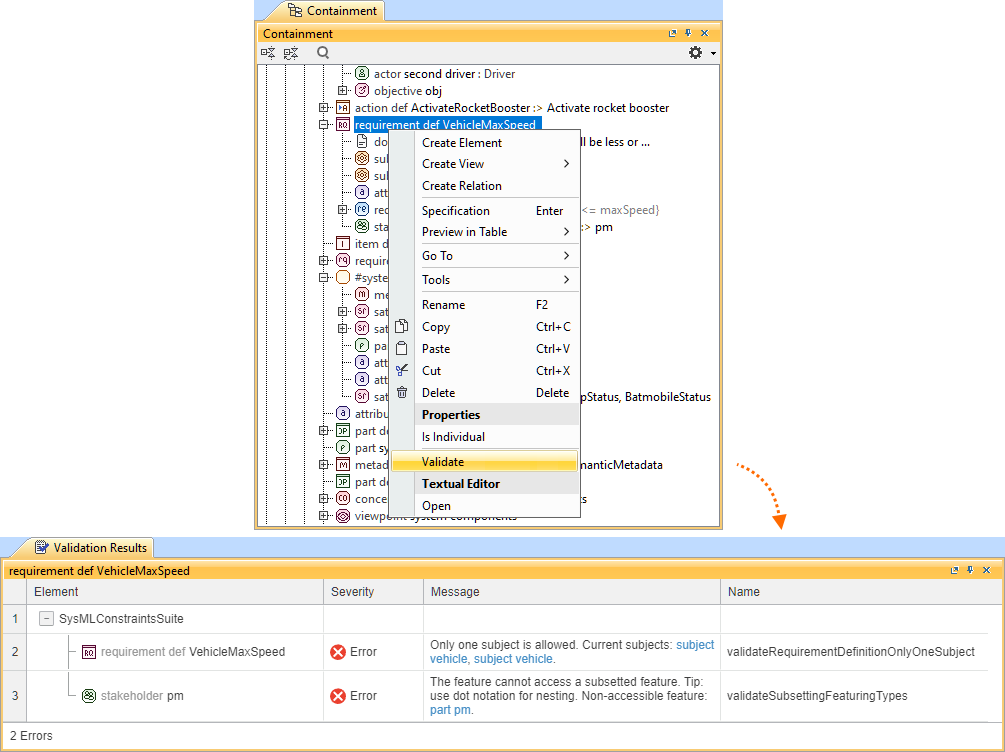
Validating the model

Validating model elements via the Validate command

To validate model elements via the Validate command


  • Right-click an element in the Containment tree or an element symbol in a view and in the shortcut menu, click Validate.
    The element is validated recursively against enabled validation suites. The Validation Results panel opens, allowing you to review the validation results.

    If you modify the element(s) for which the Validation Results panel was opened, you need to repeat the validation to update its results.