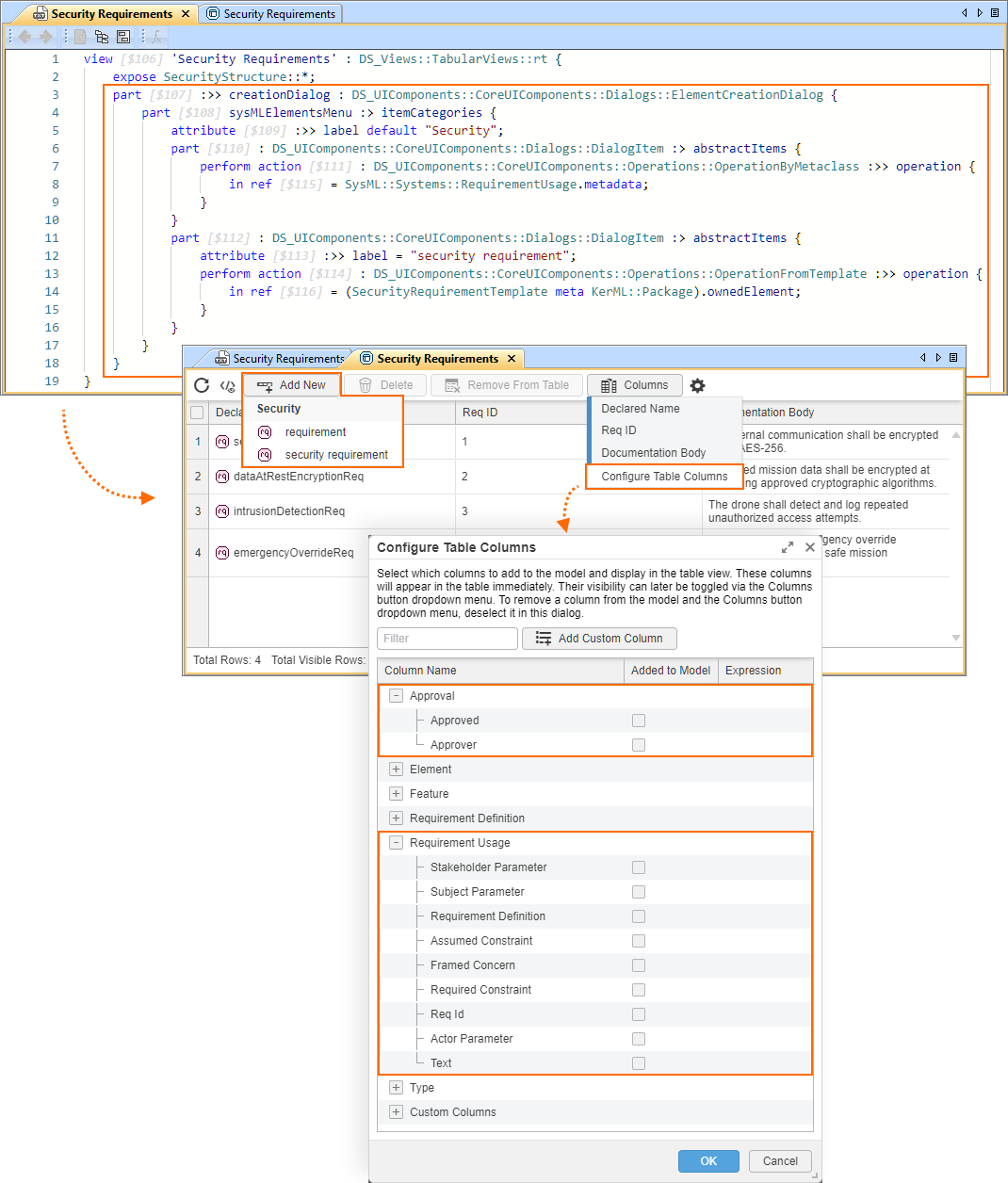
Custom table-specific Add New button dropdown menu
You can create a custom table-specific Element Creation dialog to be used in the specific table's (tabular view usage or definition) Add New dropdown menu instead of the Element Creation dialog activated for the entire project. This way, you can control what elements are available in the Add New dropdown menu.

- This procedure also affects the suggested columns available for selection in the Configure Table Columns dialog. The elements you specify for the dropdown menu are also made available as the suggested columns in the Configure Table Columns dialog, including the meta-features of the specified metaclass/metadata.
- Keep in mind that if the specified elements do not satisfy the view's filters, they will not appear in the Add New dropdown menu, and the Add New button will be disabled.
Custom table-specific Add New button dropdown menu
To create a custom table-specific Add New button dropdown menu
- Within the body of a tabular view, create a part usage that redefines the creationDialog and define it by the needed Element Creation Dialog configuration (e.g., DS_UIComponents::CoreUIComponents::Dialogs::ElementCreationDialog).
- Within the body of the part, create the needed Element Creation Dialog configuration. See the Creating Element Creation dialog page for relevant procedures.
A custom table-specific Element Creation dialog is now used in the specific table's Add New dropdown menu.
view 'Security Requirements' : DS_Views::TabularViews::rt {
expose SecurityStructure::*;
// redefines the inherited creationDialog and is defined by the conceptual Element Creation dialog ElementCreationDialog configuration:
part :>> creationDialog : DS_UIComponents::CoreUIComponents::Dialogs::ElementCreationDialog {
// custom Element Creation Dialog configuration:
part sysMLElementsMenu :> itemCategories {
attribute :>> label default "Security";
part : DS_UIComponents::CoreUIComponents::Dialogs::DialogItem :> abstractItems {
perform action : DS_UIComponents::CoreUIComponents::Operations::OperationByMetaclass :>> operation {
in ref = SysML::Systems::RequirementUsage.metadata; // specifies a reuiqirement usage
}
}
part : DS_UIComponents::CoreUIComponents::Dialogs::DialogItem :> abstractItems {
attribute :>> label = "security requirement";
perform action : DS_UIComponents::CoreUIComponents::Operations::OperationFromTemplate :>> operation {
in ref = (SecurityRequirementTemplate meta KerML::Package).ownedElement; // specifies custom element via its template
}
}
}
}
}
package SecurityRequirementTemplate {
#SecurityStructure::Approval requirement ;
}
package SecurityStructure {
private import ScalarValues::*;
metadata def Approval {
attribute approved : Boolean;
attribute approver : String;
}
requirement <'1'> secureCommReq {
doc /* All external communication shall be encrypted using AES-256. */
@Approval {
:>> approved = true;
:>> approver = "Chief Security Engineer";
}
}
requirement <'2'> dataAtRestEncryptionReq {
doc /* All stored mission data shall be encrypted at rest using approved cryptographic algorithms. */
@Approval {
:>> approved = true;
:>> approver = "Data Protection Officer";
}
}
requirement <'3'> intrusionDetectionReq {
doc /* The drone shall detect and log repeated unauthorized access attempts. */
@Approval {
:>> approved = false;
:>> approver = "Cyber Defense Team";
}
}
requirement <'4'> emergencyOverrideReq {
doc /* An authenticated emergency override mechanism shall allow safe mission termination. */
@Approval {
:>> approved = true;
:>> approver = "Safety & Security Board";
}
}
}