Rendering views basics
There are two ways a rendering usage can be specified for a view:
- by referencing the rendering usage defined elsewhere in the model.
- The element symbol is displayed with the render keyword (unnamed element) or the rendering keyword (named element).
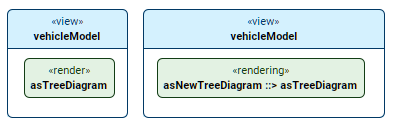
- See the procedures:
- The element symbol is displayed with the render keyword (unnamed element) or the rendering keyword (named element).
- by containing an owned rendering usage, i.e., the view renderer is the owned rendering usage itself.
- The element symbol is displayed with the rendering keyword.
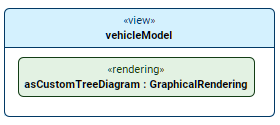
- See the procedures:
- The element symbol is displayed with the rendering keyword.
Rendering views by referencing renderings defined elsewhere in the model
Rendering views via the Textual Editor
To render views via the Textual Editor
- In the body of a view for which you want to reference a rendering, declare one of the following:
- For an unnamed rendering, declare the render keyword, then follow with the name of the rendering you want to reference.
- For a named rendering, declare the rendering keyword, name the new usage, and then reference subset the rendering you want to reference.
- Click the Synchronize button.
view vehicleModel {
render asTreeDiagram; // unnamed rendering
rendering asNewTreeDiagram ::> asTreeDiagram; // named rendering
}
Rendering views via the Drag and Drop handler in a view
To render views via the Drag and Drop handler in a view
- Drag and drop a rendering element from the Containment tree or use its symbol's Drag and Drop handler and drop it on a rendering usage element symbol (keyword render rendering) that you want to render the view by referencing the rendering using the Create Satisfy Requirement command.
Rendering views via the Specification panel
To render views via the Specification panel
- Drag and drop a rendering element from the Containment tree or use its symbol's Drag and Drop handler and drop it on the Referenced Rendering field in the Properties section of the Specification panel for the rendering usage element (keyword render rendering).
The appropriate rendering is specified for the element.
Rendering views via the owned rendering usage itself as the renderer
Rendering views via the Textual Editor
To render views via the Textual Editor
- In the Textual Editor, place the cursor within the curly braces of the view's body, declare the rendering keyword, specify the element name, and then the rendering's body.
- Click the Synchronize button.
view vehicleModel {
rendering asCustomTreeDiagram : GraphicalRendering; // // new view-owned rendering usage
}