Click to change the Show Properties When Not Applied property value to true.
Click the Show Properties When Not Applied Limited By Element Type property and then select a stereotype or a metaclass.
You can select more than one value.
Case Study
Let’s analyze the customization element of the «OraUser» stereotype in the Oracle Customization profile (Oracle_Profile.mdzip). This profile belongs to the Cameo Data Modeler plugin and can be used for database modeling.
If the «User» stereotype is selected as the Show Properties When Not Applied Limited By Element Type property value, properties of the «OraUser» stereotype will be visible only for elements that have the «User» stereotype applied.
If the Show Properties When Not Applied Limited By Profile Application property value is set to true, properties of the «OraUser» stereotype will be visible only for elements whose owning package has the Oracle Customization profile application, such as elements inside the Oracle schema.
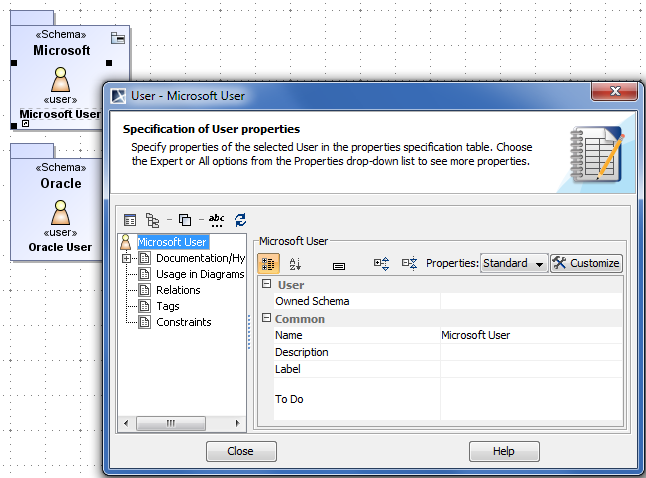
Specification window of user that is NOT INSIDE Oracle schema
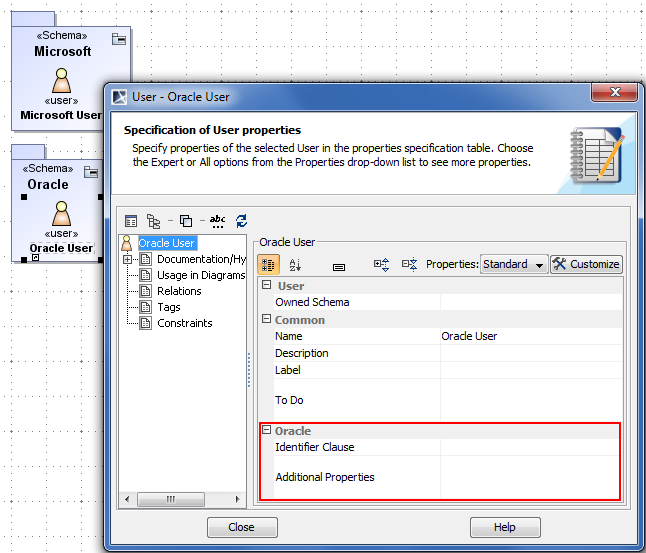
In conclusion, Oracle-specific properties will be visible only for users inside the Oracle schema.
Specification window of user that is INSIDE Oracle schema