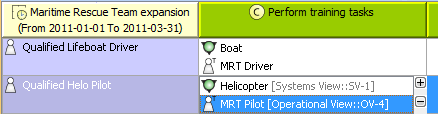
UPDM 2 NAF 4.0 viewpoints and views Deployed Resources viewpoint Dr Deployment Schedule Current: Modifying Dr table Modifying Dr table To add/remove Capabilities in/from Dr tableClick the Add/ Remove Columns button.In the Select Capability dialog, choose Capabilities to add or to remove them from the table.Click OK when you are done. The Capabilities are removed only from the table but not from the model.An Exhibits relationship between the context element and Capability is added/removed from the model. To remove Resources from Dr tableClick the cell you want to edit.Select a Resource you want to remove and click the - button. The Resource is removed only from the table but not from the model. To remove Actual Organizational Resources from Dr tableSelect Actual Organizational Resource.Click Remove from Table button in table toolbar. To remove Actual Organizational Resources from modelSelect Actual Organizational Resource.Click Delete button in table toolbar. For more information about table management, see Managing Tables. ×