Data Markings and Classification Plugin
Released on: June 26, 2026
The Data Markings and Classification Plugin 2026x Refresh1 release introduces the 'subsumes' attribute for Data Markings, allowing you to specify which Data Marking overrules another, even across different Data Marking Categories. Additionally, you can now extend custom and DoD Data Marking Categories with additional Data Markings from separate Categories. When exporting a table to an Excel file, the table’s Diagram Banners are now automatically included in the exported file. In addition, the exported table's name now reflects the portion markings of the Data Markings applied to the table in the model. A new project option, Default Data Markings for New Sensitive Elements, has been introduced, allowing you to select which Data Markings are automatically applied to newly created sensitive elements, based on the element types specified in the Sensitive Element Types project option.
To download the latest version of the modeling tool, see Downloading installation files.
The subsumes Representation Attribute
The 2026x Refresh1 release introduces the subsumes attribute for Data Markings. It allows you to specify which Data Marking overrules another, even across different Data Marking Categories. When an element with a subsumed marking is removed during Sensitive Element Redaction, all elements marked with the subsuming Data Marking are automatically removed as well. This provides clearer Data Marking relationships and predictable redaction results, preventing inconsistent or partial redaction. Learn more >>
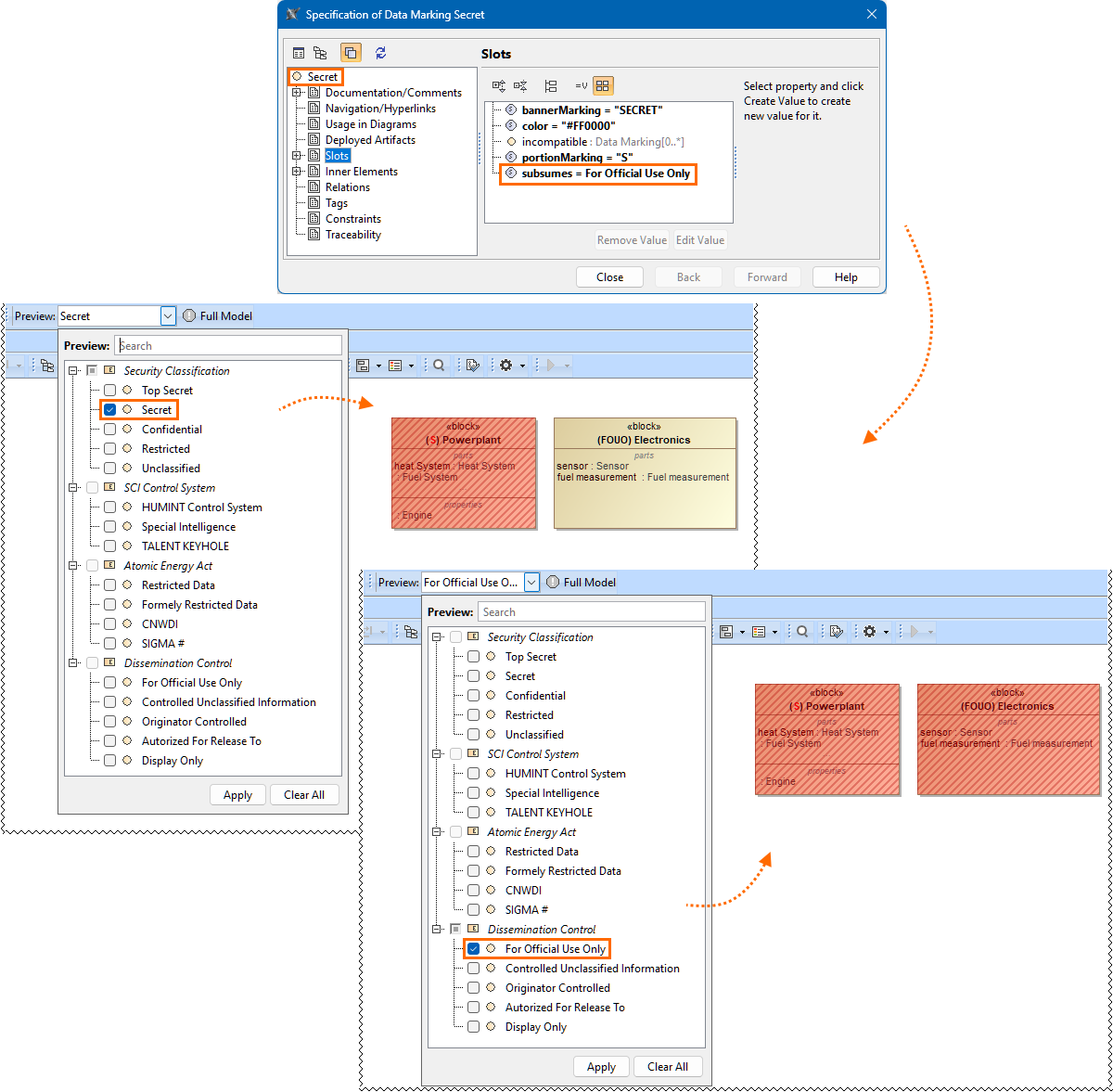
The Data Marking 'Secret' subsumes the Data Marking 'For Official Use Only'.
If you perform Sensitive Element Redaction preview, removing elements marked 'For Official Use Only' also removes those marked 'Secret', but not vice versa.
Extend Data Markings Across Categories
You can now extend custom and DoD Data Marking Categories with additional Data Markings from separate Categories. The new Category serves only as a container for new Data Markings, which are grouped as submarkings under the parent Data Marking in another Category, as specified through the «permissiveSubDataMarkingCategory» stereotype's groupWith tag. These submarkings are not shown as a separate Category in menus and can only be applied through their parent Data Marking. This enables flexible extension of Data Markings without modifying existing Categories, keeping configurations stable while supporting new or evolving Data Marking requirements. Learn more >>

The 'Authorized For Release To' Data Marking from the 'Dissemination Control' Category is extended with submarkings 'CAN', 'GBR', and 'USA'.
These submarkings are available for selection in the Add/Remove Data Markings menu, under the 'Authorized For Release To' Data Marking.
Diagram Banners and Table Data Markings in Exported Tables
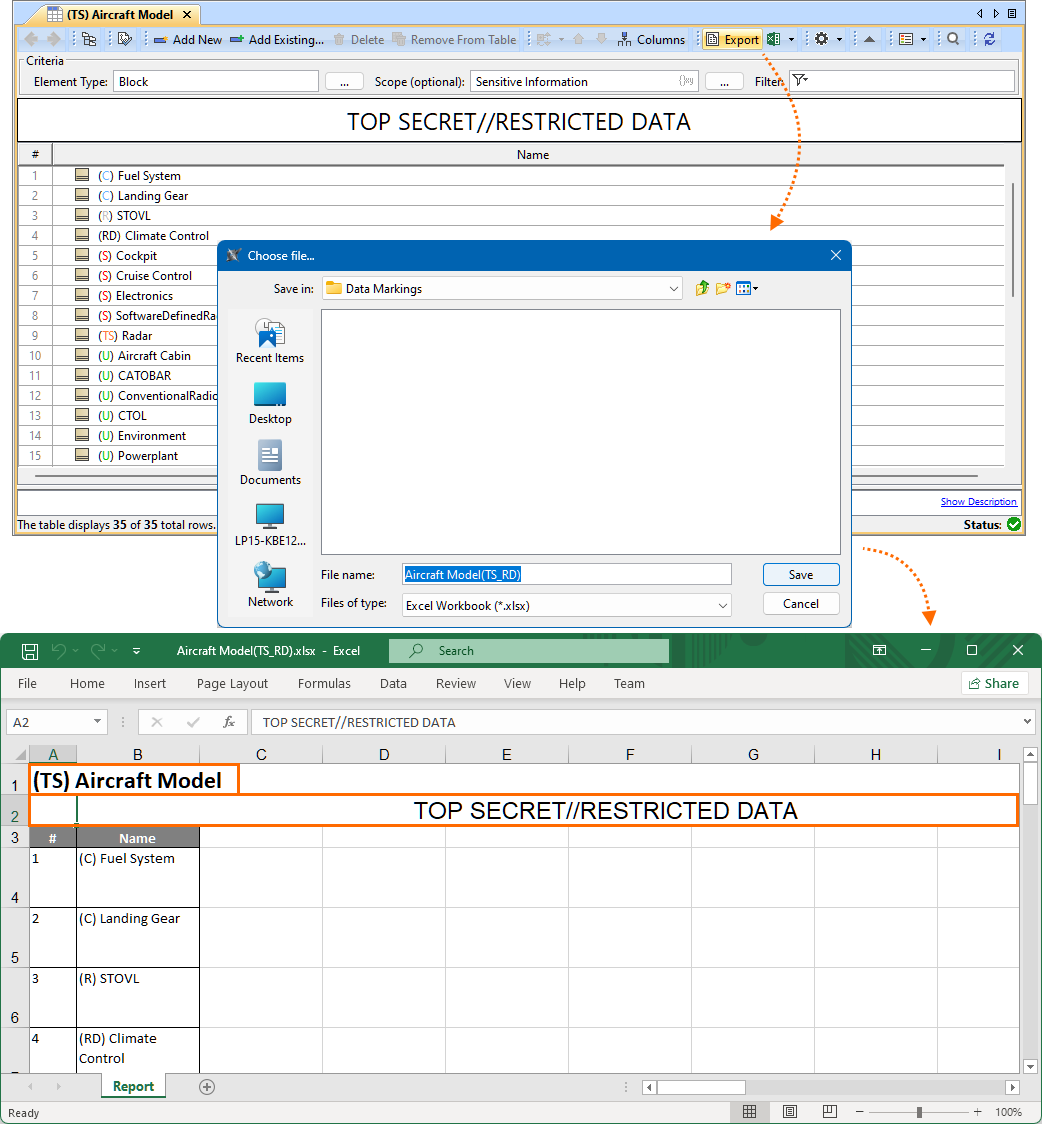
When exporting a table to an Excel file, the table’s Diagram Banners are now automatically included in the exported file. In addition, the exported table's name now reflects the portion markings of the Data Markings applied to the table in the model. This ensures that marking information remains visible and consistent outside the modeling environment.
Other Improvements
- A new project option, Default Data Markings for New Sensitive Elements, has been introduced. It allows you to select which Data Markings are automatically applied to newly created sensitive elements, based on the element types specified in the Sensitive Element Types project option. This project option is user-specific and does not affect other users. Learn more >>