SysML v2 Evaluation Plugin
Released on: June 26, 2026
The 2026x Refresh1 release expands the SysML v2 Evaluation plugin with new capabilities, including support for constraints written in scripting languages, support for binding connectors in feature chain expressions, evaluation of part definitions, and the ability to define initial values directly in model views. It also improves usability by displaying units alongside evaluated values and showing individual evaluation results for each requirement constraint, making model analysis more efficient.
Textual Representation Support for Constraints
The new version of the SysML v2 Evaluation plugin enables the use of textual representation elements to evaluate constraints written in other scripting languages. As a result, scripting languages can now be used not only for standard calculations, but also to evaluate both requirements and standalone constraints.
part vehicle {
attribute speed : Real = 100;
assert constraint { language "groovy" /*speed==100 */ }
}
Support for Binding Connectors
The 2026x Refresh1 release introduces support for binding connectors used with feature chains in expressions. This enhancement enables you to evaluate calculations and execute performActions in model views. During evaluation, output values are calculated using either default values or values obtained through binding connectors.
Defining Initial Values During Evaluation
You can now enter initial values during evaluation using model views, even if no value is defined in the model. Such features and attributes are displayed with “:=” and an empty field in both shapes and compartments.
Displaying Units for Evaluated Values
Views now display units next to calculated values when units are defined in the model. This improves clarity and makes results easier to interpret.
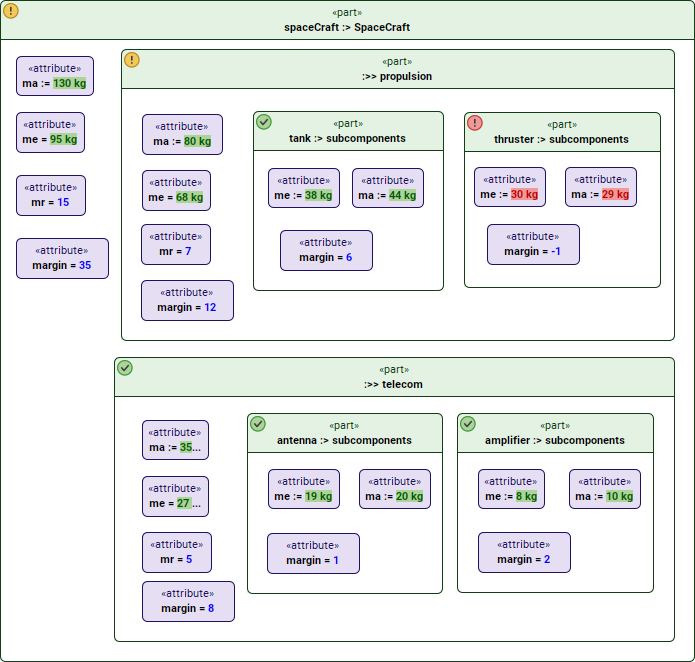
Displaying units next to evaluated values in model views.
Evaluating Part Definitions
In addition to part usages, the new plugin version now allows you to evaluate part definitions as well. When a part definition is evaluated directly, all of its features are evaluated recursively. When evaluating an entire model view, only the first-level part definitions are processed. This enhancement helps you quickly analyze the structure of a part definition without having to create part usages.
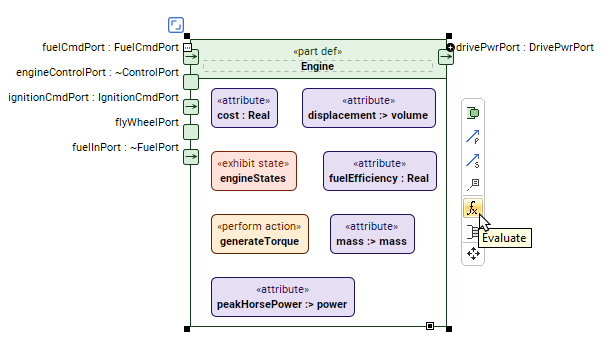
Initiating the evaluation of a part definition in a model view.
Evaluation Results for Individual Requirement Constraints
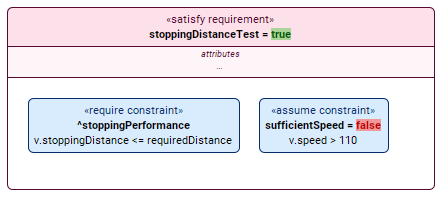
When a requirement has multiple constraints, model views now display the evaluation result for each constraint individually. This improvement provides clearer insight into how the overall requirement result is determined and makes it easier to understand evaluation results.