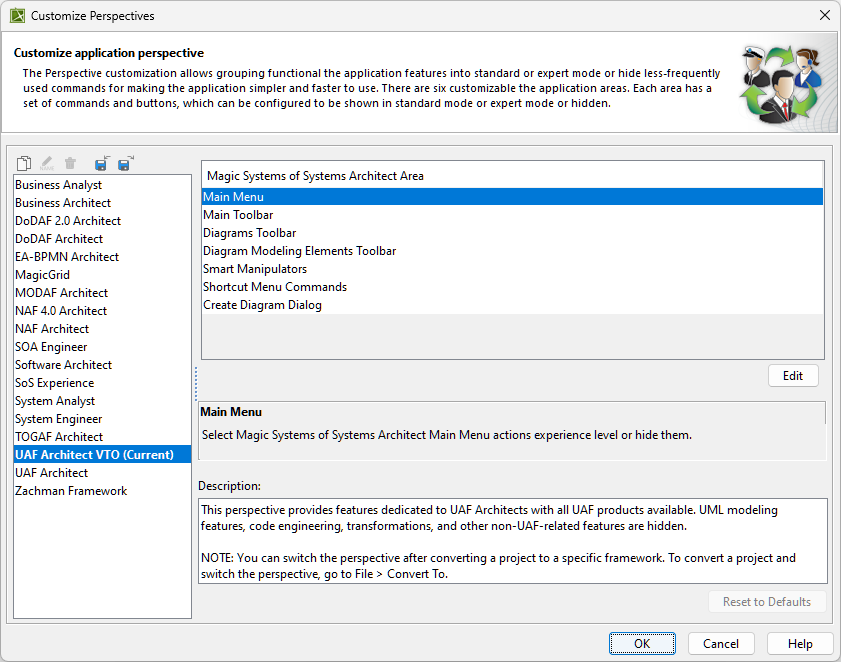
| Element Name | Description |
|---|
Clone Selected Perspective  | Copy the selected perspective to a new one.
|
|---|
Rename Selected Perspective  | The Enter Perspective Name dialog opens.
Change the name of the perspective and click OK.
You can also rename perspectives by pressing F2.
|
|---|
Remove Selected Perspective  | Delete the selected perspective from the list.
|
|---|
Import New Perspective  | The Open dialog appears. Select *.umd extension file
and click Open to import the perspective into the
modeling tool environment.
|
|---|
Export Selected Perspective  | The Save dialog opens. Type a name for the
created perspective, and click Save to store it
as *.umd extension file.
|
|---|
| Perspective names | List of the available perspectives with the predefined configuration.
|
|---|
| Customizable elements | List of customizable toolbars and command sections.
|
|---|
| Edit | Click the Edit button to open the Customize Main Menu dialog.
Change the command mode by selecting the radio buttons.
|
|---|
| Description | Learn the short description of each selected area.
|
|---|
| Reset to Defaults | Reset all changes back to the default configuration.
|
|---|