

You can download and install the CSV Import plugin on your computer through the menu item Resource/Plugin Manager under MagicDraw Help menu.
To install CSV Import using the Resource/Plugin Manager
- Click Help > Resource/Plugin Manager on the MagicDraw main menu. The Resource/Plugin Manager dialog, see figure below, will open.
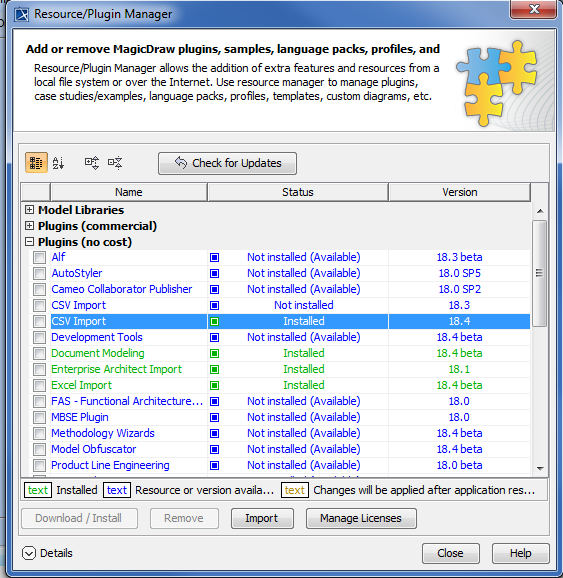
2. Click on Plugins (no cost) and select the CSV Import check box, and then click  .
.
3. Once the installation is complete, a message dialog informing you that the installation is complete will open. Click OK.
4. Restart MagicDraw.
You need to restart MagicDraw upon installing the CSV Import plugin on your computer to allow MagicDraw to load the plugin correctly.
Free updates are available through the Resource/Plugin Manager menu item in MagicDraw.
To see if any update is available for your plugin
- Click Help > Resource/Plugin Manager on the MagicDraw main menu. The Resource/Plugin Manager dialog will open.
- Click Check for Updates > Check.
- Click .