

On this page
You can import data from Excel (.xls and .xlsx) or CSV (.csv and .txt) format files to your model. You are able to specify the import mapping options between file columns and element properties of the model. Additionally, you can save your maps, collect them in groups, manage those groups, and use an entire group instead of a single map for data import. Before importing data from Excel or CSV files to model, create new or open an existing project. Import Using Existing Map Group - to import data from Excel or CSV file by selecting the map group that collects as many Import Maps as you added. To import data from Excel or CSV files, the files must met the following prerequisites: Recommended prerequisites: To import data from an Excel or CSV file to model by using a new map Select the file and specify mapping options. How to >> You must select the file in the Select Excel/CSV file area and specify the Element Type, Properties to Map, and Target Scope mapping option values to import data. To import data from Excel or CSV file to model by using an existing map In the Select Import Map dialog, select existing Import Map. If you cannot see any Import Maps, you need to save it first. Saving an Import Map To import data from an Excel or CSV file to model by using an existing map group In the Select Map Group dialog, choose the map group. If you cannot see any map group, you need to create it first. Managing Map Groups Click OK. The import of a map group can fail because of the following reasons:Introduction
You can choose the following import commands:
Importingdatabyusinganewmap
Saving an Import Map
Importingdatabyusingexistingmap
Saving an Import Map
Importingdatabyusingexistingmapgroup
Managing Map Groups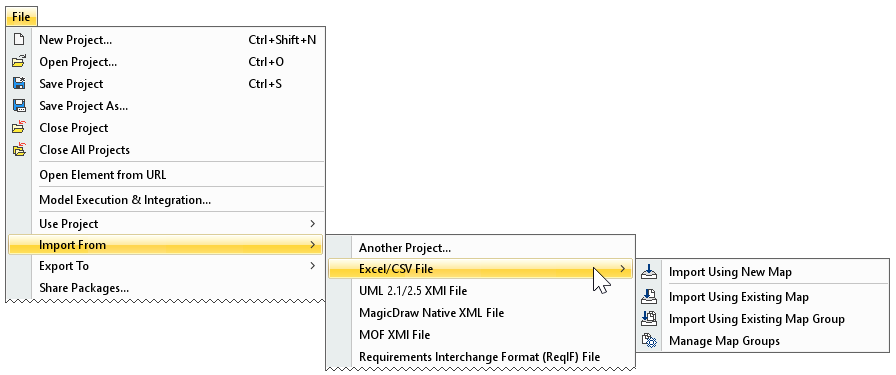
All Excel/CSV file import commands from the File menu.
Preparing Excel or CSV file to import
Importing data by using a new map
- the auto usages of Excel Import Plugin are removed. How to >>
- the Excel or CSV file met the basic prerequisites. Importing data from Excel or CSV files
The data from the Excel or CSV file is imported to the model according to the specified options.Importing data by using an existing map
- the auto usages of Excel Import Plugin are removed. How to >>
- the Excel or CSV file met the basic prerequisites. Importing data from Excel or CSV files
The data from the Excel or CSV file is imported to the model according to the specified options.Importing data by using an existing map group
- the auto usages of Excel Import Plugin are removed. How to >>
- the Excel or CSV file met the basic prerequisites. Importing data from Excel or CSV files
The data from Excel or CSV files are imported to the model according to Import Maps and their order in the Map Group.