

On this page
An instance specification specifies the existence of an entity in a modeled system and completely or partially describes the entity. The description may include: MagicDraw allows you to create the instances of classifiers such as Class, Interface, Enumeration, Use Case, Actor, Node, Component, Manifestations. In the Component (or Deployment) diagram Node Instance, Component Instance, Artifact Instance elements are the same Instance Specification elements with an assigned component, node or artifact. The instances are shown using a rectangle by underlining the name string of an instance element. The instance of an Actoris shown as an actor “stick man” figure with the actor’s name below the symbol. You can specify instance properties in the instance Specification window. In the same window, you can find a description of each property. Descriptions are presented in the description area of the Specification window. If you need to handle a huge amount of instance specifications, use the Instance table. To assign a classifier to an instance, do one of the following On the diagram, click an instance shape, then click the name area. Type the “:” and then type the classifier name. Press Enter or click anywhere on the diagram. The classifier is created and assigned. Type the “:” colon, then press Ctrl+Space or Ctrl+Backspace and then in the open list, select the classifier. Use the Node Instance button to create the Instance Specification with assigned Node and the Node Instance will have a Node shape. To assign Instance Specification as Default Value Drag-and-drop feature is available only if Instance Specification classifiers are compatible with the Property type and if Property is editable. Setting the initial value to an attribute of the assigned classifier To show slots of the assigned classifier By default slots of the classifier are suppressed. To display slot type on the instance symbol To display specification value on the Instance Specification symbol When you have a Class (Block) and an Instance of that Class (Block) which contains some particular values, you can save those values as default to the Values property of the Class (Block). To save the Instance values as default Save to composite parts recursively. Redefine inherited properties.Introduction
Assigning a classifier to an Instance Specification
 . In the open list, select the classifier.
Assigning Instance Specification as Default Value
To set the initial value to an attribute of the assigned classifierShowing slots of the assigned classifier
 .
.Displaying slot type on the Instance Specification symbol
Displaying specification value on the Instance Specification symbol
Saving Instance values to the default property values of the Class (Block)

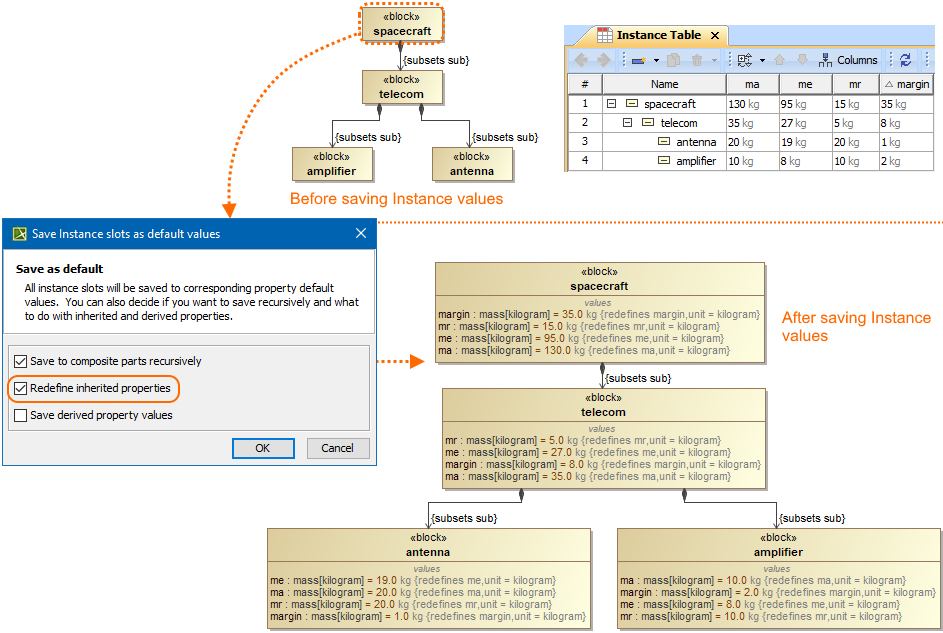
An example of Instance property values saved as default in the Block value properties. The "Save to composite parts recursively" option was selected.