

You can manage code engineering through the Code Engineering Sets in the Model Browser. The Code Engineering Sets tree contains the list of all sets created in the project, as well as instruments for managing those sets.
Adding a new set
To add a new set
- Choose New from the Code Engineering Sets shortcut menu.
- Choose the language you want:
- Java
- Java Bytecode
- C++
- CORBA IDL
- DDL (Cloudscape, DB2, Microsoft Access, Microsoft SQL Server, MySQL, Oracle, Pervasive, Pointbase, PostgreSQL, Sybase). For DDL, the Cameo Data Modeler plugin is required
- XML Schema, the Cameo Data Modeler plugin is required
Edit sets in the Round Trip Set dialog.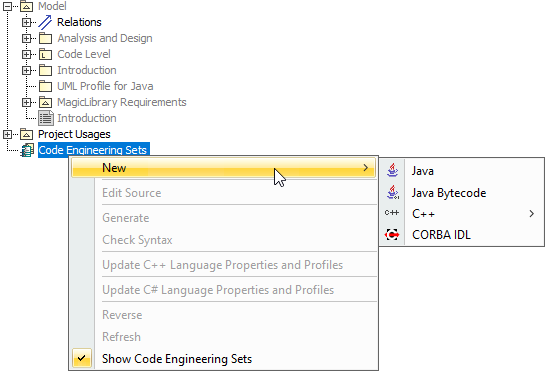
2024x Refresh3 HotFix1 Update
Oracle DB and PostgreSQL drivers are no longer distributed with the modeling tool's 2024x Refresh3 HotFix1 version. Download and add the needed drivers according to the database type and version.
To add a new set
- Choose New from the Code Engineering Sets shortcut menu.
- Choose the language you want:
- DDL (Cloudscape, DB2, Microsoft Access, Microsoft SQL Server, MySQL, Oracle, Pervasive, Pointbase, PostgreSQL, Sybase). For DDL, the Cameo Data Modeler plugin is required.
Editing sets in the Round Trip Set dialog
To open the Round Trip Set dialog
- Right-click the selected set and choose Edit from the set shortcut menu.
- Select the set and press Enter.
The Round Trip Set dialog allows you to manage entities to be added/removed from your set.
Round Trip Set dialog
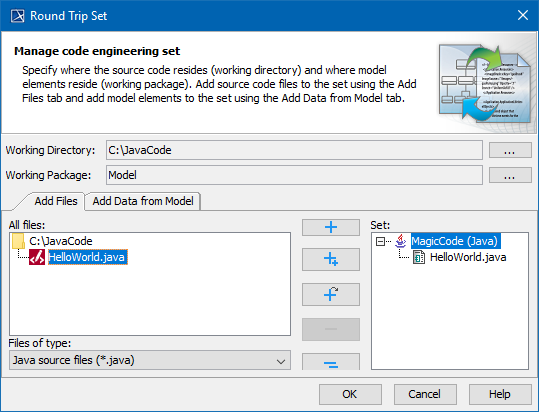
Round Trip Set dialog. Add files tab
Working directory and package specification
- Specify the Working Directory for displaying source files. This option indicates files and required sub-directories where the code generation output goes. Type a path manually or browse in the directory tree by clicking the
 button.
 - The Working Package box allows you to define any package for reverse output or code generation. A model is reversed or code-generated from this specified package.
You can only select or change the working package before adding files from the working directory to the code engineering set.
Dialog tabs
The Round Trip Set dialog has two tabs: Add Files and Add Data from Model.
2024x Refresh3 HotFix1 Update
In the 2024x Refresh3 HotFix1 version, the Round Trip Set dialog has the following options:
- Reverse from files
- Reverse from DB
The Round Trip Set dialog has two tabs, depending on the selected dialog option:
- If the dialog option is set to Reverse from files, the available tabs are Add Files and Add Data from Model.
- If the dialog option is set to Reverse from DB, the available tabs are Retrieve DB info and Add Data from Model.
Add Files tab
The Add Files tab helps you manage the source code files involved in your code engineering set.
| Element name | Function |
|---|---|
| All files | Lists directories with the source files for the set. |
| Files of type | Contains possible file name extensions for the chosen language. |
Retrieve DB info tab
2024x Refresh3 HotFix1 Update
The Retrieve DB info tab (available in the 2024x Refresh3 HotFix1 version) helps you manage the database information for the code engineering set.
To add drivers for the database
- In the Round Trip Set dialog, with the Reverse from DB option selected, click the Edit button for the Driver files to add the needed drivers according to the database type and version.
Add Data from Model tab
The Add Data from Model tab helps you manage elements located in the UML model.

Round Trip Set dialog. Add data from the model tab.
The All Data (or All Files) list contains the hierarchy of UML model packages with model elements (or other packages) inside. Your code engineering set can be combined from model and code elements. The following buttons are available in the Round Trip Set dialog:
| Add | The selected file in the All Files or All Data list is added to the set. |
| Add All | All files in the opened or selected directory are added to the set. |
| Add Recursively | All files in the selected directory and its subdirectories are added to the set. |
| Remove | Removes the selected entity from the set. |
| Remove All | Removes all entities from the set. |