SysML Plugin TWRT Documentation


On this page
You can use the specific condition patterns in Requirement texts if you want to extract Constraint from Requirement automatically.
Enabling/disabling the Requirement patterns underlining in Requirement text
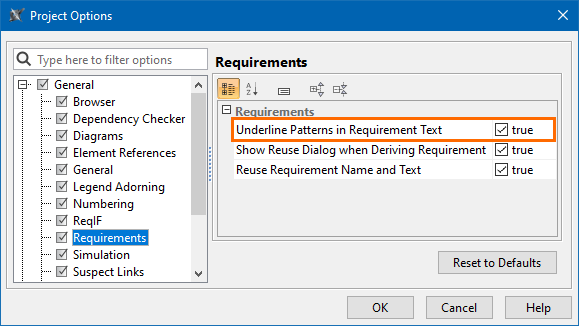
Before using this feature, make sure the Underline Patterns in Requirement Text option is enabled.
To enable/disable Requirement patterns underlining
- From the main menu, click Options > Project.
- In the Project Options dialog, under the General group, click Requirements and select the Underline Patterns in Requirement Text option.
Set its value to true to underline the Requirement text that matches the defined pattern, or false - to disable it.
The default value of the Underline Patterns in Requirement Text option is true.
Defining custom condition patterns
If you can't find an appropriate condition pattern from the predefined glossary table, you can define a custom glossary. For this, you have to create a new Glossary Table with the <<requirementTerms>> stereotype applied.
To create a new glossary table with the stereotype <<requirementTerms>>
- From the main toolbar, click the Create Diagram button.
- Double-click the glossary table icon.
- Open the Specification window of the newly created Glossary table.
- Change the Applied Stereotype property value to <<requirementTerms>>.
- Click Close.
The new glossary table with the stereotype <<requirementTerms>> is created. You can now define your own condition patterns by adding them in the Glossary Table.
Opening the predefined requirements glossary table
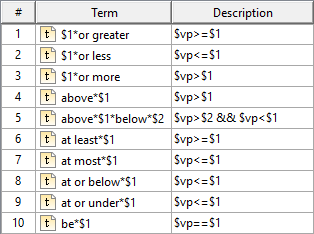
You can use condition patterns from the already created glossary table. If you want to check the most frequently used patterns, open the predefined glossary table.
To open the predefined glossary table
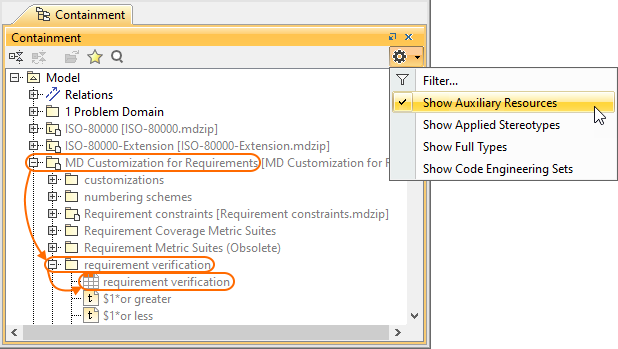
- In the Model Browser, click
 and select Show Auxiliary Resources.
 - Expand MD Customization for Requirements Package > requirement verification Package.
- Double-click the requirement verification to open the table (see the figure below).
The glossary table with the stored frequently used condition patterns opens (see the following figure).
Warning
You cannot extend the list of custom condition patterns in this Glossary Table.
Overview
Content Tools