SysML Plugin TWRT Documentation


You can apply the default or newly created pattern Block by using the Rollup Pattern Wizard. If you want to apply total cost, mass, or power calculation for your model, you can use the default rollup patterns. The default rollup pattern Blocks are as follows:
- CostRollupPattern.
- MassRollupPattern.
- PowerRollupPattern.
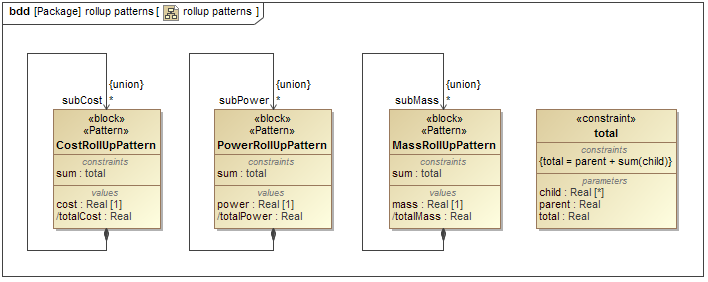
The total cost, mass, or power rollup pattern Blocks defined in the SysML Block Definition Diagram.
The default rollup patterns are created to calculate the total cost, mass, and power of the model elements. Each pattern Block contains a SysML Parametric Diagram that defines the calculation needs, and allows you to define any kind of rollup pattern. The patterns are created in association with a Constraint Block that defines the logic of the constraints. The Constraint Property type is a Constraint Block. The following figure demonstrates the Parametric Diagram of Cost Rollup Pattern.
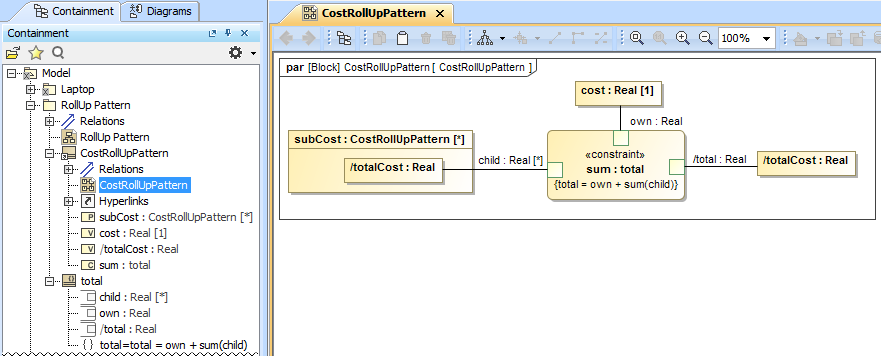
The SysML Parametric Diagram of Cost Rollup Pattern.
All default rollup patterns are stored in each project under the auxiliary resources.The procedure below describes how to find them in your project.
To find default rollup pattern Blocks in a project
- In the Containment tree, click
 , and select the Show Auxiliary Resources option.
 - Select package MD Customization for SysML > rollup patterns.
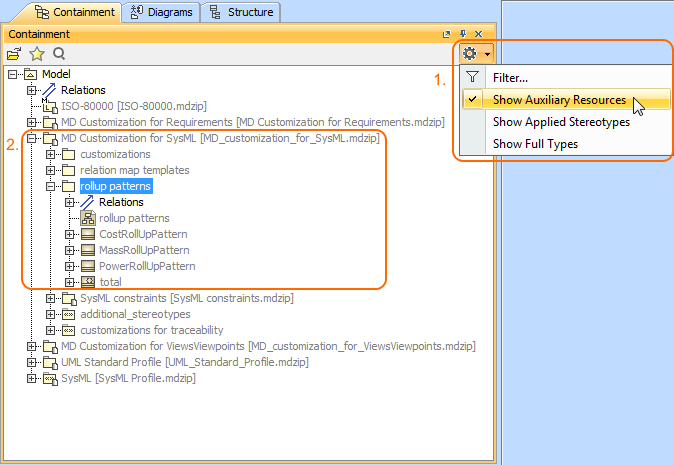
The default rollup pattern Blocks are stored in the model under the auxiliary resources.
Sample model
The sample model used in the figures of this page is the Laptop Cost Analysis that comes with Cameo Simulation Toolkit Plugin. To open this sample do one of the following:
- Download LaptopCostAnalysis.mdzip.
- Find in modeling tool <modeling tool installation directory>\samples\simulation\LaptopCostAnalysis.mdzip
Overview
Content Tools