SysML Plugin TWRT Documentation


On this page
Three validation rules complement each other to check whether the structure model is compatible with the behavior model. If any inconsistencies are found, the structure model can be automatically synchronized with the behavior model using solvers. First, you need to synchronize interfaces so that you can handle Connectors and, finally, Item Flows. As a consequence, the manual work is reduced.
Tip
You can handle detected inconsistencies using solvers directly in:
- Internal Block Diagram
- Validation Results panel
Handling missing Proxy Ports and Interface Blocks
The first validation rule checks whether Proxy Ports and Interface Blocks are compatible with flows that flow between the two different Part Properties in Activities. The missing Proxy Ports and Interface Blocks can be handled automatically using solvers.
To create missing Proxy Ports and Interface Blocks
- Do one of the following:
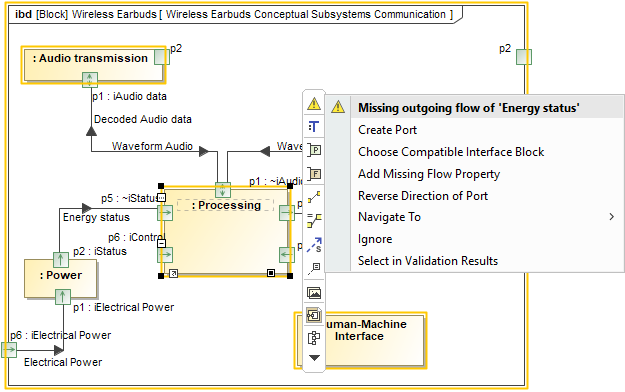
- In the Internal Block Diagram, select a Part Property highlighted in yellow, and then in the smart manipulator toolbar, click
 .
.
- In the open Validation Results panel, right-click a validation result.
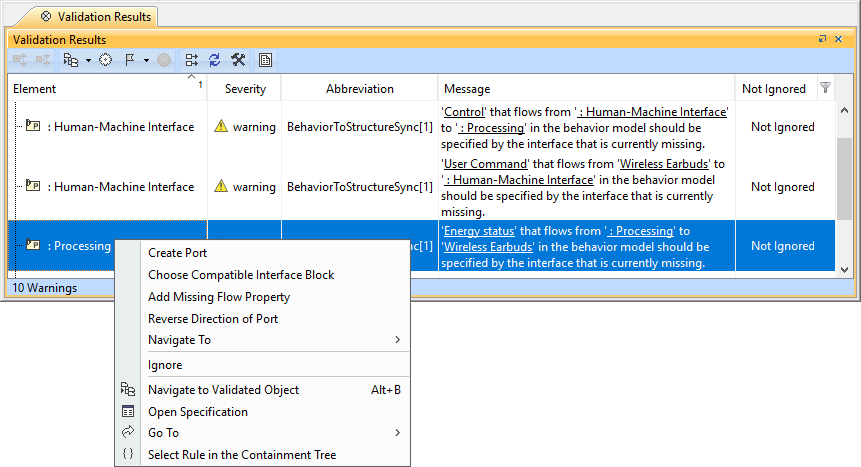
- In the Internal Block Diagram, select a Part Property highlighted in yellow, and then in the smart manipulator toolbar, click
- Select one of the following:
- Create Port - creates a new Proxy Port typed by a compatible Interface Block.
- Choose Compatible Interface Block - changes an already existing Proxy Port type to a compatible Interface Block.
- Add Missing Flow Property - adds a new Flow Property to an Interface Block that types a Proxy Port.
- Reverse Direction of Port - changes the Proxy Port direction, thus changing the Flow Property direction of an Interface Block that types a Proxy Port.
A Proxy Port typed by a compatible Interface Block is created.
Choosing a compatible Interface Block
If you select the Choose Compatible Interface Block solver, the Choose Proxy Port with Compatible Interface Block dialog opens.
You can now choose a Proxy Port and type it with an Interface Block that has Flow Properties compatible with the type and direction of the missing flow.
Alternatively, you can create a new Proxy Port and an Interface Block to type the Proxy Port. For this, select <NEW>.

Choosing a Proxy Port and specifying a compatible Interface Block as its type.
Handling missing Connectors
The second validation rule checks whether there is a Connector between the two compatible Proxy Ports owned by the Part Property. The missing Connectors can be handled automatically using solvers.
To create missing Connectors
- Do one of the following:
- In the Internal Block Diagram, select a Proxy Port highlighted in yellow, and then in the smart manipulator toolbar, click .
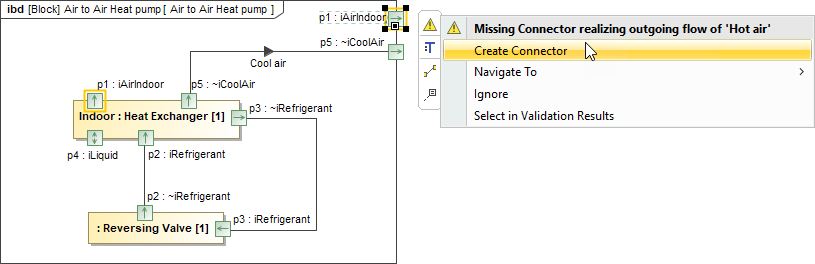
- In the open Validation Results panel, right-click a validation result.
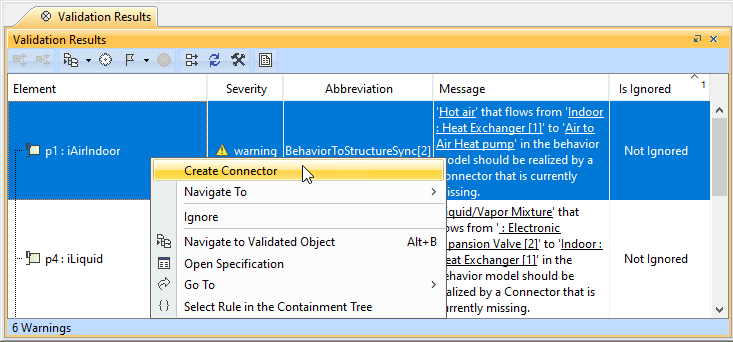
- In the Internal Block Diagram, select a Proxy Port highlighted in yellow, and then in the smart manipulator toolbar, click
- Select Create Connector.
A Connector between the two compatible Proxy Ports is created.
Handling missing Item Flows
The third validation rule checks realized Item Flows in Activities and helps to ensure the correct Item Flows are realized on Connectors that connect Proxy Ports typed by compatible Interface Blocks. The missing Item Flows can be handled automatically using solvers.
To realize missing Item Flows on Connectors
- Do one of the following:
- In the Internal Block Diagram, select a Connector highlighted in yellow, and then in the smart manipulator toolbar, click.
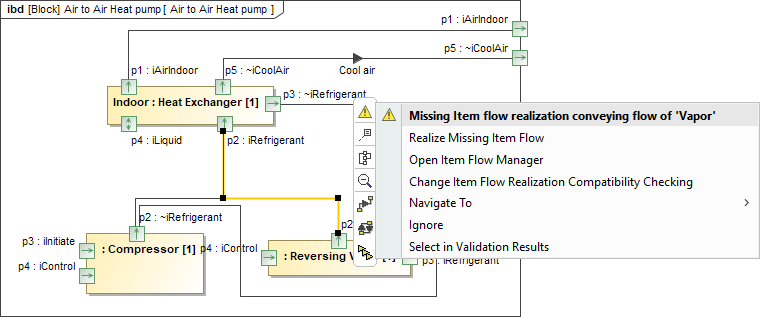
- In the open Validation Results panel, right-click a validation result.
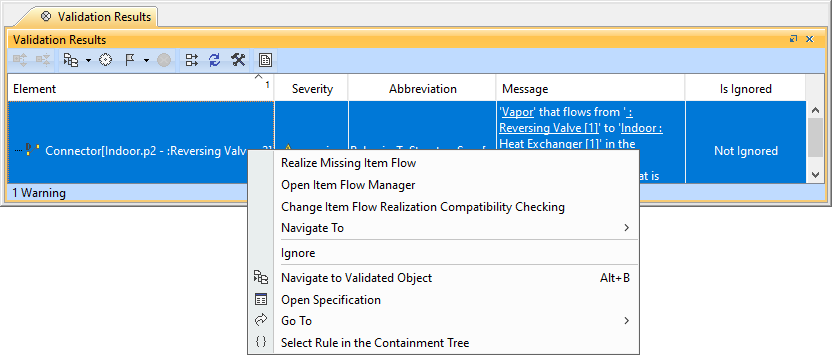
- In the Internal Block Diagram, select a Connector highlighted in yellow, and then in the smart manipulator toolbar, click
- Select one of the following:
- Realize Missing Item Flow - realizes the compatible existing Item Flow on the Connector that was found in the behavior model.
- Open Item Flow Manager - opens the Item Flow Manager dialog.
- Change Item Flow Realization Compatibility Checking - opens the Project Options dialog to enable/disable the Item Flow realization checking.
A compatible Item Flow is realized on the selected Connector.
Navigating to elements
To learn more about the validated elements, in the smart manipulator toolbar of the Internal Block Diagram or Validation Results panel, select the Navigate To command to navigate to:
- Activity Edges in the Activity diagram from which the missing flow has been identified.
- Part Properties in the Internal Block Diagram between which items are flowing.
Elements are automatically selected on the diagram pane and in the Containment tree.
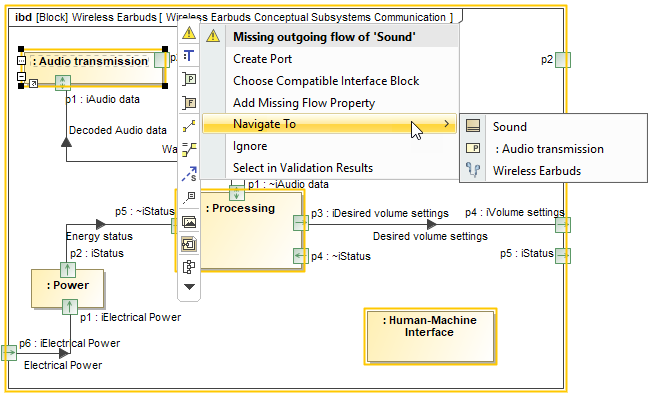
Navigating to an element from the smart manipulator toolbar.
Overview
Content Tools