SysML Plugin TWRT Documentation


On this page
Introduction
The «ModelicaBlock», «ModelicaParameter» and «ModelicaPort» stereotypes are created to specify which SysML properties (including ports) of its blocks correspond to Modelica library reusable component. The semantics of these elements are given by the corresponding elements in the Modelica libraries. For more details, read the OMG SysPhS specification.
The figure below shows how the «ModelicaBlock», «ModelicaParameter» and «ModelicaPort» stereotypes are defined in the SysML profile.
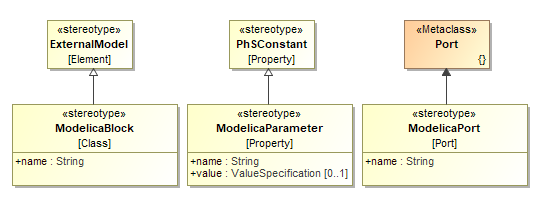
Modelica stereotypes.
Using «ModelicaBlock» stereotype
Apply «ModelicaBlock» stereotype for a Block to reference its Part Properties with an equivalent component in the Modelica library. The value of the name tag must be a fully qualified name (e.g. Modelica.Electrical.Analog.Basic.Capacitor) of the corresponding component in the Modelica library. How to reference Block properties with Modelica library component >>
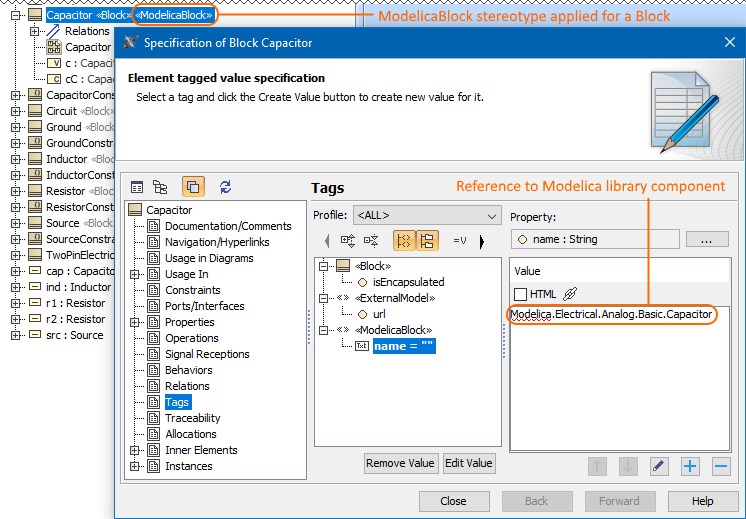
The «ModelicaBlock» stereotype applied for a Capacitor Block and created reference to corresponding component in the Modelica library.
Using «ModelicaParameter» stereotype
Apply «ModelicaParameter» stereotype for a Value Property to reference it with an equivalent parameter of a Modelica library. The stereotyped Value Property must be owned by a Block stereotyped by «ModelicaBlock». The value of the name tag is the name of the corresponding parameter, and the value attribute gives the value of this parameter. If the value is empty, the value of the parameter must be given using initial values of the stereotyped property.
In the following image, after the «ModelicaParameter» stereotype is applied for the r Value Property, its name tag value is referenced with the parameter R in the Modelica library. How to reference Value Property with Modelica library parameter >>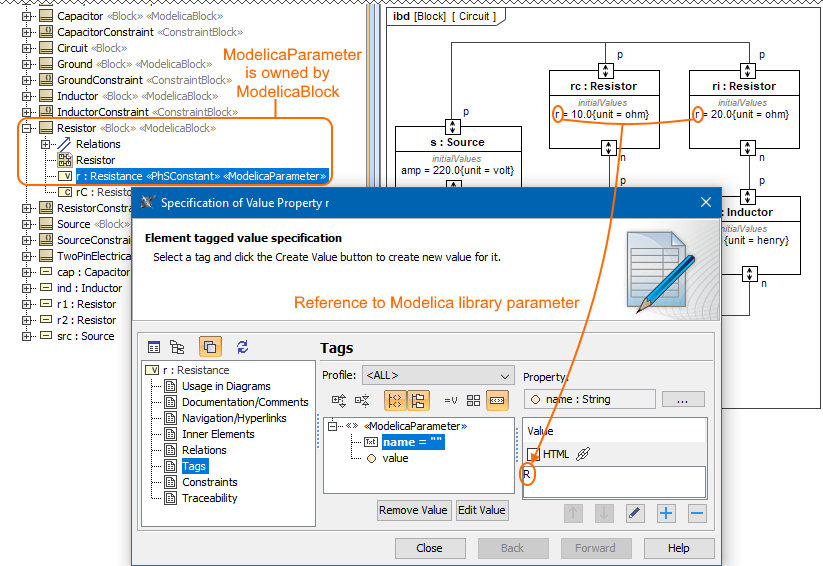
The «ModelicaBlock» Resistor owns r Value Property stereotyped by «ModelicaParameter» and created reference to the Modelica library component.
Using «ModelicaPort» stereotype
Apply «ModelicaPort» stereotype for a port to reference it with an equivalent port in the Modelica library. The stereotyped port must be owned by a Block with «ModelicaBlock» stereotype applied. The value of the name tag gives the name of the corresponding port in the Modelica library. How to reference port with Modelica library port >>
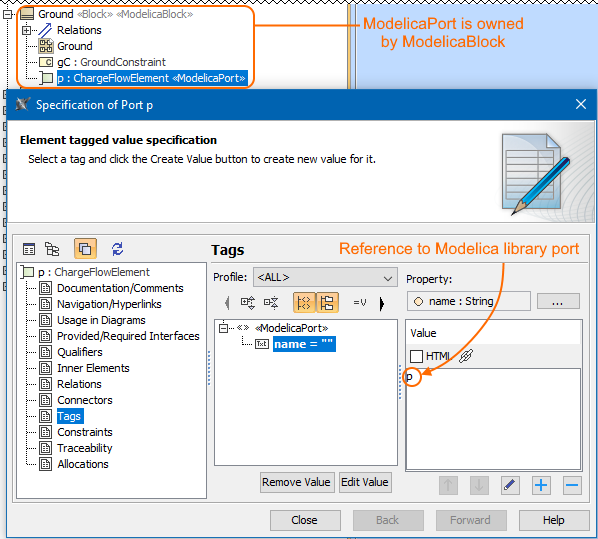
The «ModelicaBlock» Ground owns p Proxy Port stereotyped by «ModelicaPort» and created reference to the Modelica library component.
Referencing with Modelica library components
To reference SysML elements with Modelica library components
- Apply «ModelicaBlock», «ModelicaParameter» and «ModelicaPort» stereotypes respectively for Block, Value Property and Proxy Port. How to apply stereotype >>
- In the Specification window, make sure the Expert or All mode is selected.
- Select the Tags property group, make sure
 is switched off.
 - Select the name property and click Create Value.
- Type the name of the corresponding component in the Modelica library as follows:
- for a Block type the fully qualified name, e.g. Modelica.Electrical.Analog.Basic.Resistor.
- for a Value Property type the parameter name, e.g. R.
- for a port type the port name, e.g. p. - Click Close.
The SysML elements are referenced with the component in the Modelica library.
The figure below shows a comparison between exported model without and with references to the Modelica library components. How to export your model to Modelica file >>

Overview
Content Tools