SysML Plugin TWRT Documentation


The chapter outlines various methods of working with your model's elements. You will find detailed instructions on creating and defining model elements, default property values, extracting, defining hyperlinks, etc. You will also learn how the modeling tool shortcut menus, toolbar, and browser enable you to easily edit model elements.
In the model, a model element is stored in the Model Browser and its symbol or path (for relationships) is represented on the diagram pane, as shown below.
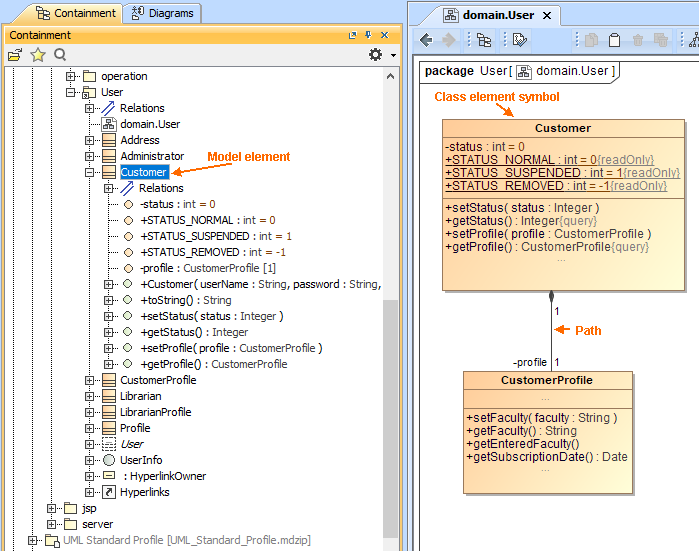
Model elements and symbols.
You can represent several symbols or paths of the same element in the diagram.
To create elements in the Containment tree
- In the Containment Tree, right-click the element owner where you want to create a new model element.
- From the shortcut menu, select Create Element.
- A list with available elements appears. Select the element you need or start typing an element name in the Search box to find it faster.
- Type the name of the element.
You can also create an element directly on the diagram pane. In this case, a symbol of the element and the element in the diagram owner is created.
To create elements on the diagram pane
- Open the diagram or create a new diagram where you want to create a new model element.
- From the diagram palette, select an element and drag it on the diagram pane. The element symbol is created.
- Click the symbol and type the element name.
Containment Tree
Please note, the new element is created in the Model Browser as well.
Overview
Content Tools