Only a user with a Server Administrator role can change the license.
To get a new Magic Collaboration Studio license from the current license server
- In a web browser, go to http(s)://<domain_name>:<port>/webapp to open the authentication page.
- Sign in to the Administrator account or a user account with a Server Administrator role
- Open the Settings application.
- In the left-side menu select the Server license.
- In the License information card, click Click the Change License button. A dialog informing that you are about to delete the license you are currently using will open.
Click Update. Click the Change button. | Warning |
|---|
You cannot undo your action after clicking Update. |
Your current license server address appears in the License Server box. Click the Show Licenses button:
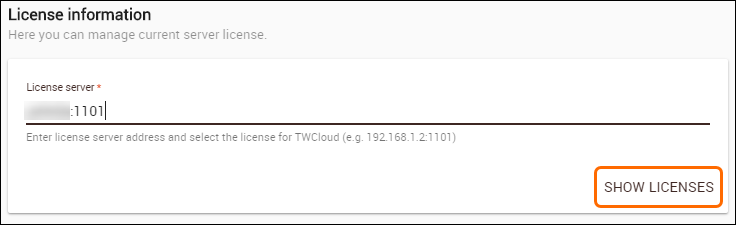 Image Removed Image Removed
Teamwork Cloud Admin will update the license information and show all available license keys on the current license server in tabular form:
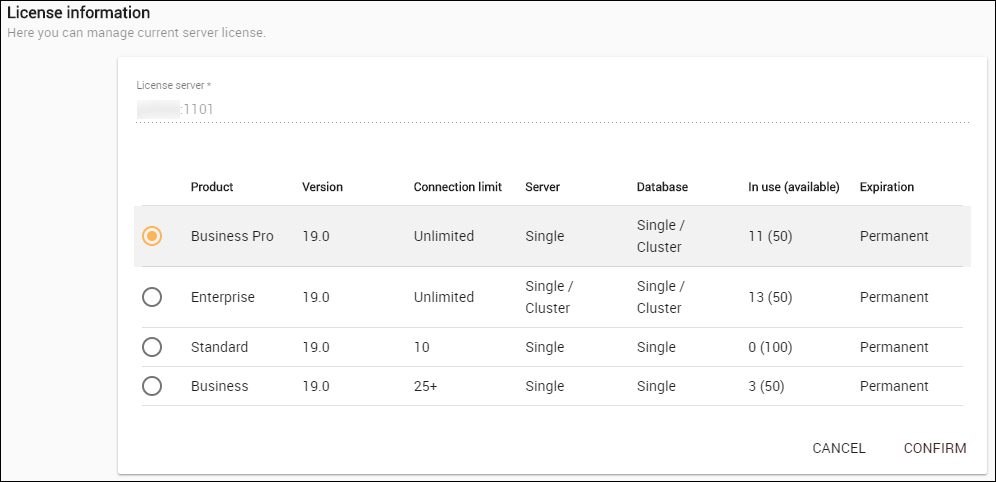 Image Removed Image Removed
- Select a new license key from the table and click Confirm button. Your new license will be applied and appear in the Server License section.
Getting a new Magic Collaboration Studio license from another license serverTo get a new Magic Collaboration Studio license from another license server clicking the Change button. |
- If you want to apply a license form another license servever, change the license server address in the Server license field.
- Click the Show Licenses button.
- Log into the Teamwork Cloud Admin with an Administrator account.
- Using App bar, navigate to Settings application.
- Click the Change License button. A dialog informing that you are about to delete your current license will open.
- Click the Yes button.
- Type the address and port of another license server in the Server license box.
- Click the Show License button. All available license keys on the new server license will appear in tabular form.
- Select a new license key from the table and click Confirm. Your new license will be applied and appear in the License Information sectionand click the Confirm button.
After changing the license, a new license is displayed in the License information card.
| 