
...
It is important to notice that any used any used projects in a MagicDraw project are not exported together with the project on its export to an Ecore file. Only references to these used projects are exported. Therefore the output of the project export is an Ecore file (model) containing the direct content of the MagicDraw project and referencing to other Ecore files (used projects) that are used in the MagicDraw project. For referencing to used projects, i.e., other Ecore files, Ecore references are used.
...
It is strongly recommended to read the following paragraph before your very first attempt to export a MagicDraw project that uses used projects. Getting familiar with this information may help you to escape a serious problem that arises because of the nature of Ecore references.
...
Ecore elements validation
MagicDraw The modeling tool provides a validation suite for validating a model that is being exported to an Ecore file. This suite contain batches of rules to check exported elements. Warnings about not exported elements (for example, diagrams, behavioral elements, or other) are displayed after the validation process is completed.
...
- From the main menu, select Analyze > Validation > Validate. The Validation dialog opens.
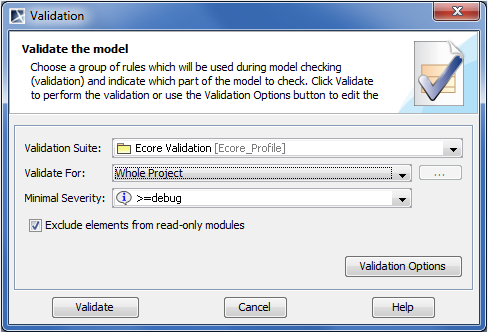
- In the Validation Suite drop-down list, select Ecore Validation.
- In the Validate For drop-down list, select the scope of the validation.
In the Minimal Severity drop-down list, select the level of severity.
Click Validate.
...