You can display a Port shape as a Part and display compartments of the Port type in it. This means you can represent the inner structure or properties of the Block type in a Port shape.
To enable Part compartments on the Port shape
- On the diagram pane, right-click the selected Port.
- In the open shortcut menu, select Enable Part Compartment. The Port is represented as a Part symbol in the diagram, and the Compartments smart manipulator activates on the Port.
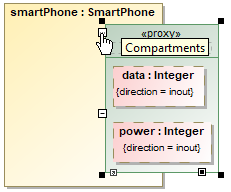 - Click the Compartments smart manipulator to open the list of properties and select properties you want to display in the Port shape.
To restore the usual representation of the Port, you must delete the Port from the diagram and add it again. | 