
...
| id | 564722837 |
|---|
...
| id | 564722839 |
|---|
...
| id | 564722838 |
|---|
You can create requirements using the the Requirements Project template. It contains predefined packages, elements, and diagrams to start creating your own requirements in the model.
| Warning |
|---|
The Requirements Project template is only available in MagicDraw with Cameo Requirement Modeler Plugin installed. |
To create a Requirement Project
...
- Open the New Project dialog. Do one of the following:
- From the File menu, select New Project.
- On the main toolbar, click the New Project button.
- Press Ctrl + Shift + N.
- In the New Project dialog, specify the following:
- On the left side of the dialog, under the General-Purpose Modeling domain, select the Requirements Project.
- On the right side of the dialog, type the file name in the Name box.
- On the right side of the dialog, click
...
- the
 button and select the location to store the created project.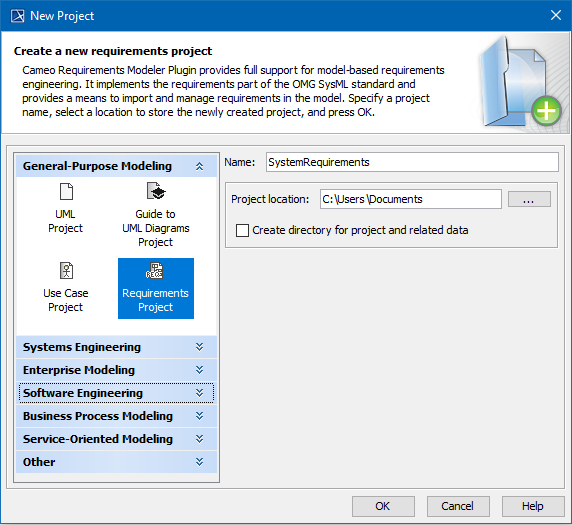
- the
- Click OK.
The new Requirement project is created with predefined structure as shown in the image below.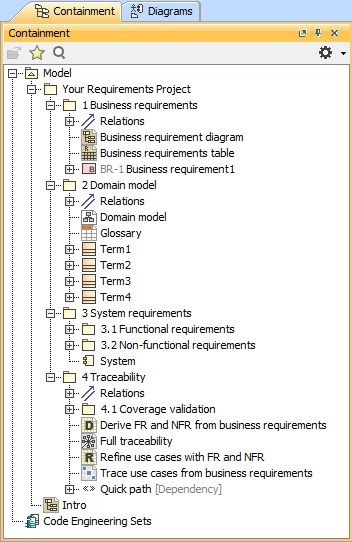
...
| id | 564722836 |
|---|
Related pages
...