
...
| id | 138587489 |
|---|
...
| id | 138587491 |
|---|
...
| id | 138587490 |
|---|
To access the DataHub menu, you need to start MagicDraw® and open a new or existing project.
...
From the MagicDraw main menu, click Tools > DataHub. The DataHub menu items open.
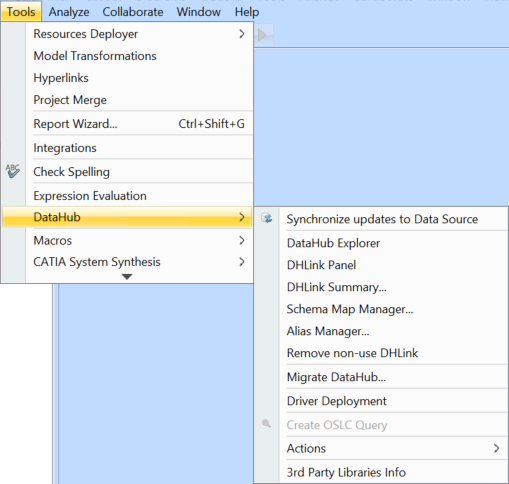
DataHub menu items.
The table below explains the functions of the DataHub menu items.
...
Name
...
Function
...
Opens the DHLink Panel
...
| Note | ||
|---|---|---|
| ||
Some of the DataHub menu items may be disabled if those items are not applicable in the current context. For example, the Create OSLC query menu item is enabled only when you have an IBM® Rational® DOORS® Next Generation Data Source open. |
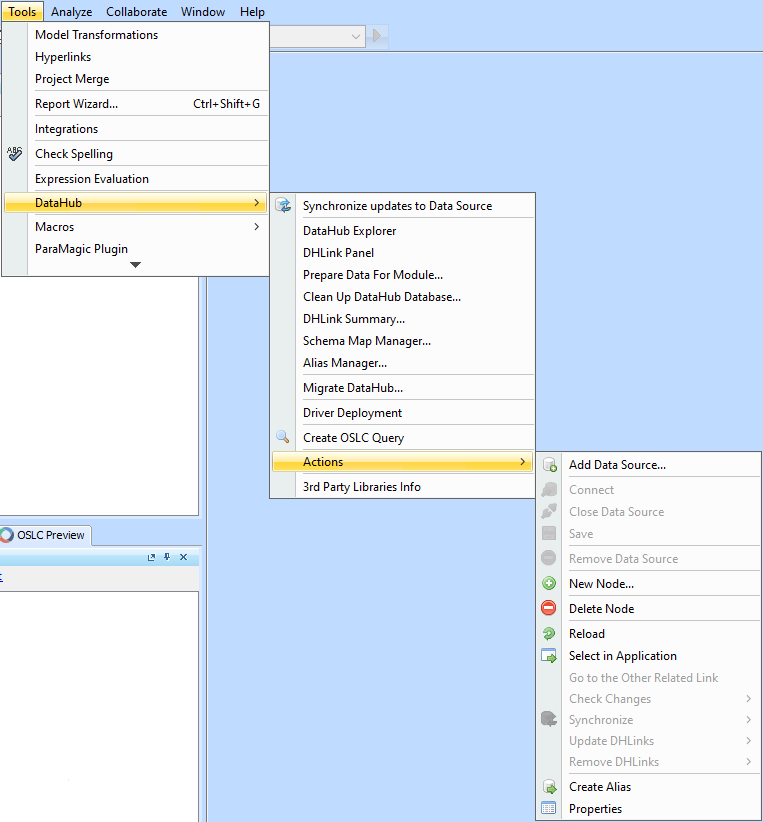
...
Name
...
Function
...
Reviews all nodes that have been changed or edited without synchronizing them. The Check Changes menu has four sub-menus
- Check DHLink Changes:
Views the changes in DHLinks only in the selected node. - Check DHLink Changes Recursively:
Views the changes in DHLinks in both the selected node and its children. Check DHTrace Changes:
Determines trace changes in the selected node.Check DHTrace Changes Recursively:
Determines changes in trace links in the selected node and its children.
...
Sends data updates from the selected Data Source to all of the related items in other tools. This option performs data synchronization for DHLinks only, but DHTraces are not synchronized. The Synchronize menu contains two sub-menus
- Synchronize Node:
Synchronizes data only in the selected node. - Synchronize Node Recursively:
Synchronizes data under the selected node and all its child nodes.
...
- Update Pending DHLinks:
Updates pending DHLinks in a single node. - Update Pending DHLinks Recursively:
Updates pending DHLinks across a node and its children. - Clear Suspect DHTraces:
Clears suspect DHLinks in a single node. - Clear Suspect DHTraces Recursively:
Clears suspect DHLinks across a node and its children.
...
- Remove DHLinks:
Removes all DHLinks from a single node. - Remove DHLinks Recursively:
Removes all DHLinks from a node as well as all its children. - Remove DHTrace:
Removes all DHTrace links from a node. - Remove DHTrace Recursively:
Removes all DHTrace links from a node and all its children.
...
| Warning | ||
|---|---|---|
| ||
Removing a Data Source deletes all of its mappings and DHLinks. |
...
| id | 138587487 |
|---|
Related page
| Children Display |
|---|