
...
- Standalone sequence object. This generator is not tied to any other object. Programer must explicitly query it to get the next value from the sequence and then use the retrieved value appropriately (usually in the INSERT statement to insert value for id column). Usually there are separate sequences for each table; sometimes the same sequence is reused for several columns.
- Autoincrement columns. Column of the table can be designated as autoincrement. When row is inserted into the table, if value of such column is not explicitly provided, one is generated automatically.
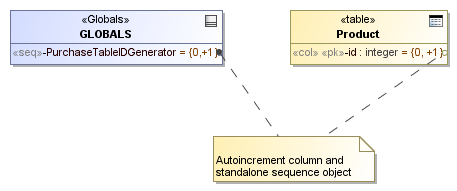
Example of sequence and autoincrement column modeling.
...
- Open the column Specification window.
- Select the Default Value property.
- Click the black-arrowed button next to the property value and select Value Specification > IdentitySpecifier as shown in the following figure.
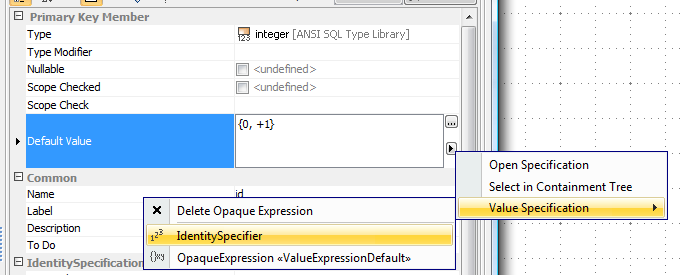
Marking column as autoincrement.
After the switching, the Autoincrement property group appears in the Specification window of the column allowing to specify autoincrement data (start value, increment, etc.).
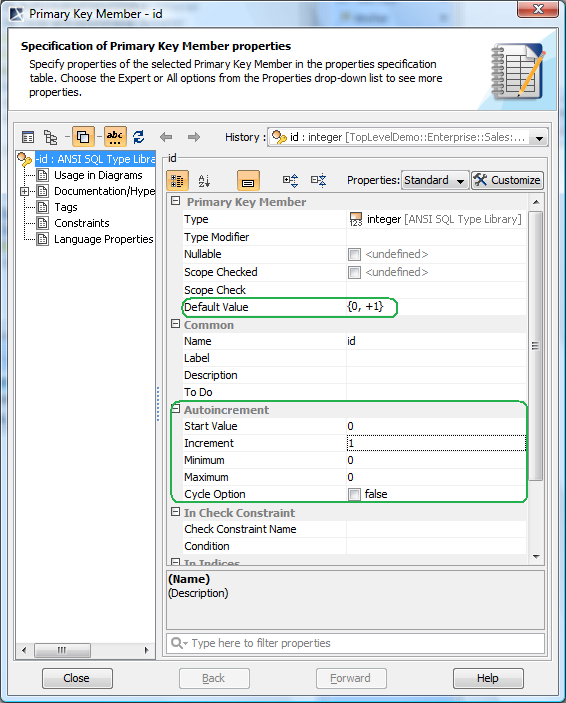
Additional properties in autoincrement column’s Specification window.
Besides the standard SQL element properties and sequences, an autoincrement column has the following properties available in the Autoincrement property group of the Specification window.
...