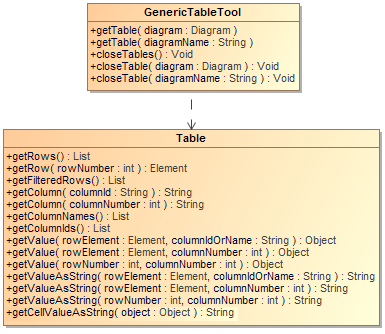
Class GenericTableTool: Methods: - +getTable( diagram : Diagram) : Table
- +getTable( diagramName : String) : Table
- +closeTables() : Void
- +closeTable(diagram : Diagram) : Void
- +closeTable(diagramName : String) : Void
Class Table: Methods: - +getRows() : List<Element>
- +getRow( rowNumber : int ) : Element
- +getFilteredRows() : List<Element>
- +getColumn( columnId : String) : String
- +getColumn( columnNumber : int) : String
- +getColumnNames() : List<String>
- +getColumnIds() : List<String>
- +getValue( rowElement : Element, columnIdOrName : String ) : Object
- +getValue( rowElement : Element, columnNumber : int ) : Object
- +getValue( rowNumber : int, columnNumber : int ) : Object
- +getValueAsString( rowElement : Element, columnIdOrName : String ) : String
- +getValueAsString( rowElement : Element, columnNumber : int ) : String
- +getValueAsString( rowNumber : int, columnNumber : int ) : String String
- +getValueAsString( rowNumber : int, columnNumber : int, showFullType : boolean ) : String
- +getVisibleColumnIds() : List<String>
- +getVisibleColumn( columnNumber : int) : String
- +getVisibleValue( rowElement : Element, columnNumber : int ) : Object
- +getVisibleValue( rowNumber : int, columnNumber : int ) : Object
- +getVisibleValueAsString( rowElement : Element, columnNumber : int ) : String
- +getVisibleValueAsString( rowNumber : int, columnNumber : int ) : String
A Generic Table is a special diagram. You can retrieve it by using the variable $Diagram. Thus, every method must accept the diagram instance or diagram name. Use the following method to get the Generic Table instance. We use Generic Table instances to retrieve table information such as row elements and column names. To get a Generic Table instance from a specified diagram element, use the following code. getTable( diagram : Diagram) : Table | Code Block |
|---|
| #set($table = $generic.getTable($diagram)) |
Where the parameter is: - diagram – the diagram element.
Return the instance of a Generic Table. Example code: | Code Block |
|---|
| #foreach($diagram in $project.getDiagrams("Generic Table"))
#set($table = $generic.getTable($diagram))
#end |
To get a Generic Table instance from a specific diagram name, use the following code. getTable( diagramName : String) : Table | Code Block |
|---|
| #set($table = $generic.getTable($diagram)) |
Where the parameter is: - diagram – the diagram name.
Return the instance of a Generic Table. Example code: | Code Block |
|---|
| #set($diagram = "diagram name")
#set($table = $generic.getTable($diagram)) |
Use the following method to close a table diagram. CloseTables() : Void | Code Block |
|---|
| $generic.closeTables() |
closeTable(diagram: Diagram) : Void | Code Block |
|---|
| $generic.closeTable($diagram) |
Where the parameter is: - diagram – a table diagram you want to close.
closeTable(diagramName: String) : Void | Code Block |
|---|
| $generic.closeTable($diagramName) |
Where the parameter is: - diagramName – the name of a table diagram you want to close.
The Generic Table consists of a series of row elements and column names. Use the following methods to retrieve a list of row elements. getRows() : List<Element> | Code Block |
|---|
| $table.getRows() |
The returned value is a list of Elements. The following shows an example of how to print all row element names. | Code Block |
|---|
| #foreach($row in $table.rows)
$row.name
#end |
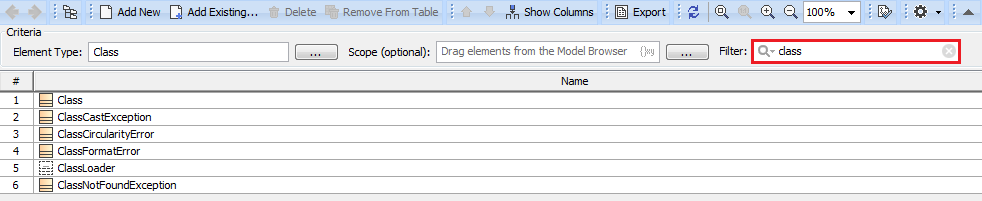
getFilteredRows() : List<Element> The returned value is a list of Elements that have been filtered by the Filter field. #foreach($row in $table.getFilteredRows())
$row.name
#end |
The figure below shows the rows returned after applying the filter. getRow( rowNumber : int ) : Element | Code Block |
|---|
| $table.getRow($rowNumber) |
Where the parameter is: - rowNumber – the row number starts with 0.
The returned value is an Element. Column names are referred by column IDs. A column is a MagicDraw QProperty ID that is not readable or accessible by the user. We need to create other methods that provide better usability than using QProperty ID. Use the following methods to retrieve column names. | Info |
|---|
The methods in this section retrieves column names from the list returned by Show Columns menu item from generic table diagram. The methods in the preceding section, however, retrieves column names from the diagram itself and not from the list returned by Show Columns menu item. |
getColumn( columnId : String) : String | Code Block |
|---|
| $table.getColumn($columnId) |
Where the parameter is: - columnId – the ID of a column. Using column IDs has a benefit of consistency between different languages, for example, French and English. The column ID can be retrieved by the method getColumnIds().
The returned value is the name of a column. getColumn(columnNumber : int) : String | Code Block |
|---|
| $table.getColumn($columnNumber) |
Where the parameter is: - columnNumber – a column number starts with 1. The column number 0 is the row number.
The returned value is the name of a column. getColumnNames() : List<String> | Code Block |
|---|
| $table.getColumnNames() |
The returned value is a list of column names. Example code: Prints all column names. | Code Block |
|---|
| #foreach($colname in $table.getColumnNames())
$colname
#end |
getColumnIds() : List<String> | Code Block |
|---|
| $table.getColumnIds() |
The returned value is a list of column IDs. Example code: Print all columns IDs | Code Block |
|---|
| #foreach($colid in $table.getColumnIds())
$table.getColumn($colid)
#end |
A cell value is the value in a row element with a column name. To get a cell value, you need to provide both the row element and column. A cell value is an Element or row number. Use the following methods to retrieve a cell value. getValue( rowElement : Element, columnIdOrName : String ) : Object | Code Block |
|---|
| $table.getValue($rowElement, $columnId) |
Where the parameters are: - rowElement – a row element.
- columnId – a column ID.
The returned value is the value in a cell. If the cell contains an element, the value is the Element.
Example code: Prints the row, column, and value. | Code Block |
|---|
| #foreach($diagram in $project.getDiagrams("Generic Table"))
#set($table = $generic.getTable($diagram))
#foreach($row in $table.getRows())
<h1>$row.name</h1>
#foreach($col in $table.getColumnIds())
$table.getColumn$col) : $table.getValue($row, $col)
#end
#end
#end |
getValue( rowElement : Element, columnIdOrName : String ) : Object | Code Block |
|---|
| $table.getValue($rowElement, $columnName) |
Where the parameters are: - rowElement – a row element.
- columnName – a column name.
The returned value is the value in a cell. If the cell contains an element, the value is the Element. getValue( rowElement : Element, columnNumber : int ) : Object | Code Block |
|---|
| $table.getValue($rowElement, $columnNumber) |
Where the parameters are: - rowElement – a row element.
- columnName – a column number starts with 1. The column number 0 is the row number.
The returned value is the value in a cell. If the cell contains an element, the value is the Element. getValue( rowNumber : int, columnNumber : int ) : Object | Code Block |
|---|
| $table.getValue($rowNumber, $columnNumber) |
Where the parameters are: - rowNumber – a row number starts with 0.
- columnNumber – a column number starts with 1. The column number 0 is the row number.
The returned value is the value in a cell. If the cell contains an element, the value is the Element. getValueAsString( rowElement : Element, columnIdOrName : String ) : String | Code Block |
|---|
| $table.getValueAsString($rowElement, $columnId) |
Where the parameters are: - rowElement – a row element.
- columnId – a column ID.
The returned value is the value in a cell and is converted into String. The String value is created by MagicDraw text representation API. getValueAsString( rowElement : Element, columnIdOrName : String ) : String | Code Block |
|---|
| $table.getValueAsString($rowElement, $columnName) |
Where the parameters are: - rowElement – a row element
- columnName – a column name
The returned value is the value in a cell and is converted into String. The String value is created by MagicDraw text representation API. getValueAsString( rowElement : Element, columnNumber : int ) : String | Code Block |
|---|
| $table.getValueAsString($rowElement, $columnNumber) |
Where the parameters are: - rowElement – a row element.
- columnName – a column number starts with 1. The column number 0 is the row number.
The returned value is the value in a cell and is converted into String. The String value is created by MagicDraw text representation API. getValueAsString( rowNumber : int, columnNumber : int ) : String | Code Block |
|---|
| $table.getValueAsString($rowNumber, $columnNumber) |
Where the parameters are: - rowNumber – a row number starts with 0.
- columnNumber – a column number starts with 1. The column number 0 is the row number.
The returned value is the value in a cell and is converted into String. The String value is created by MagicDraw text representation API. getValueAsString( rowNumber : int, columnNumber : int, showFullType : boolean ) : String | Code Block |
|---|
| $table.getValueAsString($rowNumber, $columnNumber, showFullType) |
Where the parameters are: - rowNumber – a row number starts with 0.
- columnNumber – a column number starts with 1. The column number 0 is the row number.
- showFullType – the default value is true for showing a full type of element in a cell in String form.
The returned value is the value in a cell, converted into String, and shown in a full type or normal form. getCellValueAsString( object : Object ) : String
| Code Block |
|---|
| $table.getCellValueAsString($object) |
Where the parameter is: The returned value is the object in cell value converted into String. For example: | Code Block |
|---|
| #set($result = $table.getValue($row, $id))
#if($list.isArray($result))
#foreach($r in $result)
- $table.getCellValueAsString($r)
#end
#else
$table.getCellValueAsString($result)
#end |
A visible cell value is the column which is visible on a diagram. Unlike the methods described in section 23.1.5 Getting Cell Values, the following methods will retrieve only the value which is visible on a diagram. getVisibleColumnIds() : List<String> | Code Block |
|---|
| $table.getVisibleColumnIds() |
The returned value is a list of visible column IDs. getVisibleColumn( columnNumber : int) : String | Code Block |
|---|
| $table.getVisibleColumn($columnNumber) |
Where the parameter is: - columnNumber – a column number starts with 1. The column number 0 is the row number.
The returned value is the name of a visible column. getVisibleValue( rowElement : Element, columnNumber : int ) : Object | Code Block |
|---|
| $table.getVisibleValue($rowElement, $columnNumber) |
Where the parameters are: - rowElement – a row element.
- columnNumber – a column number starts with 1. The column number 0 is the row number.
The returned value is the value in a visible cell. If the cell contains an element, the value is the Element. getVisibleValue( rowNumber : int, columnNumber : int ) : Object | Code Block |
|---|
| $table.getVisibleValue($rowNumber, $columnNumber) |
Where the parameters are: - rowNumber – a row number starts with 0.
- columnNumber – a column number starts with 1. The column number 0 is the row number.
The returned value is the value in a visible cell. If the cell contains an element, the value is the Element. getVisibleValueAsString( rowElement : Element, columnNumber : int ) : String | Code Block |
|---|
| $table.getVisibleValueAsString($rowElement, $columnNumber) |
Where the parameters are: - rowElement – a row element.
- columnNumber – a column number starts with 1. The column number 0 is the row number.
The returned value is the value in a visible cell and is converted into String. The String value is created by MagicDraw text representation API. getVisibleValueAsString( rowNumber : int, columnNumber : int ) : String | Code Block |
|---|
| $table.getVisibleValueAsString($rowNumber, $columnNumber) |
Where the parameters are: - rowNumber – a row number starts with 0.
- columnNumber – a column number starts with 1. The column number 0 is the row number.
The returned value is the value in a visible cell and is converted into String. The String value is created by MagicDraw text representation API. |