
Cameo DataHub additionally supports HTML image tags as attached files, text style in rich-text files (RTF), and image and other objects , e.g., (such as Embedded Excel spreadsheet and Words files, ) in object linking and embedding (OLE).
To enable the HTML image support from the from a data source in the projects a project as an attached filesfile
...
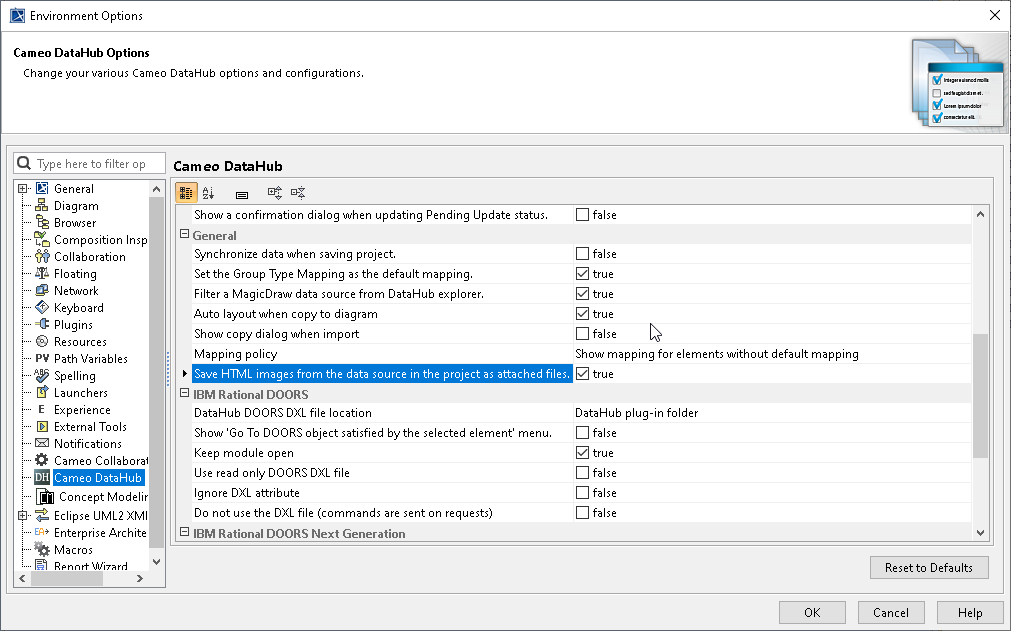
- On the main menu, click click Options > > Environment. The The Environment Options dialog dialog opens.
- In the left pane, select select Cameo DataHub. Under the the General group group, set the the Save HTML images from the data source in the project as attached files option to true. option to true, as shown below:
Click OK to close the Environment Options dialog.
To enable the RTF text support
...
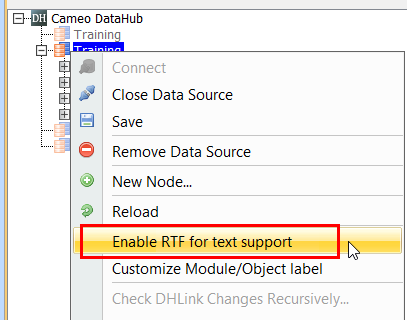
- Right-click the DOORS Data Source and select select Enable RTF for text support., shown below:
To enable the RTF and OLE support for text style and image
...
- Right-click the DOORS Data Source and select select Enable RTF for text support.
- Right-click the DOORS Data Source again and select Enable RTF for OLEs support.
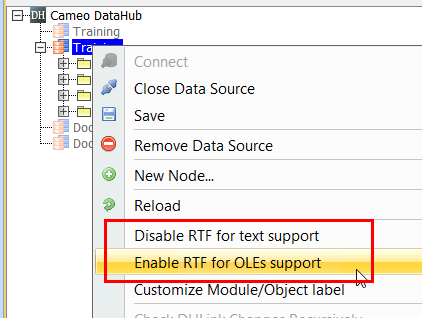
| RTF and OLE command | Function |
|---|---|
| Enable RTF for text support | Allows |
| support of text styles in RTF when copying data from DOORS to MagicDraw. | |
Disable RTF for text support (available after selecting Enable RTF for text support) | Suspends |
| RTF and OLE support. | |
Enable RTF for OLEs support (available after selecting Enable RTF for text support) | Copies text styles and |
images as |
OLE |
objects from DOORS to MagicDraw.
|
|
If you have selected only only Enable RTF for text support, but does did not select select Enable RTF for OLEs support after after right-clicking the DOORS Data Source for the second time, copying elements , (e.g., Requirements) from DOORS to MagicDraw will include only text styles , (e.g., bold, italic, underline, strikethrough, superscript, and subscript). However, any image in the data will not be copied.
...
Image in RTF is not copied from DOORS to MagicDraw when selecting only the Enable RTF for text support command.
If you have selected selected Enable RTF for text support and select and then select Enable RTF for OLEs support after after right-clicking the DOORS Data Source for the second time, copying elements , (e.g., Requirements) from DOORS to MagicDraw will include both text styles and image as an OLE object.
...
| Note | ||
|---|---|---|
| ||
Due to the different compatibility of image types between MagicDraw and DOORS, image types are converted during synchronization between the tools.
|
| Note | ||
|---|---|---|
| ||
|
...