The layout templates functionality, which is driven by <<layoutTemplate>> stereotype, assists you in creating well-formed diagrams. It allows you to define Class appearance once, and reuse it later when creating Parts typed by that Class and Ports in different diagrams. Parts and their Ports are represented identically as part's type Class whose layout and style is defined in the layout template diagram. Often, Port position reflects its physical location in the system, so it is beneficial to maintain the same appearance of Parts, layout, and style of Ports throughout the whole model. In the figure below, the appearance of the Modem Card Block is the same in two different diagrams, SysML Block Definition diagram and SysML Internal Block diagram. | Widget Connector |
|---|
| width | 700 |
|---|
| url | https://www.youtube.com/watch?v=UtnKfP58ET0&feature=youtu.be |
|---|
| height | 500 |
|---|
|
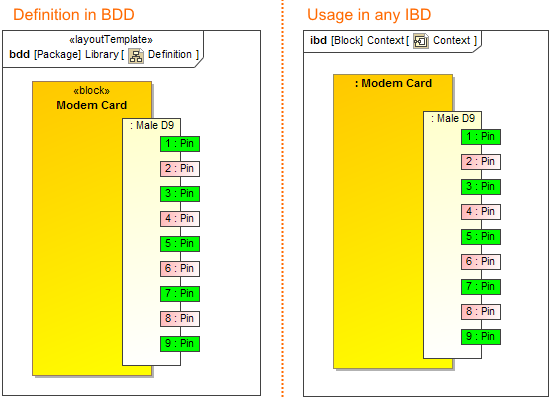 Image ModifiedUsage of a layout template. The illustration displays concepts from SysML Plugin. Image ModifiedUsage of a layout template. The illustration displays concepts from SysML Plugin.
You can create a layout template in the Class Diagram or derive it from an existing Composite Structure Diagram as described below.
To define a layout template in the Class Diagram and apply it to other diagrams:
Define the appearance of Class, layout, and style of
| 