Before simulating FMU files, you must make sure the following conditions are met: - The FMU files and file can be attached to the project must be , placed in the same directory as the project or the path to the file can be specified as url tag on the FMU block. The path is set automatically when importing an FMU file.
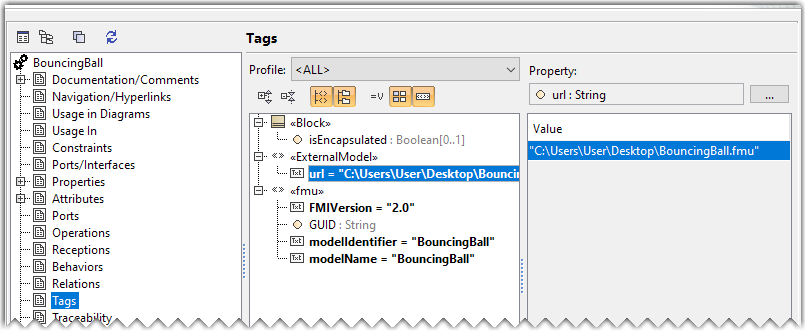 Image Added Image Added
- The FMU files must be OS-platform supported, e.g., Win64, Win32, linux64, linux32, etc. (Cross-platform execution of FMU files is not supported.). You can see all supported platforms in the Binaries folders of the FMU files. If the platform you are using is not in the Binaries folder, it will not be supported.
- An FMU Block requires a SimulationConfig with the Internal simulation clock to provide the reference time in the simulation (shown in Step 3 below). Otherwise, a warning message will be shown in the Console pane. Please see also the WaterTankFMI build-in sample of Simulation.
| 