
...
| id | 1077213431 |
|---|
...
| id | 1077213433 |
|---|
...
| id | 1077213432 |
|---|
The following is an example of the LDAP Structure for Active Directory.
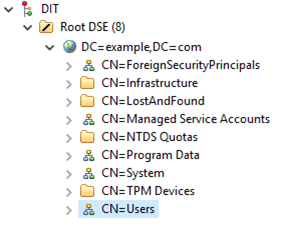
LDAP structure (Active Directory).
To
...
configure LDAP properties
...
for Active Directory
...
- Go to the Settings application to open the LDAP management page.
...
- Click Create LDAP configurationhe Create LDAP configuration pane.
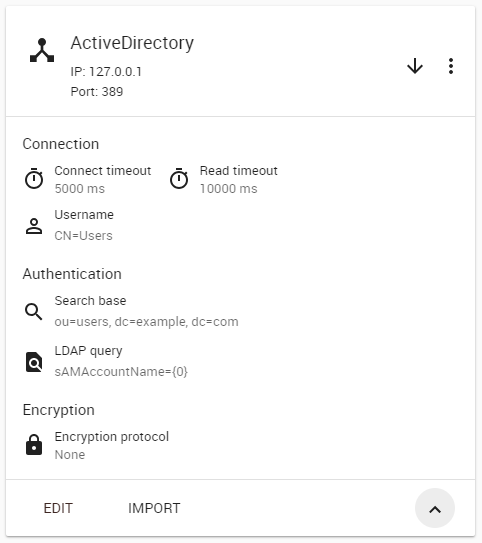
- Configure the LDAP settings, for example:
- The LDAP users are
...
- under CN=Users
...
- record.
- The LDAP server is starting at machine IP
...
- address 127.0.0.1
...
- with a default LDAP
...
- port 389.
The following figure represents a simple LDAP (Active Directory) configuration example in Teamwork Cloud Admin:
...
| id | 1077222713 |
|---|
Related pages
...