Versions Compared

Key

  • This line was added.
  • This line was removed.
  • Formatting was changed.

...

id1144117790

...

id1144117792

...

id1144117791

To open DataHub Explorer

...

  1. Create a new MagicDraw® project or open an existing project.
  2. From the MagicDraw main menu, click Tools > DataHub > DataHub Explorer. The DataHub Explorer tab opens.
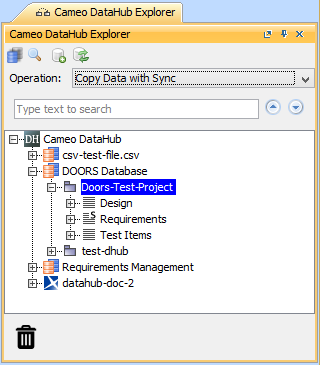
     

DataHub ExplorerImage Modified


1144117789
Note
titleNote
  • Nodes under particular drivers in DataHub Explorer also represent nodes in the applications belonging to the drivers.
  • If a driver is correctly started, the name of the driver will appear in the DataHub Explorer tree. The driver will then connect to data in each of its respective application.
Content block
id

Related page