
Page History
...
Before establishing allocations, you must define the allocation mode - Definition or Usage. The definition elements are Activity and Block, and usage elements are Action and Part Property. Depending on the mode, you can convey which allocations are established considering the system context.
...
Click the Vertical Swimlanes button on the activity diagram palette and then click an empty space on that diagram pane. The Represent Properties dialog opens.
Note The Represent Properties dialog opens if:
- The Activity diagram is owned by a Block or Use Case.
- The owning Block or the Block set as the Use Case subject has part properties.
Partitions are created for each property you select to represent as a Swimlane in the Activity diagram.
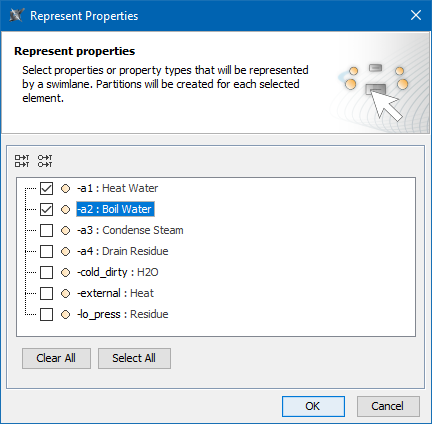
Otherwise, you can manually define properties represented by a Swimlane.
- In the dialog, select the properties you want to represent as Swimlanes and click OK.
Right-click any of the Swimlane partitions and select Allocation Mode > Usage (if not selected yet). The allocation to usage mode is enabled in the diagram.
Info title Usage mode This mode allows you to convey that allocations are established considering the system context. Otherwise, allocations are generic and not related to any system context.
- Drag existing actions from the diagram pane or create new actions for particular swimlanes.
...
Overview
Content Tools