
...
| id | 831386208 |
|---|
...
| id | 831386210 |
|---|
...
| id | 831386206 |
|---|
On this page
| Table of Contents |
|---|
...
| id | 831386209 |
|---|
| Excerpt |
|---|
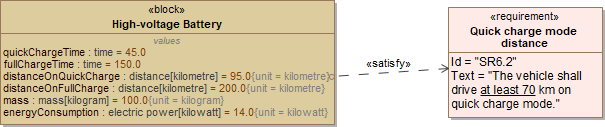
The Extracting Constraint from Requirement functionality provides the ability to verify Requirements easier when trying to prove the assertion is true (or false). A glossary mechanism extracts the constraint directly from the Requirement text. If you want to create constraints and associate them with the requirements automatically, you can use the extract Constraint from Requirement text functionality. To extract |
...
Constraint value from |
...
Requirement text
Anchor |
|
| Anchor | ||||
|---|---|---|---|---|
|
To extract a Constraint from a Requirement
- Right-click a value property in the compartment area of the element shape.
- Select Tools > Extract Constraint From Requirement.
The constraint is created automatically with a value and condition pattern defined in the Requirement.
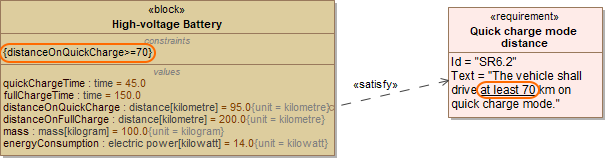
In the example below, the text "at least 70" of the Quick charge mode distance Requirement is automatically parsed to "distanceOnQuickCharge >= 70" and solved as a constraint.
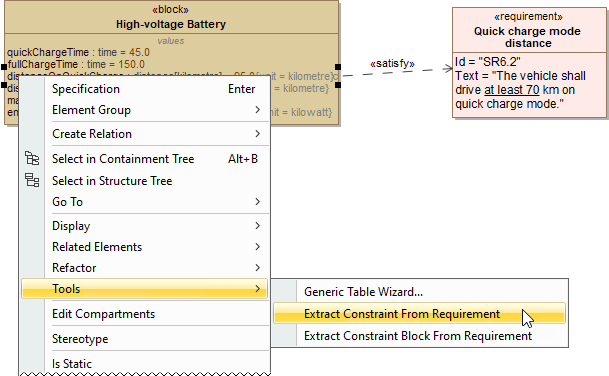
After selecting the Extract Constraint From Requirement command, the constraint {distanceOnQuickCharge >=70.0} is automatically created. It satisfies the requirement text "at least 70".
...
...
Sample model
The model used in the figures of this page is the extract requirement values sample model To open this sample do one of the following:
...