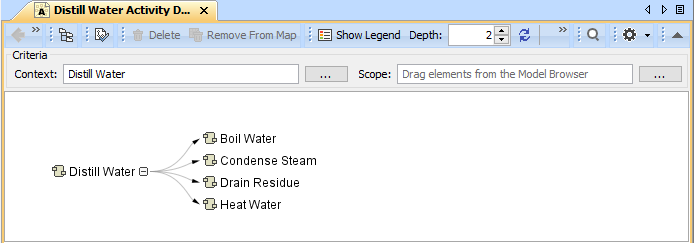
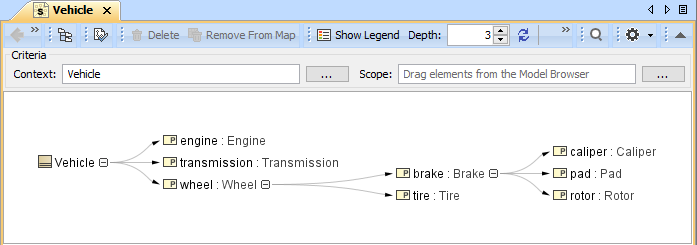
You can use all predefined relation maps to represent the traceability of system requirements and design elements. The main purpose of relation maps is to review and analyze relations among the elements and create new elements directly in the relation map. It is a special kind of diagram that automatically updates and renders an element's dependency tree according to predefined dependency criteria. You can create five kinds of predefined relation maps:
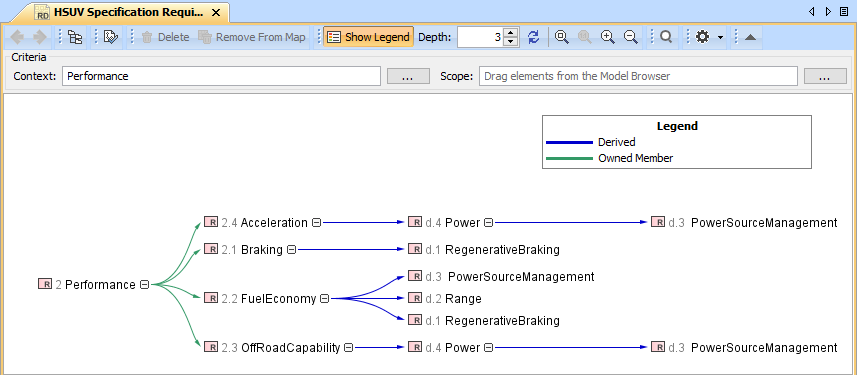
The different purposes for each relation map are illustrated below: - Requirement Derivation Map displays the decomposition of Requirements that are related trough the Derive relationship. You can review, analyze, and create Derive relationships among the Requirements. The example below is created by using the hybrid sport utility vehicle.mdzip sample model that only comes with the SysML Plugin.
| Note |
|---|
| title | Additional relation map |
|---|
| You can also create a Relation Map Diagram if you want a rapid review, analysis, and creation of relationships among the elements of the entire model. Lean more about Relation Map Diagram >> |
| Excerpt Include |
|---|
| MDTWRTMD2024xR2:Relation MapMDTWRT |
|---|
| MD2024xR2:Relation Map |
|---|
| nopanel | true |
|---|
|
|