Versions Compared

Key

  • This line was added.
  • This line was removed.
  • Formatting was changed.

...

Content layer
id841401716


Content column
id841401718


Content block
id1012377060

On this page

Table of Contents
maxLevel4
minLevel2

Content block
id841401717

Introduction

You can add new or manage existing hyperlinks in the Edit Hyperlink dialog, consisting of:

  • Three main tabs containing all modeling tools: Address tab, File tab, and Element/Symbol tab.
  • One tab required to install the Cameo DataHub Plugin: OSLC Link tab.

The following figure illustrates the tabs.
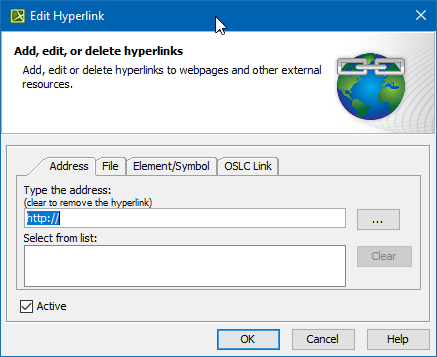
All available tabs in the Edit Hyperlink dialog.

Hyperlink types

The following table provides details of available hyperlink types.

Tab in the Edit Hyperlink dialogHyperlink typeRequired pluginsTab descriptions
Address tabLinks to webpages or other external resources.-Learn more about Address tab >>
File tabOpens the file from your file system.Learn more about File tab >>
Element/Symbol tab
  • In HTML text, opens the element Specification window.
  • In plain text, on element/symbol, or diagram, opens the diagram.
Learn more about Element/Symbol tab >>
OSLC Link tabLinks to OSLC resources.Learn more about OSLC Link tab >>


Opening the Edit Hyperlink dialog


To open the Edit Hyperlink dialog


Content block
id841401715

Related pages

Children Display
depth3
pageMD2024xR3:Defining hyperlinks