Simulation Project is a useful template that consists of fundamental diagrams and elements basically required for the user to work on a simulation project. The template significantly reduces time spent on working on the preparation of making simulation from scratch. The template is available in the Simulation project category in the New Project dialog.
To open a template
- Click File > New Project on the MagicDraw main menu.
- Select Simulation > Simulation Project in the New Project dialog.
- Name your project, select its location, create a directory for the project, and click OK.
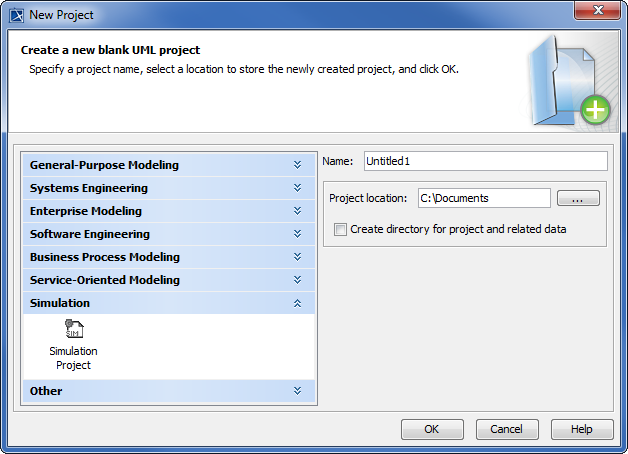 The Simulation Project Template in the New Project Dialog
The Simulation Project template arranges basic and necessary diagrams represented by Class and Package diagrams including State Machine diagrams. The project template additionally encompasses Simulation Configuration to which a Simulation Target is set.
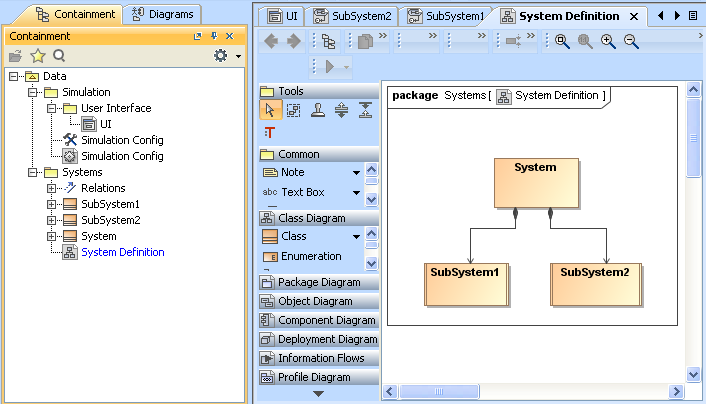 The Simulation Project Template with the Class and Package Diagrams
Simulation project template with the class and package diagrams.
