The Diagram Creation Wizard is used to create the following diagrams:
| Info |
|---|
The name of this wizard depends on particular diagram name: <diagram name> Creation Wizard: - CV-3 Creation Wizard
- PV-2 Creation Wizard
- AcV-2 Creation Wizard
- StV-3 Creation Wizard
- NPV-1 Creation Wizard
- NCV-5 Creation Wizard
- Lr Lines of Development Creation Wizard
- Cr Capability Roadmap Creation WizardPersonnel Availability Gantt Chart Creation Wizard
| Status |
|---|
| colour | Green |
|---|
title | Available from 19.0 SP1
|
To open the Diagram Creation Wizard
- Right-click the <view name> Package and select Create Diagram > <diagram name>.
The Diagram Creation Wizard opens.
The wizard consists of three steps: Name and owning package specificationIn this step, you can specify the diagram name and select or create the owning package. If you want to create a new owning package, use the Create Owner button. Also, you can clone an existing package by clicking the Clone button. 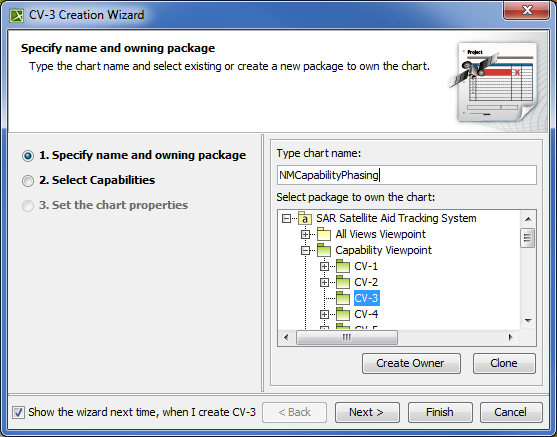 Specifying name and owning package in CV-3 Creation Wizard Specifying name and owning package in CV-3 Creation Wizard
Capability selectionIn this step, you can select Capabilities from the list. 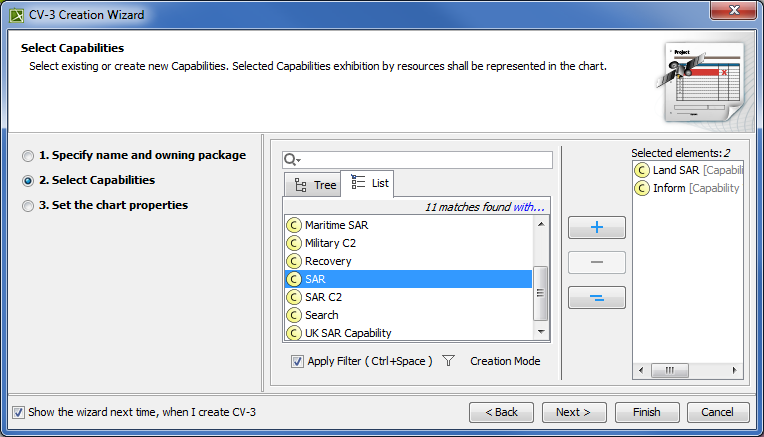 Selecting Capabilities in CV-3 Creation Wizard Selecting Capabilities in CV-3 Creation Wizard
| Button | Description |
|---|
 Add Add | Selects a Capability. | Info |
|---|
Alternatively, double-click the Capability. |
| Remove | Removes a Capability. | Remove All | Removes all Capabilities. |
The chart property setting In this step, you can set the display style of the chart. 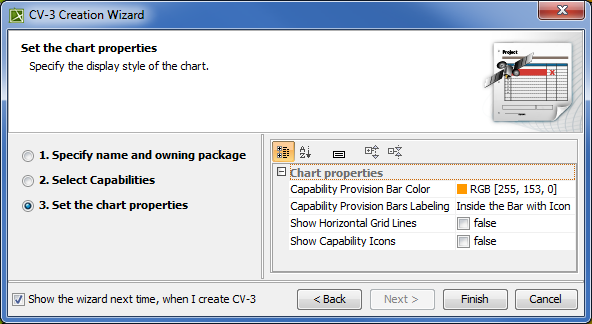 Setting the chart properties in CV-3 Creation Wizard Setting the chart properties in CV-3 Creation Wizard
| Info |
|---|
If you do not wish to use the this wizard next time, clear the Show the wizard next time, when I create <diagram name> check box. To restore the usage of the Diagram Creation Wizard
- Select Options > Environment.
- In the Environment Options dialog select the UAF options group.
- In the General properties, set the Show PV-2/AcV-2/NPV-1 Creation Wizard each Time Creating New Chart property value to true.
|
| 