Description| Note |
|---|
This feature is available in Standard, Professional, Architect, and Enterprise editions. |
The Generic Table in MagicDraw gives you the ability to manage selected elements and their properties in a single place. PurposeA Generic Table displays a list of selected elements and their properties in a single place. Using Generic Tables enables you to: - Edit property values of listed model elements.
- Create selected type elements.
- Create new derived properties or custom columns.
Example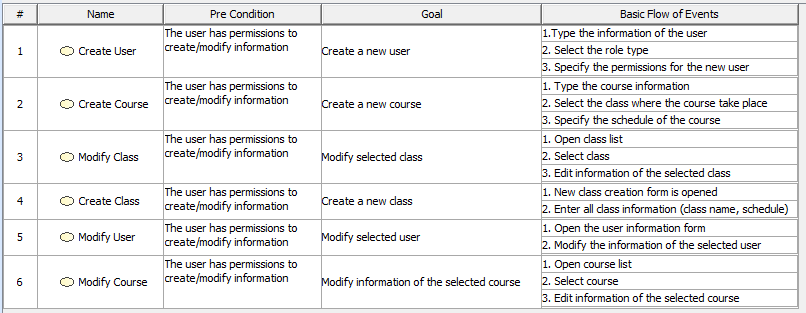 Example of generic table Example of generic table
| Info |
|---|
The Generic Table project sample allows you to read about the Generic Table feature and analyze examples within that project sample.
To open the sample, do either: - On the Welcome screen, select Samples > Diagrams > Generic table.
- Go to <MagicDraw installation directory>\samples\diagrams and open the generic table.mdzip file.
All the examples given in this section are based on the data from this sample. |
Specific tasks in Generic TableAll procedures dedicated only for Generic Table are as follows:
| 