
An integrated MDZipX plugin helps to improve the display of diagrams on the 3DEXPERIENCE 3DEXPERIENCE platform by converting them to the MDZipX file.
...
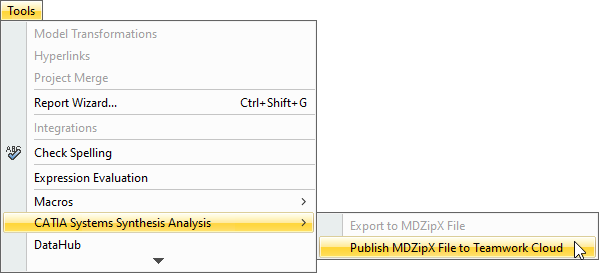
- Click Tools > CATIA Systems Synthesis.
- Select Publish MDZipX File to Teamwork Cloud.
Environment Options
You can also enable the automatic publishing of the MDzipX file environment option to include diagrams from used projects when publishing MDZipX to Teamwork Cloud. If the option is specified, the MDzipX file will be The MDZipX file is automatically published for each diagram you have upon the project commit if the automatic MDZipX publishing is enabled.
To include diagrams from used projects when publishing MDZipX
...
- Click Options > Environment.
- In the panel on the left, select Collaboration.
- Under CATIA Systems Synthesis Analysis, select Publish Diagrams from Used Projects.
- Click OK.
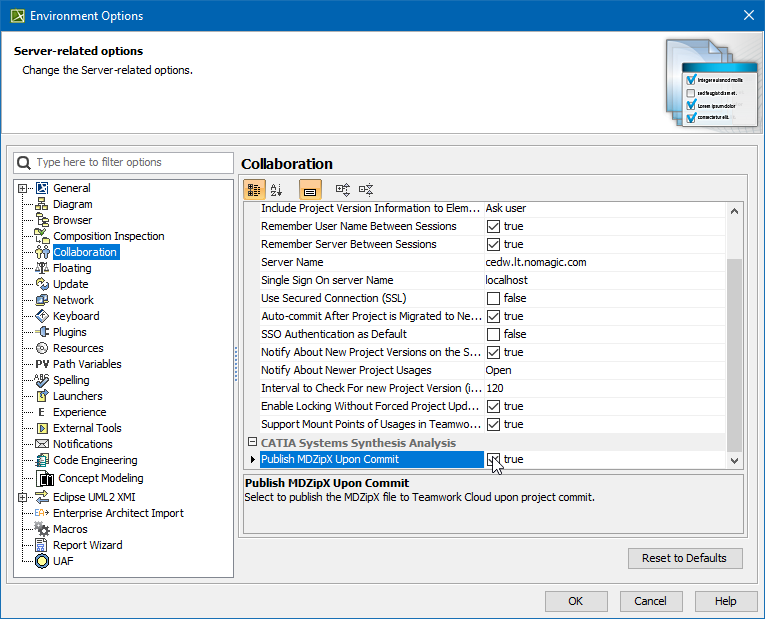
To enable the automatic MDzipX MDZipX publishing
...
- Click Click Options > > Environment.
- In the panel on the left, select Collaboration.
- Under Under CATIA Systems Synthesis Analysis, select select Publish MDZipX Upon Commit.
- Click Click OK.
For more information, please refer to http://docservices/doc422/English/TraUserMap/smv-c-ad-NoMagicConfiguration.htm .