
...
| id | 600464591 |
|---|
...
| id | 600464593 |
|---|
...
| id | 600464592 |
|---|
You can import LDAP users and groups, known as external users or groups, from an LDAP server to the TWCloud system. All imported data are stored in the external servers or LDAP servers. Use the following applications to import LDAP users and groups:
- Users application
- Settings application
| Note | ||
|---|---|---|
| ||
|
To import LDAP users or groups through
...
the User application
...
Go to the User application,
...
click the
 and choose
 Import users & groups.
 - Select an LDAP server from which you want to import users and groups.
In the search bar, type a username, group name or LDAP query, and
...
press Enter. A list of usernames that matches the username or LDAP query will appear.
Note title Note The system will connect you to the LDAP server automatically because it reuses the system username and system password you entered on
...
the LDAP Configuration
...
page. See the option
...
- Choose one or
...
- more usernames/group
...
- names to import by selecting the check box(es).
...
- Click Import.
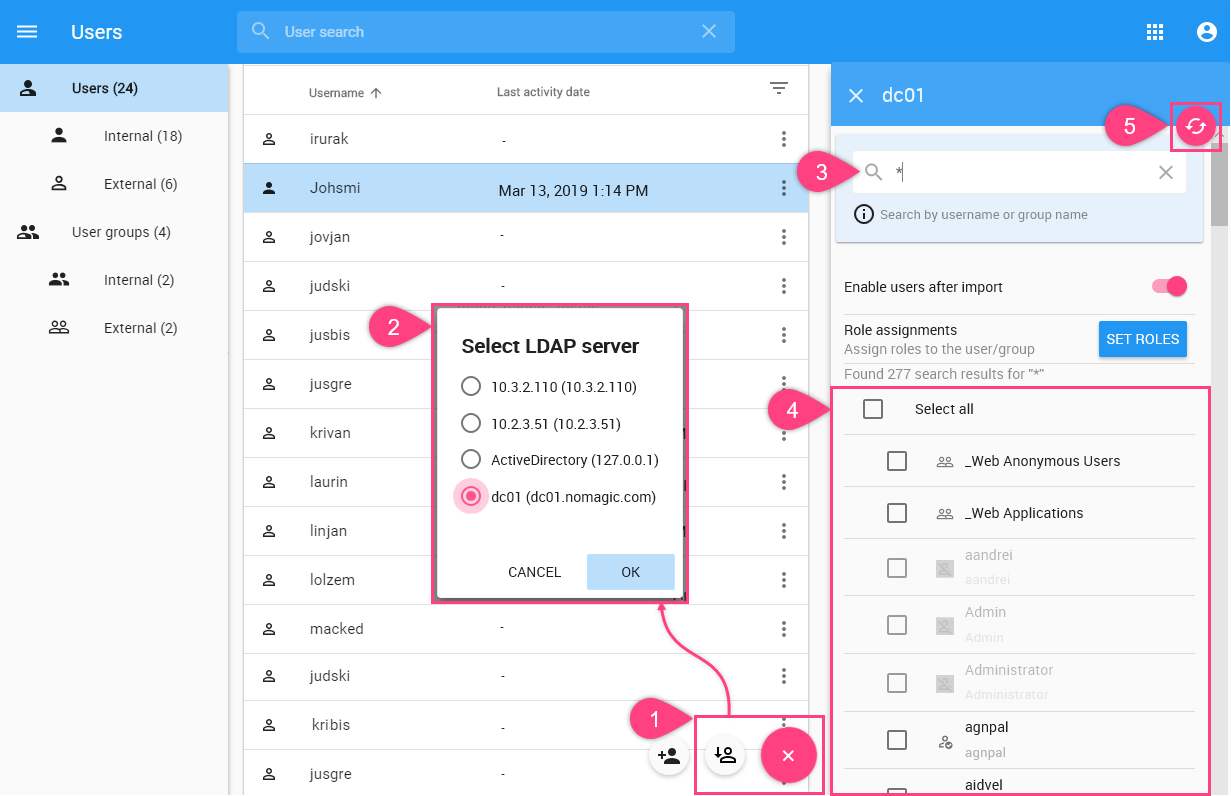
New users and groups will be imported. When imported user is new, an external user will be created and the role assignment will be assigned to the user. If the user has been imported before, the existing user information will be updated but the role assignment stays the same.
Upon importing users and groups, you can copy roles and assignments from other users to them. See the
...
section Copying roles and assignment
...
for more information.
...
| id | 600464588 |
|---|
Related pages
...