You can generate an FMU (Functional Mock-up Unit) for external co-simulation of dynamic models that enables the exchange of simulation results between different simulation tools. The generated FMU exposes the defined input and output parameters of a model, as specified in a Simulation Configuration. The generated FMU runs the server-side simulation of a particular Simulation Configuration using given inputs and returns the outputs after each time step. FMUs can be generated for two platforms: Linux 64-bit and Windows 64-bit. | Note |
|---|
| - You must have OpenJDK to generate FMU from the modeling tool.
- You must have a simulation server certificate to co-simulate the generated FMU.
- You must use the generated FMU with tools that use the same JAVA version as the modeling tool; otherwise, you will not be able to run the generated FMU.
|
FMU generation uses selected Simulation Configuration properties, and can contain the following defined data: - Start Time, End Time and Step Size property values.
- Input Parameters property value: the default values from the defined input parameters will be included in the generated FMU.
- Output Parameters property value: the default values from the defined output parameters will be included in the generated FMU.
To generate an FMU
- Open a Teamwork Cloud project.
- Right-click a Simulation Configuration and select Simulation > Generate FMU.
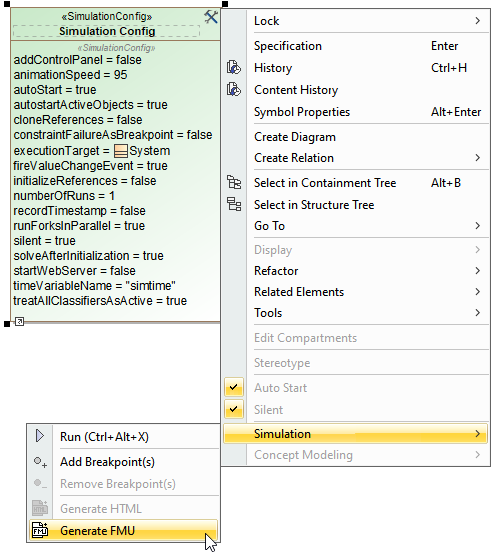 Image Modified Image Modified
- In the Generate FMU dialog specify the following:
| 
