SysML Plugin TWRT Documentation


On this page
Main rules of Requirements decomposition
The following are the rules for decomposing Requirements:
- If some part of the Requirement is going to be used somewhere else (e.g. some other Requirement derives from it, or it is subject to decomposition itself), then the requirement should be decomposed into smaller Requirements.
- If the Requirement has information from different (sub)topics, it should also be decomposed into sub-requirements.
- If parts of the Requirement are not used by any other Requirement and the Requirement holds information that naturally describes the same topic or thing, but the text of the Requirement becomes too long (e.g. 8-10 sentences), it should still be decomposed into several Requirements for better readability.
Decomposing Requirements
You can decompose Requirements in the following ways:
Creating requirements hierarchy in the Containment tree
You can decompose Requirements in the Containment tree. The element is created in the Model Browser. You can then represent them in the Requirement Diagram by dragging elements or in the Requirement Table by adding existing elements.
How to create requirements in the Containment tree >>
In the following figure, the Requirements are decomposed in the Containment tree. For example, the Item purchase Requirement is decomposed into four sub-Requirements: Purchasing facilitation, Purchase request for new items, External global repository, and Item request management.
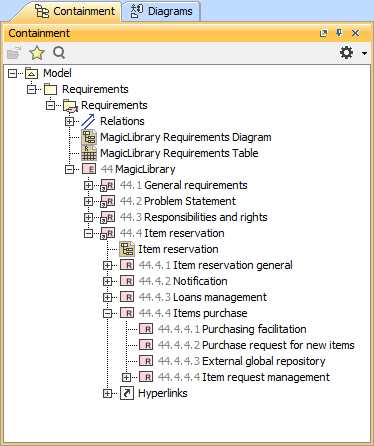
The Requirements decomposition in the Containment tree.
Creating requirements hierarchy in the Requirement Diagram
While decomposing Requirements in the Requirement Diagram the following rules apply:
- A single Requirement Diagram should contain only one nesting level: one main Requirement shape and one level of its owned Requirements.
- If each nesting level contains only a few Requirements (e.g. 1-4 requirements), a single Requirement Diagram can contain more than one nesting level.
- If the main Requirement owns more than 5 Requirements they should be refined in a separate diagram.
How to create Requirements in the Requirement diagram >>
In the following figure, the the Requirements are decomposed by using the Containment relationship and represented in the Requirement Diagram. For example, the Notification Requirement is decomposed into two sub-Requirements: Notification about available item and Notification methods.
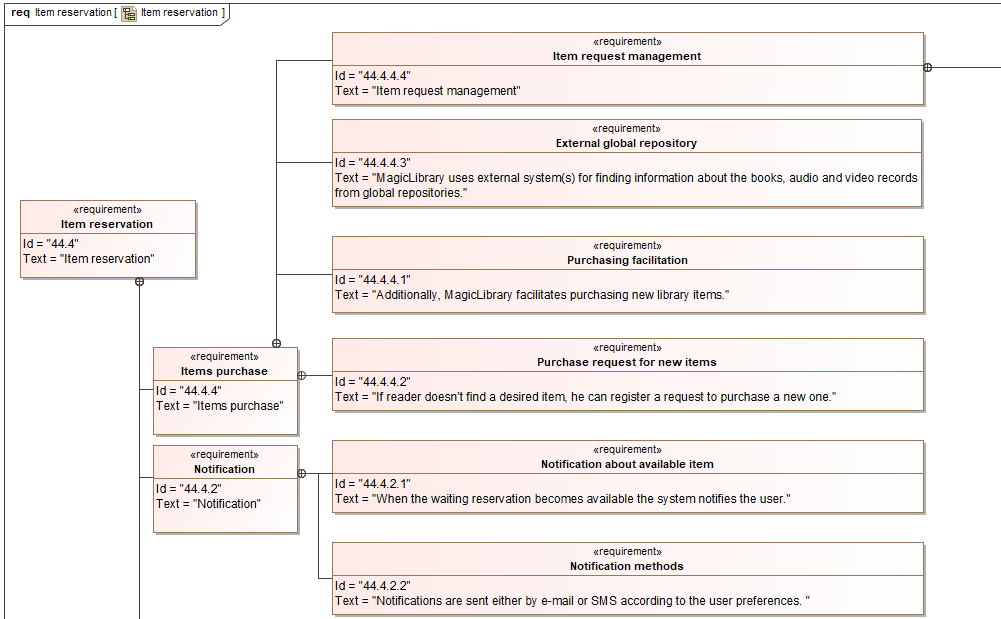
The Requirements decomposition in the Requirement Diagram.
Decomposing requirements in the Requirements table
You can represent and create Requirements of your system in the Requirements Table. How to create Requirements in the Requirement table >>
You can decompose Requirements:
In the following figure, the Requirements are decomposed and displayed hierarchically in the Requirement Table. For example, the Item purchase Requirement is decomposed into four sub-Requirements: Purchasing facilitation, Purchase request for new items, External global repository, and Item request management.
Requirements hierarchy mode in table
You can change the Requirements hierarchy in the table by using the Display Mode option. This option is described in the Table toolbars page under the Options toolbar.
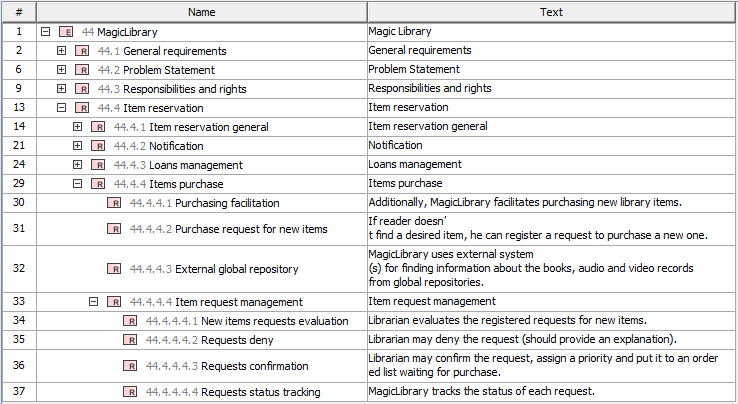
The Requirements decomposition in the Requirement Table.
Sample model
The model used in the figures of this page is the User needs - requirements module for MagicLibrary sample model that comes with MagicDraw. To open this sample do one of the following:
- Download User needs - requirements module for MagicLibrary.mdzip.
- Find in modeling tool <modeling tool installation directory>\samples\diagrams\User needs - requirements module for MagicLibrary.mdzip.
Overview
Content Tools