

Swapping allows counter-change symbols with each other on the diagram.
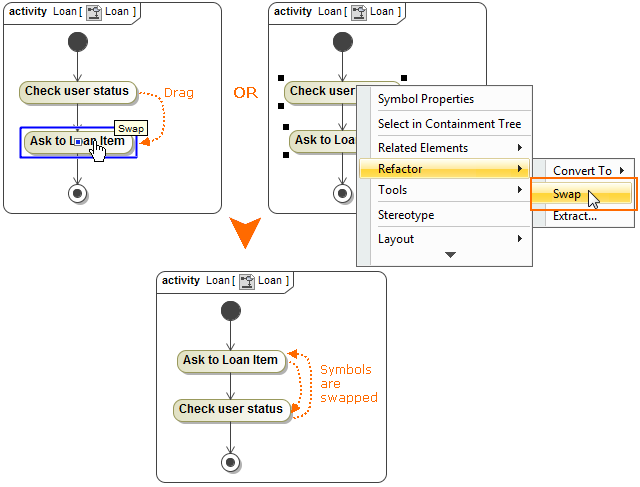
You can swap the symbols in the following diagrams:
- In the Activity diagram, you can swap actions, merge or decision nodes, join or fork nodes with each other, if the symbols are connected through control flow.
- In the State diagram, you can swap states or pseudo states (initial state, deep history, join, fork, junction, choice, entry point, etc.) with each other, if symbols are connected through transition.
To swap elements, do one of the following
Drag one shape onto another.
Swap does not work when dragged shape can be added into the target shape (or in other words, can be added as a child).
- On the diagram, select the two shapes that you want to swap, right-click, and from the shortcut menu, select Refactor > Swap.
- Swapping does not work when symbols have different parents.
- If you cannot swap within a Teamwork Cloud project, make sure you have the right to edit the model of this project and then try to lock for edit this diagram.
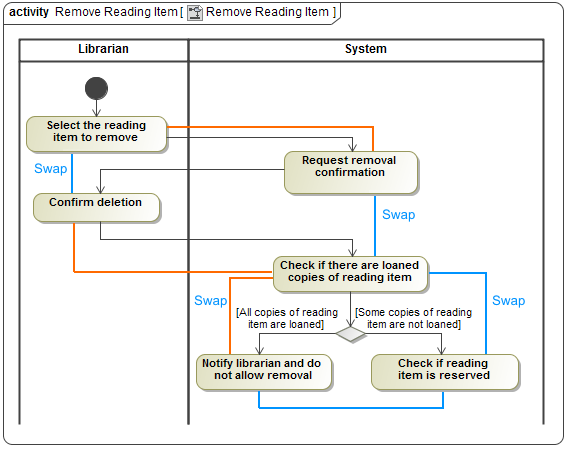
In the following example, you can see the cases when you can swap the elements and the cases when you cannot swap the elements.
| Rule | Example |
|---|---|
You can swap the elements that | You can swap the following elements:
|
You cannot swap the | You cannot swap the following elements:
|
You cannot swap the elements that | You cannot swap the following elements:
|
Related pages