
Released on: July 5, 2024
The 2024x Refresh1 release introduces performance improvements, as well as general modeling and collaborative modeling enhancements.
The client-side performance enhancements include improvements in Diagram Export as SVG, optimizing the efficiency of exporting matrices and tables in the SVG format. This results in significantly reduced file sizes.
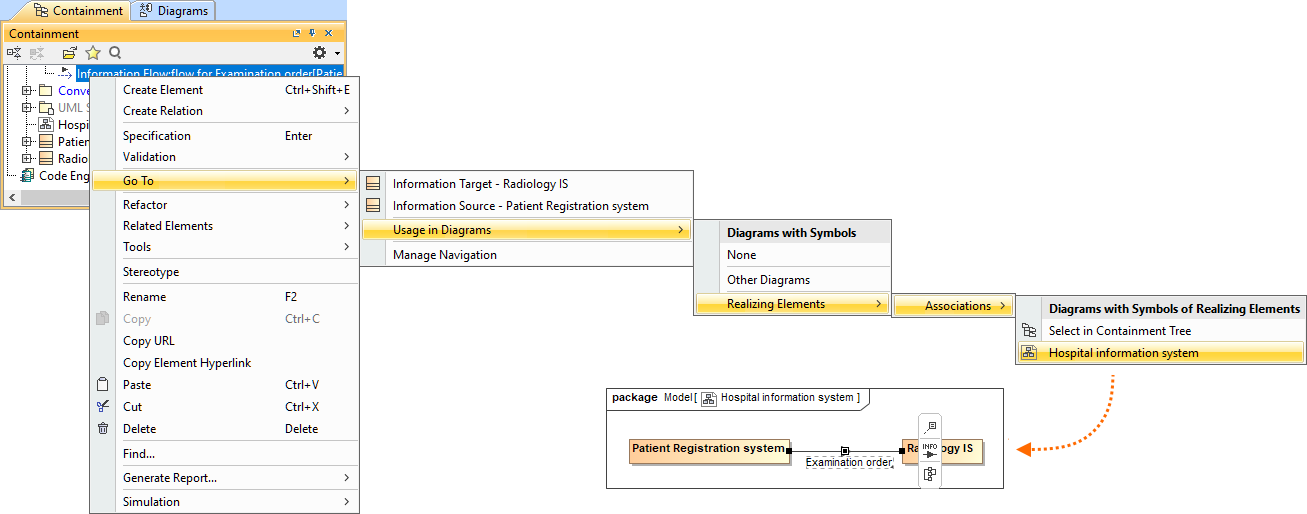
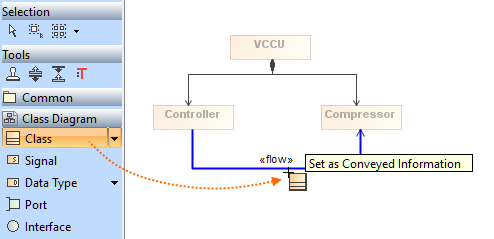
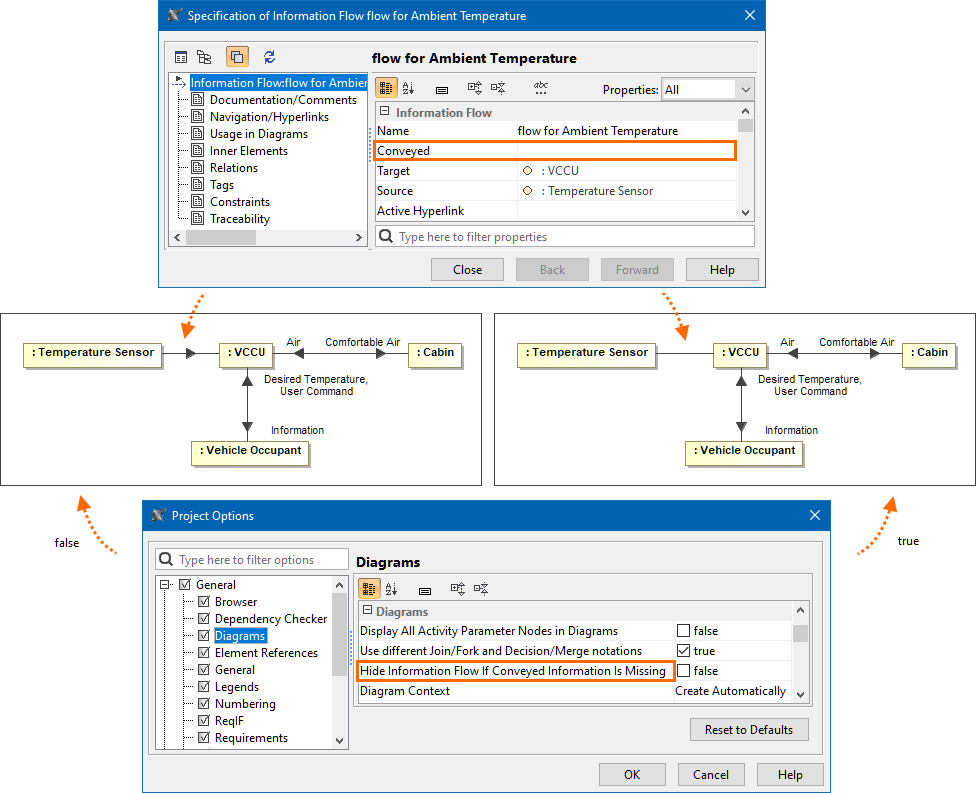
For general modeling, this release presents Information Flow management improvements. Now you can easily navigate from the selected Information Flow in the Containment tree to the diagrams where that flow is realized. You can also specify the Conveyed Information directly in the diagram, picking the necessary Conveyed Information element from the diagram palette and dragging it on to the Information Flow. Additionally, you can now choose whether you want to hide the arrow notation on the realizing elements when the Conveyed Information is hidden or unspecified using the 'Hide Information Flow If Conveyed Information Is Missing' project option that controls the arrow visibility. Furthermore, the Conveyed Information in the 'New Conveyed Information' dialog is represented with icons to help you identify the Conveyed Information. Finally, new validation rules have been implemented to highlight Information Flows that do not have any Conveyed Information.
Additional enhancements include the improved samples access and navigation in the modeling tool, as now you can review the list of available samples any time by invoking the Samples tab. Also, a new 'Letter Spacing Reduction in SVG' environment option is introduced to control the spacing between letters when exporting diagram images in SVG format, allowing you to maintain text alignment within shape boundaries upon export.
Additionally, collaborative modeling brings several enhancements to the Model Patch functionality, which is now out of the technology preview phase. The Model Patch UI has been improved with a new panel that identifies and explains issues related to model patch application. Project commit processes are now more efficient with a First-In-First-Out (FIFO) queue system for simultaneous commits. Finally, you can save time by skipping the migration of archived branches when migrating Teamwork Cloud projects and more.
Collaboration powered by the 3DEXPERIENCE platform introduces significant improvements as well. You can now move Teamwork Cloud projects to the 3DEXPERIENCE platform and then update these projects using the .szip file format. In addition, the History and Edit Branches dialogs now indicate if and from which iteration a project was merged.
To download the latest version of the modeling tool, see Downloading installation files. For further information, check the product documentation.
2024x Refresh1 Hot Fix 1 is now available for CATIA Magic and No Magic portfolios. It includes a number of improvements and bug fixes, and vulnerability fixes in our modeling tools, plugins, and server products . Learn more >> |
 Client-side Performance Improvements
Improvements in Diagram Export as SVG
Exporting diagrams in Scalable Vector Graphics (*.svg) format now features significant optimizations, with the most notable improvements in matrix and table exports:
- Reduction in the file size of exported SVG files.
- Export now requires up to 10 times less RAM resources.
- Decreased duration of the export process.
These optimizations enhance the efficiency of exporting matrices and tables in SVG format, resulting in significantly reduced file sizes. The improvements impact various functionalities that utilize SVG image generation, such as image export via the MDZipX plugin or the 'Save as Image' command.
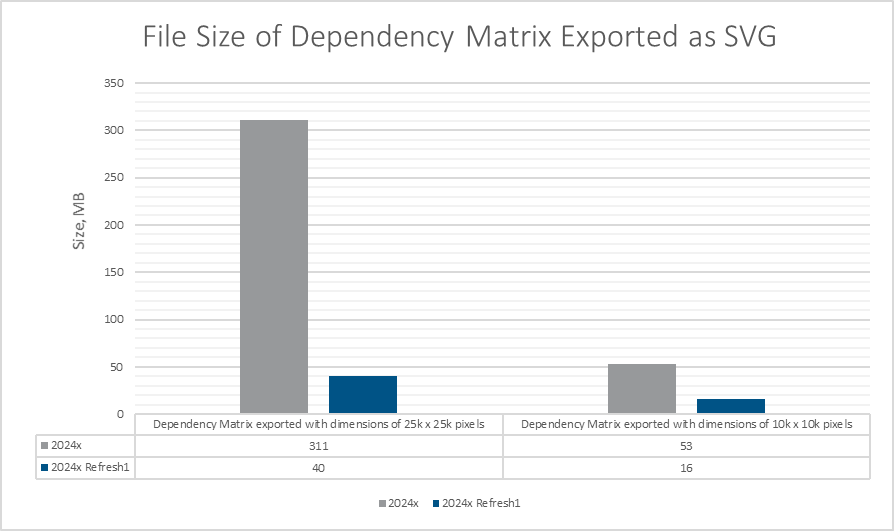
A chart comparing the file size of a Dependency Matrix exported as a SVG image in 2024x and 2024x Refresh1.
 Modeling and Infrastructure
Information Flow Management Improvements
- Now you can easily navigate from the selected Information Flow in the Containment tree to the diagrams where that flow is realized. Learn more >>
- Specify the Conveyed Information directly in the diagram, picking the necessary Conveyed Information element from the diagram palette and dragging it on to the Information Flow. Learn more >>
- You can now choose whether you want to hide the arrow notation on the realizing elements when the Conveyed Information is hidden or unspecified. The Hide Information Flow If Conveyed Information Is Missing project option controls the arrow visibility. Learn more >>
- Now the Conveyed Information in the New Conveyed Information dialog is represented with icons to help you identify the Conveyed Information.
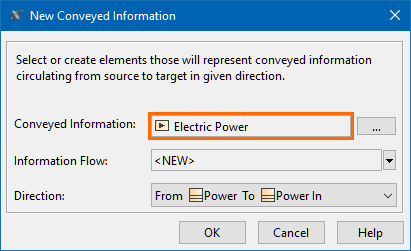
- New validation rules (IFHNCI[1] and RIFHNCI[1]) have been implemented to highlight Information Flows that do not have any Conveyed Information. Learn more on the Information Flow has no Conveyed Information and Realized Information Flow has no Conveyed Information pages.
- Now you can easily navigate from the selected Information Flow in the Containment tree to the diagrams where that flow is realized. Learn more >>
Improved Samples Access and Navigation
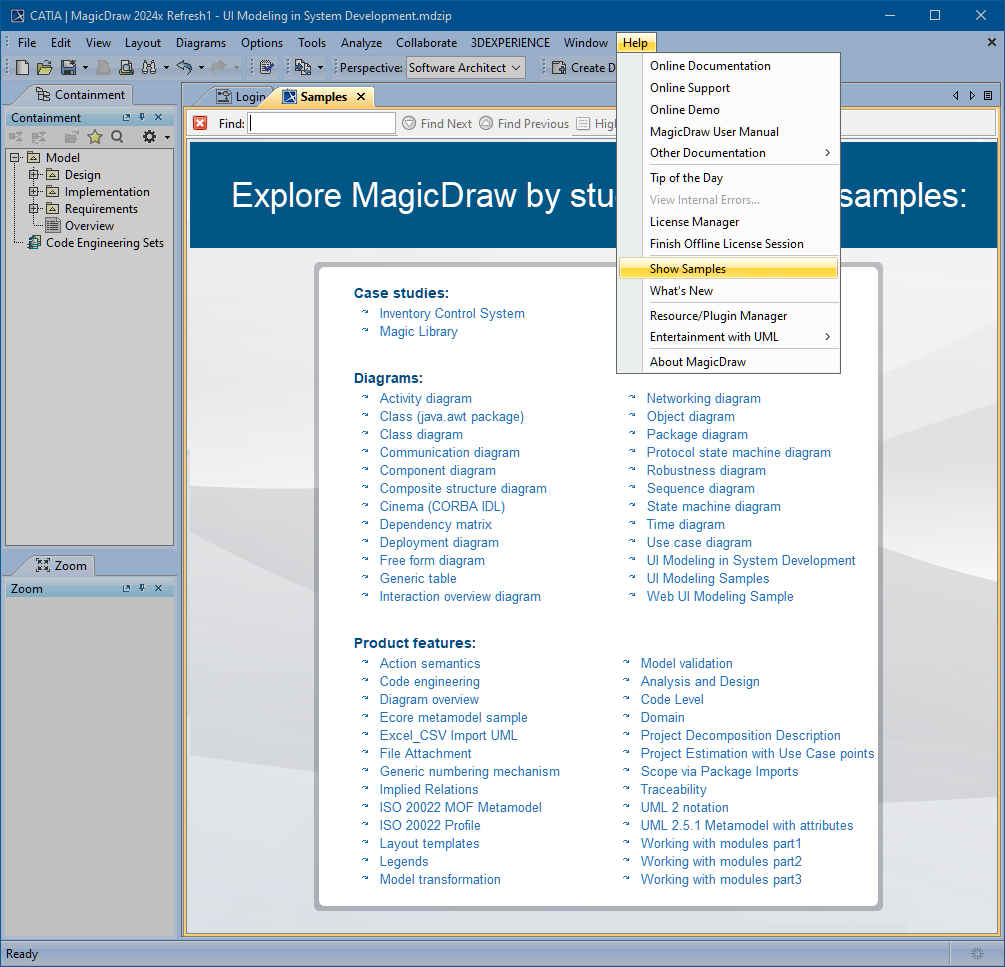
From now on, you can review the list of available samples anytime by invoking the Samples tab. The tab displays all the samples provided with the modeling tool installation, providing a convenient way to review and access the needed samples. Additionally, you can use the search bar to navigate the available content efficiently both in the Samples and Welcome tabs.
Other Improvements
- A new Letter Spacing Reduction in SVG environment option is introduced to control the spacing between letters when exporting diagram images in SVG format. Adjusting letter spacing enables you to maintain text alignment within shape boundaries when exporting, ensuring it does not exceed their borders. Learn more >>
Collaboration
Model Patch Functionality Improvements
We are happy to announce that in this release the Model Patch functionality is coming out of the technology preview phase with several enhancements. Model Patch is a more convenient alternative to a full Model merge or disconnected team collaboration because it allows you to move the selected elements or element changes from one model branch to another and transfer only a specific scope of model modifications.
In this version, we improved the Model Patch UI and introduced a new panel that will help you solve any problems related to model patch application. This panel lists all the changes that could not be applied and describes the underlying issue for each change. Learn more >>
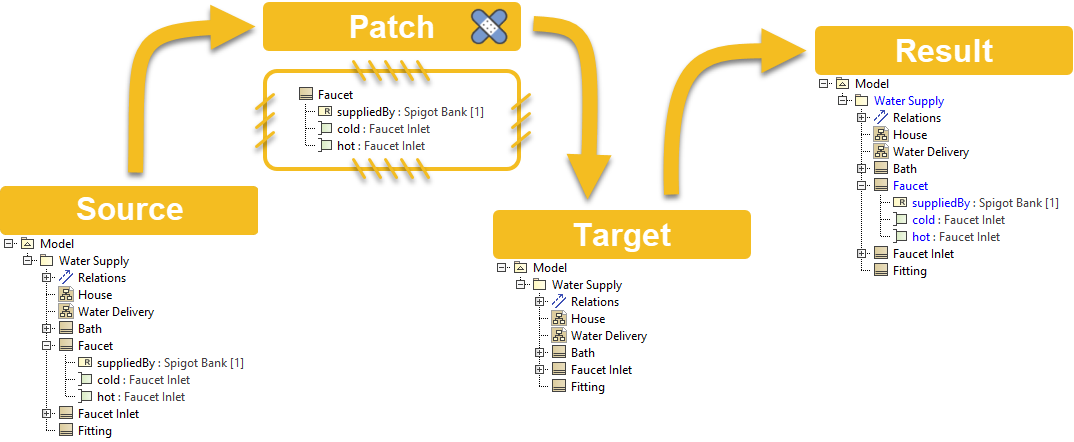
Model Patch mechanism.
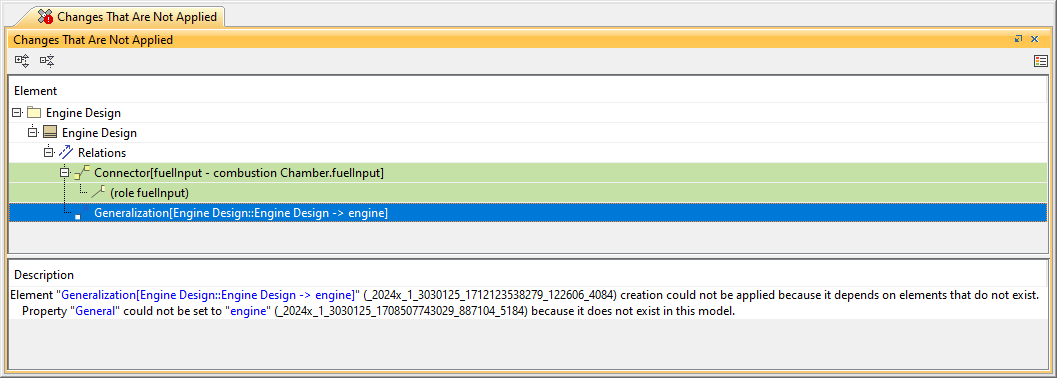
A panel listing the model patch changes that could not be applied.
Commit Queues
You now have access to a quicker and more predictable project commit execution at the end of a long working day: simultaneous commits are processed by putting all users in a First-In-First-Out (FIFO) line, ensuring fairness and efficiency in project commits. Learn more >>
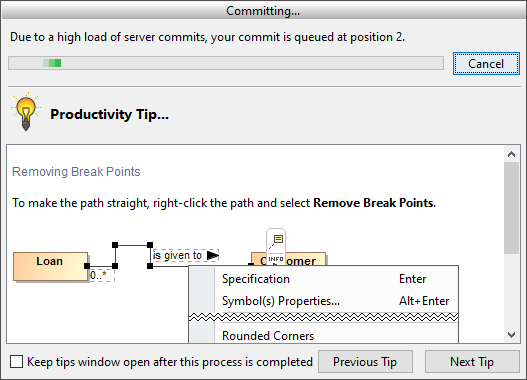
The dialog showing your position in the project commit queue.
Other
- Starting with version 2024x Refresh1, you won't need to manually specify the Web Application Platform URL to access specific Teamwork Cloud features like Resource Usage Map or global element usage search. Teamwork Cloud will now retrieve the URL automatically.
- Now it will be possible to skip the migration of archived branches when migrating Teamwork Cloud projects, which will significantly reduce the migration time.
- The project comparing functionality no longer requires the Read Resources permission for used projects. However, you still need the Read Resources permission for the main projects you want to compare.
Collaboration Powered by 3DEXPERIENCE Platform
Moving Projects to the 3DEXPERIENCE Platform
We're thrilled to announce a significant step towards collaboration between Teamwork Cloud and the 3DEXPERIENCE platform. With this release, you will have the ability to move Teamwork Cloud projects to the 3DEXPERIENCE platform using the server project file format (.szip). Previously, the .szip file format facilitated collaboration solely between different Teamwork Cloud servers. However, with version 2024x Refresh1, we have extended its functionality to allow importing projects from .szip files to the 3DEXPERIENCE platform as well and updating them if a project already exists on the platform.
We hope that you will benefit from this new functionality and stay tuned for further improvements in future releases. Learn more >>
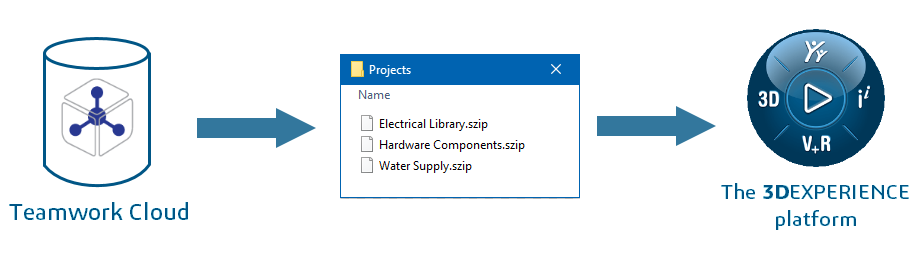
Moving projects to the 3DEXPERIENCE platform by using the server project file format.
Iteration Merge Information
Now the History and Edit Branches dialogs show if a specific project iteration was merged, as well as the iteration it was merged from.
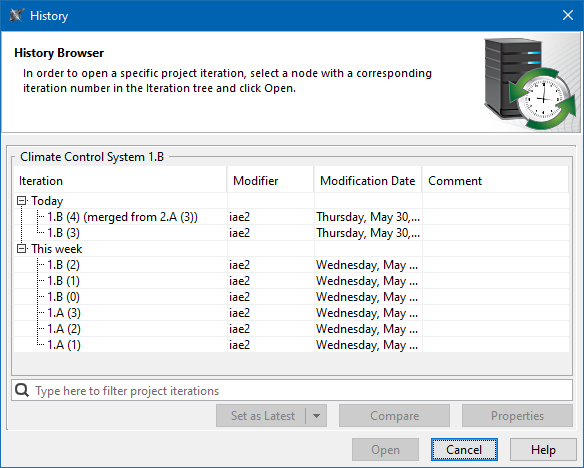
The Iteration column of the History dialog displays the project merge information.
Performance Improvements
The performance for various basic server operations, especially project opening, has been significantly improved. As you can see in the charts below, now projects on the 3DEXPERIENCE platform open at least five times faster compared to version 2024x.
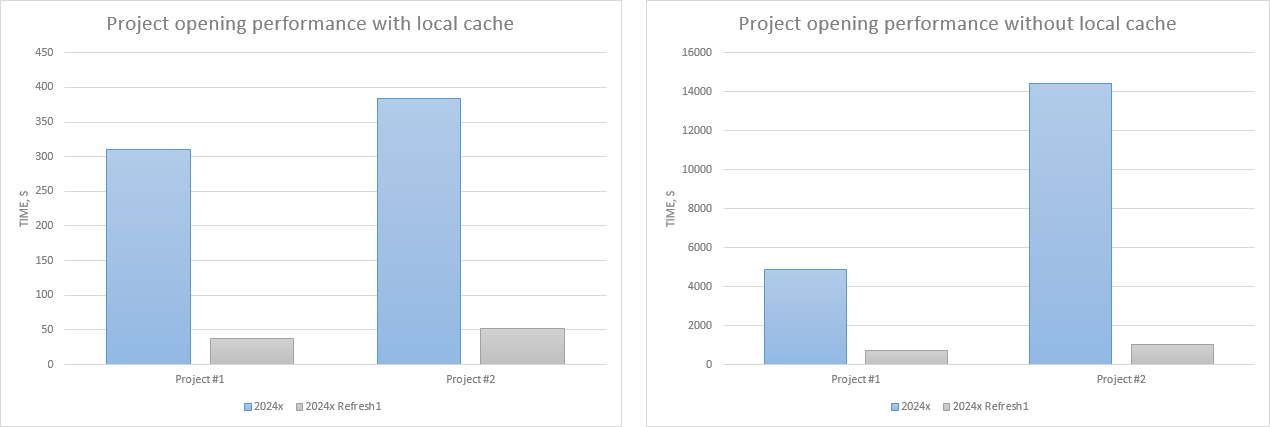
The charts comparing project opening performance for projects with 2 million elements.
MagicDraw Documentation
News of earlier versions