UAF 1.2 Plugin
Released on: July 5, 2024
Beginning with version 2024x Refresh1, significant enhancements have been made to various diagramming tools and tables. The Security Connectivity and Security Role-based Connectivity tables have been restructured into dedicated diagrams for better clarity on Operational and Resource viewpoints. The Strategic Driver Map now visually connects Drivers, Enterprise Goals, and Strategic Phases, while the new Strategic Drivers Table organizes elements, such as Drivers, Challenges, Opportunities, and Capabilities, in a structured format. The Preview Affected Diagrams dialog has been introduced for easier management and preview of affected diagrams, with new options for updating diagram elements. Enhancements to Gantt Charts include better project and milestone management and display options for projects. Measurement management has been improved with features for reusing default values and auto-populating measurements in Property Sets. Additionally, model conversion between frameworks and new validation rules have been implemented to streamline processes and ensure data integrity.
To download the latest version, see Downloading installation files. For further information, check the product documentation.
Diagraming
Security Connectivity and Role-Based Connectivity Tables
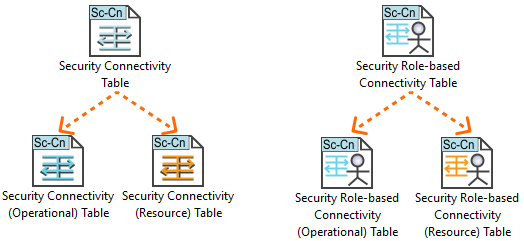
Beginning with version 2024x Refresh1, the Security Connectivity and Security Role-based Connectivity tables have been redesigned into dedicated diagrams focusing on the Operational and Resource viewpoints:
- Security Connectivity (Resource) Table
- Security Role-based Connectivity (Resource) Table
- Security Connectivity (Operational) Table
- Security Role-based Connectivity (Operational) Table
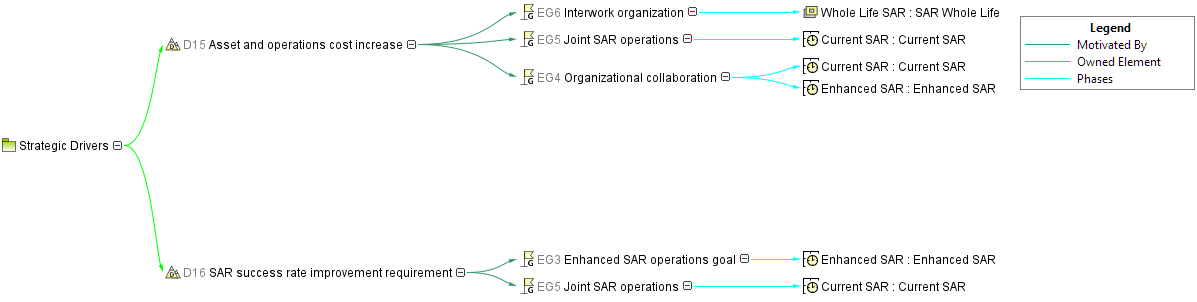
Strategic Driver Map
This predefined map includes the Driver, Enterprise Goals, and/or Enterprise Objectives that are related to a Driver using the Motivated By relationship, and Actual Strategic Phases that are related to the Enterprise Goals or Enterprise Objectives using the Phases relationship.
Strategic Driver Table
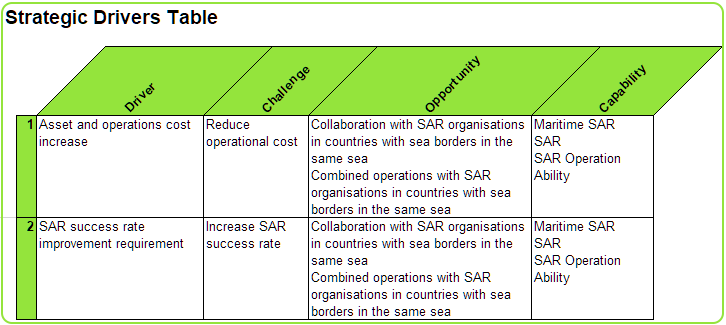
The new Strategic Drivers Table allows you to assemble Drivers, Challenges, Opportunities, and Capabilities in a tabular form in strict order: the Driver presenting Challenges, the Challenges motivating Opportunities, and the Opportunities impacting Capabilities.
In this table, you can also define relationships between Drivers and Challenges, Challenges and Opportunities, Opportunities and Capabilities. This table captures the Driver, Challenge, Opportunity, and Capability elements.

Affected Diagrams Preview Dialog
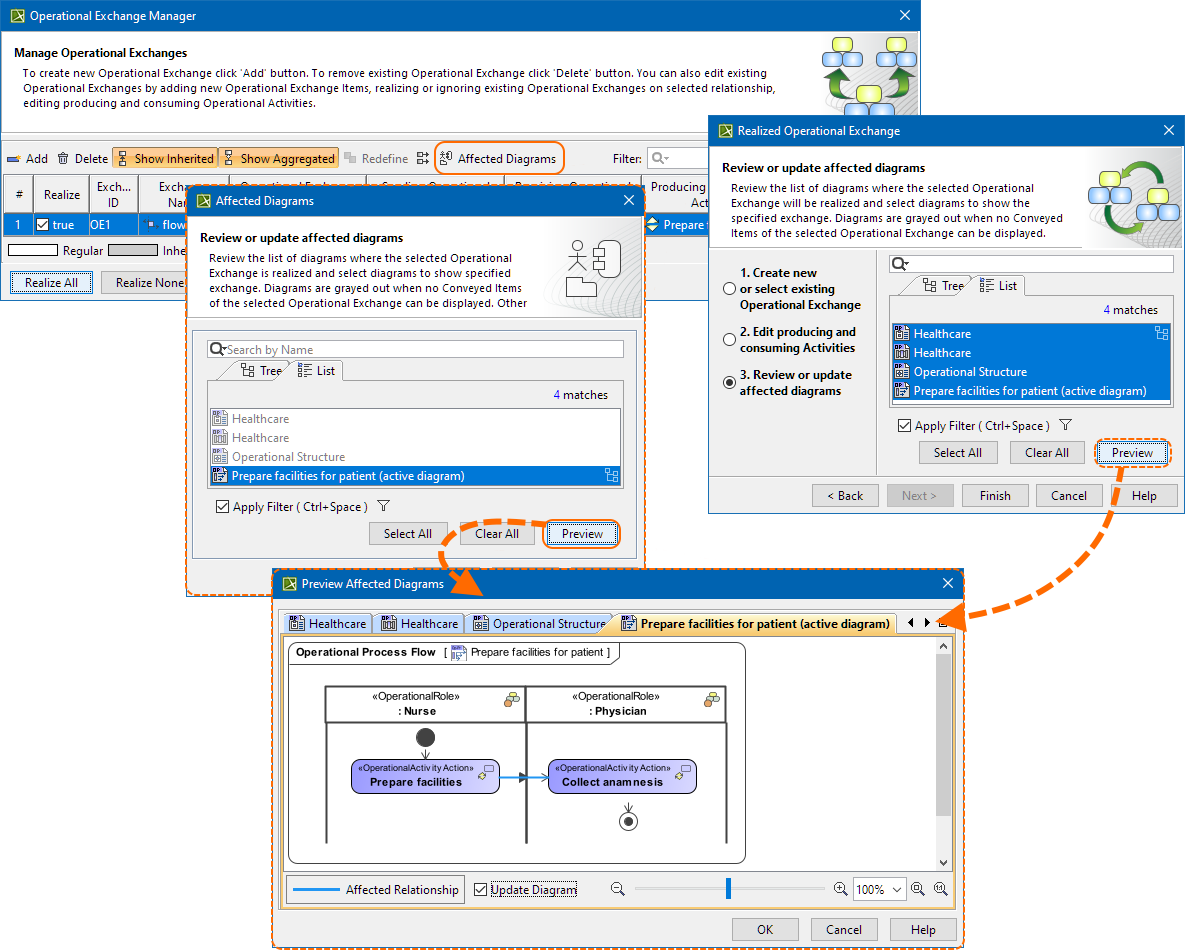
To enhance the exchange creation and management experience in Resource, Service, and Operational viewpoints, we have introduced the Preview Affected Diagrams dialog. This dialog conveniently presents all affected diagrams, allowing you to preview them individually. Furthermore, the affected elements, where the created Exchanges will be realized, are prominently marked in the diagram preview pane.
During the preview process, you can select the Update Diagram check box for diagrams in which you wish to display the Conveyed Items of the selected exchange.
The new Project option Show Item Flows on Affected Diagrams controls how the diagrams will be updated for newly created or modified exchanges. Set the option to true to update all affected diagrams and show the Conveyed Items of exchanges whenever a new exchange is created or an existing one is modified.
Report templates
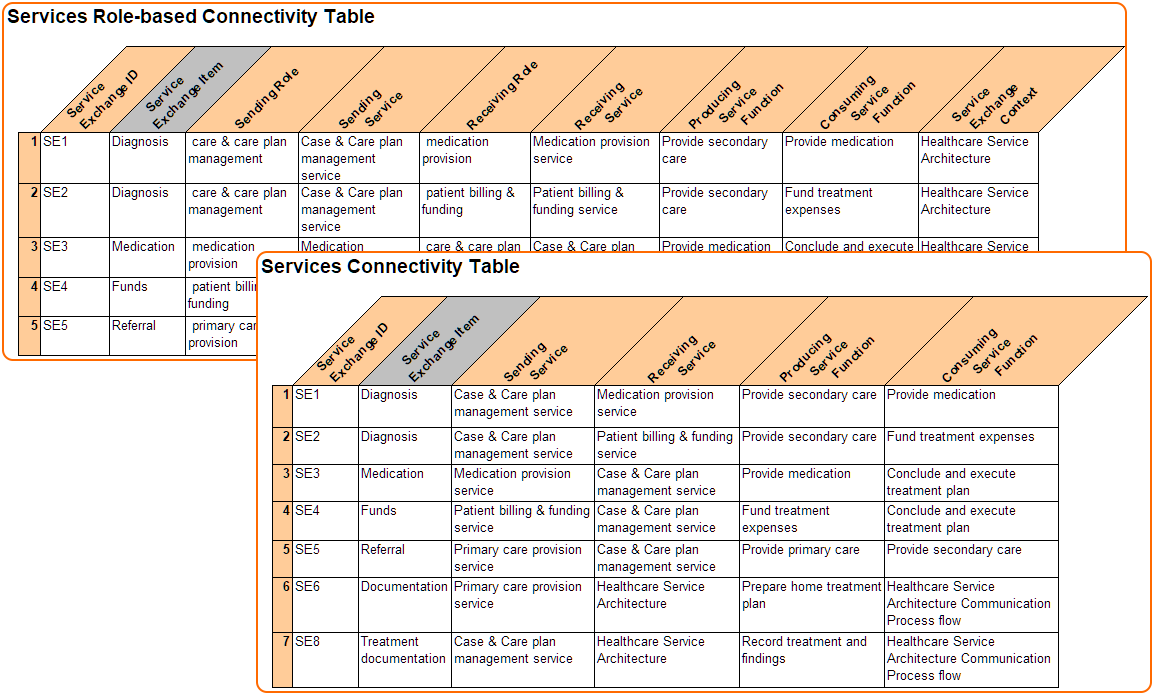
- The new report templates have been implemented for Service Connectivity Table and Service Role-based Connectivity Table. The reports are available through the Report Wizard.
- A new Strategic Driver Table also makes a new report available. You can create the report through the Report Wizard, directly from the table toolbar, or using a quick report option from the Containment tree.
Gantt Chart Enhancements
Project Roadmap Enhancements
- The new Actual Project Assignment wizard will help you add new Actual Projects to the chart more conveniently. With this wizard, you will:
- Have the ability to reuse existing Projects as created Actual Project types
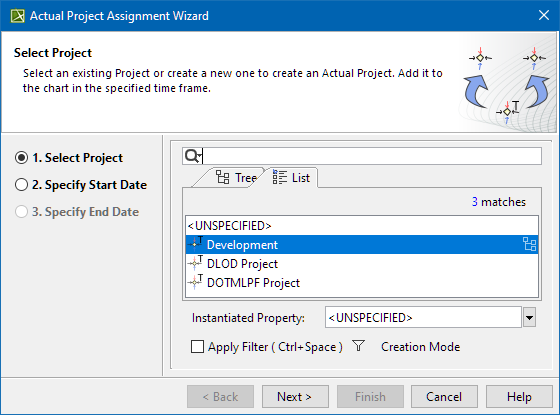
- Control Actual Projects hierarchy creation based on the existing Project structure.
- Have the ability to reuse existing Projects as created Actual Project types
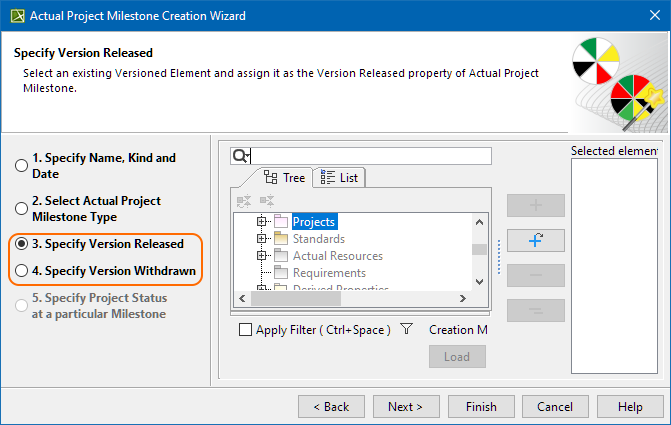
Two additional steps were added to the Actual Project Milestone Creation wizard. With these steps, you can specify the Actual Project Milestone Version Released and Version Withdrawn properties during milestone creation.
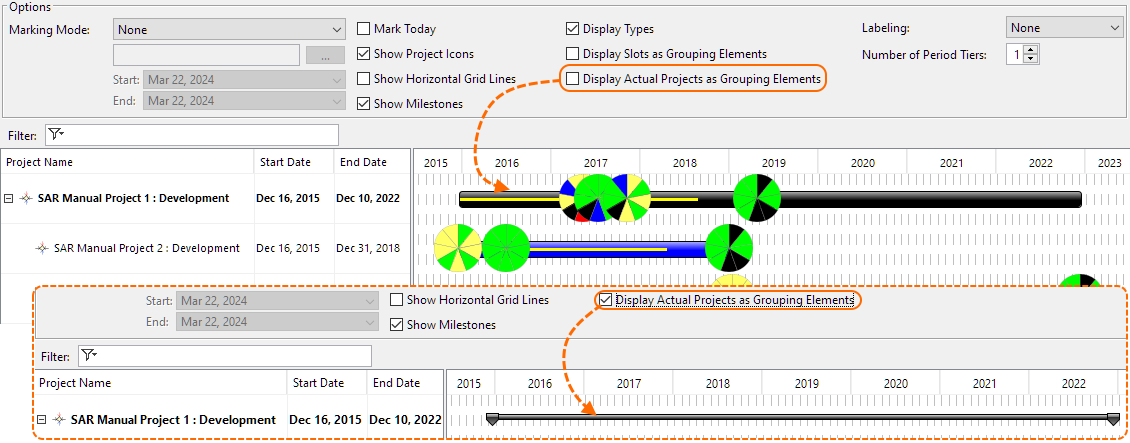
The new Display Actual Projects as Grouping Elements option (located in the Gantt chart options area) is introduced. This option controls how the Actual Project is displayed:
- Turn the option on to display the Actual Project only as a grouping element.
- Turn the option off to display the grouping Actual Project bars with Actual Project Milestones and completion progress.
Strategic Phasing Gantt Chart Enhancements
- You can now choose whether you want to show or hide selected Capability's Provisions in the Capability Provisions area in the Strategic Phasing Gantt Chart.
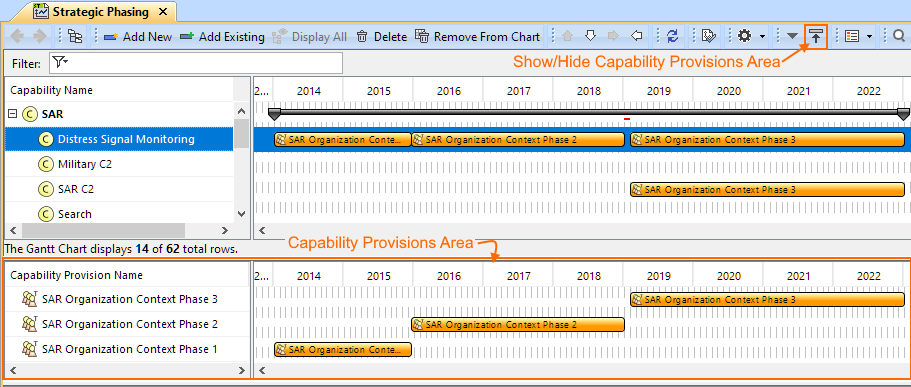
- Now, when creating a Strategic Phasing Gantt Chart, you can choose to add Capabilities and Resources from the used projects. These elements will be displayed in gray to indicate that they come from a used project.
Other
- The Gantt charts were enhanced to indicate when an element is used from another project and/or is read-only, with the element name displayed in gray to signify this status.
Exchange Management
The functionality when reconnecting connectors between elements was improved, offering options for managing exchanges. Now, the modeling tool checks the flow properties of source and target ports (if defined), recommending suitable exchanges for realization. Learn more >>>
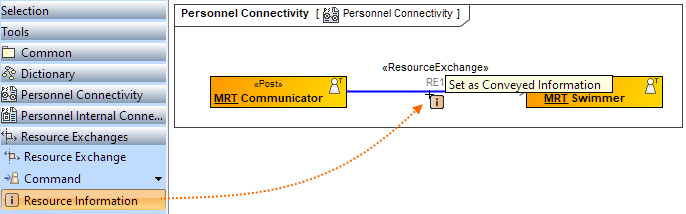
- You can now specify a Conveyed Item directly in the diagram, picking the needed Conveyed Item element from the diagram palette and dragging it on to the exchange.
- Now the Conveyed Items in the Realized Exchange wizards are represented with icons to help you identify the Conveyed Items.
- With this version, when you hide the realized exchanges, you can choose to hide the arrow notation on the realizing elements as well. The Hide Information Flow If Conveyed Information Is Missing Project option controls the arrow visibility.
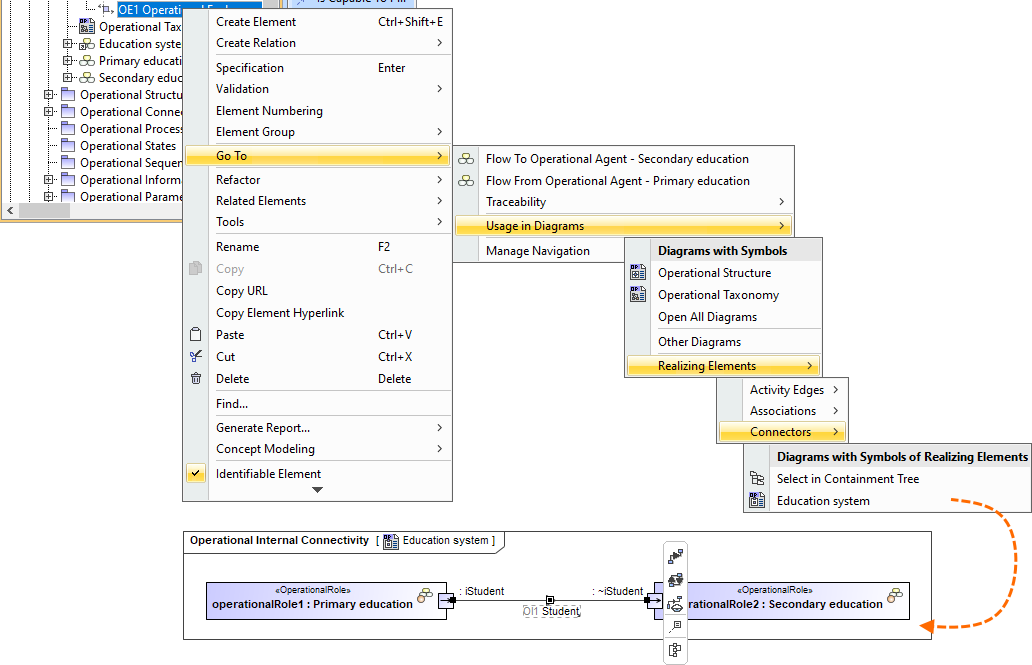
- You can now easily navigate from the selected exchange in Containment tree to the diagrams where that exchange is realized.
Measurement Management Enhancements
With this version, we have enhanced measurements management for Property Sets and Measurable Elements.
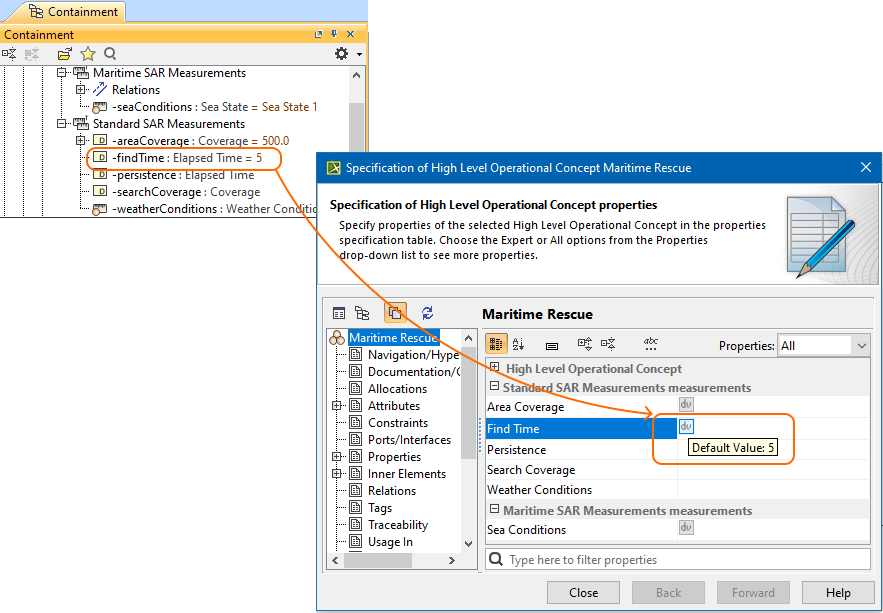
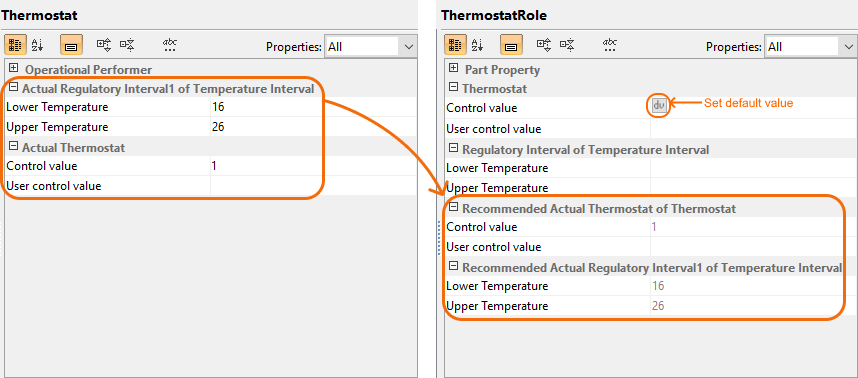
- Before the 2024xR1 release, you had the ability to define actual values for all measurements within Measurement Sets or Property Sets. Now, with the introduction of the 2024xR1 release, you can effortlessly reuse default actual values to define the entire structure of Actual Property Sets. This enhancement includes the implementation of the Default value button, conveniently accessible within the Specification window. Learn more>>>
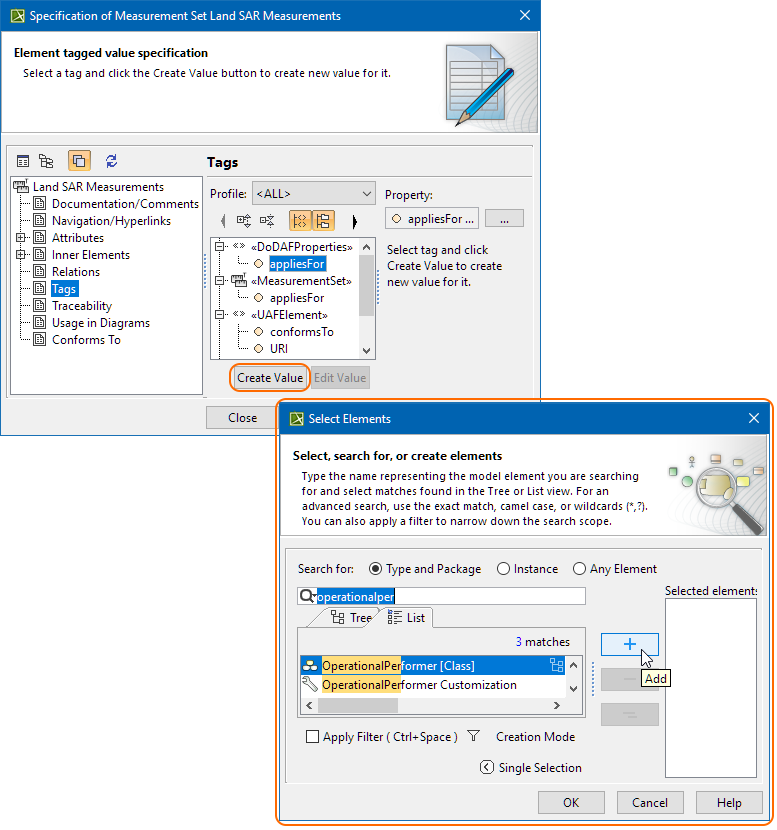
- Prior to the 2024xR1 release, automatic population of measurements was limited to Measurable Elements only, with no capability for Property Sets. With the introduction of the 2024xR1 release, you now have the ability to automatically populate measurements on Property Sets as well. Measurements are created for elements with the Applies for tag values (stereotyped with «DoDAFProperties») applied, and the newly created measurements are typed by the elements with the «DoDAFProperties» stereotype applied. Learn more>>>
- Before the 2024x R1 release, reusing and synchronization of Measurement structures was not feasible in UAF. With the release of the 2024x R1, you can now leverage this functionality for Property Set usages, including Assets and Roles, as well as Measurement Sets and Measurements. This enhancement enables the creation of an Actual Property Set structure suggested based on the structure of the Property Set typing the Measurable Element, with default values also suggested.
Existing Actual Property Sets of the Measurable Element type are recommended, and this allows you to review and adjust them as needed. Additionally, the newly created Actual Property Set is applied as a default value of the Measurable Element.
Model Conversion Between Frameworks Improvements
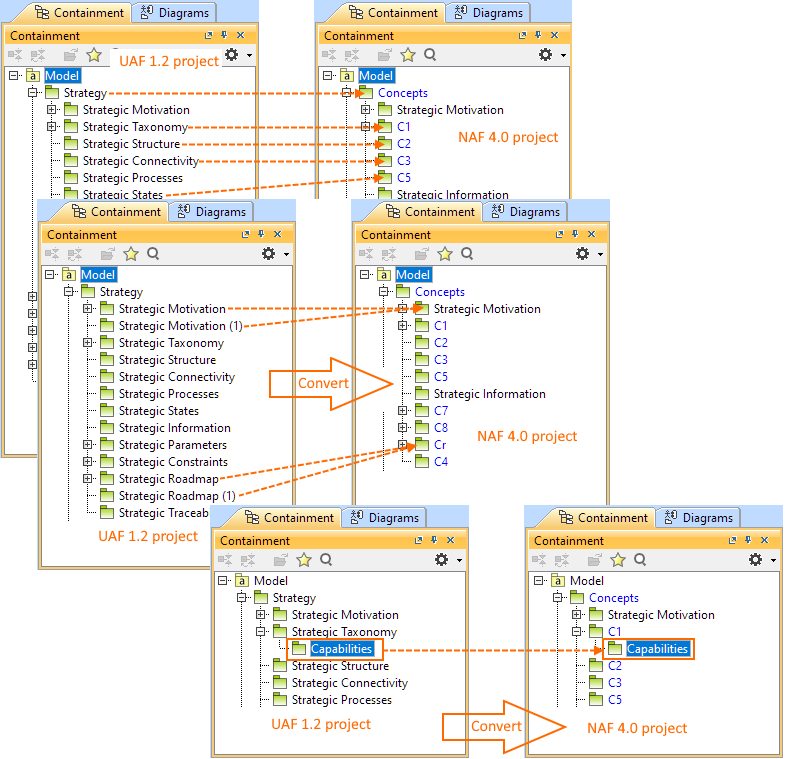
The project conversion between different Enterprise Architecture Frameworks has undergone some improvements and now adds more clarity. The framework packages are seamlessly mapped during conversion, with package names adjusted accordingly. Custom-named packages remain unchanged, while multiple packages with identical names are merged into one.
Validation
- The COR2185 validation rule was improved to synchronize Measurement Sets of the validated element, located in the Measurement Set property, with Measurement Sets of the associated element: extending beyond Measurable Elements to include Property sets that own the measurements typed by Measurement Sets.
- New completeness validation rules (COM2028, COM2029, COM2030) have been implemented for Operational, Resource, and Service viewpoints to highlight exchanges that are not realized by any realizing element.
- The new correctness validation rule COR2184 was implemented to check whether the Actual Project Start and End dates enclose the dates of its owned Actual Projects.
- The COR2196 correctness validation rule was implemented to check whether the date of the Actual Project Milestone does not precede the date of its referenced Actual Project Milestones.
Discontinued Features
- The PES export functionality is no longer available.
Other Enhancements
- One more way to model conjugated ports is to create the Conjugated Operational/Resource/Resource Service/Service/ Interface, which has the same features as its original Interface except that its Flow Properties are reversed (conjugated). Learn more>>>
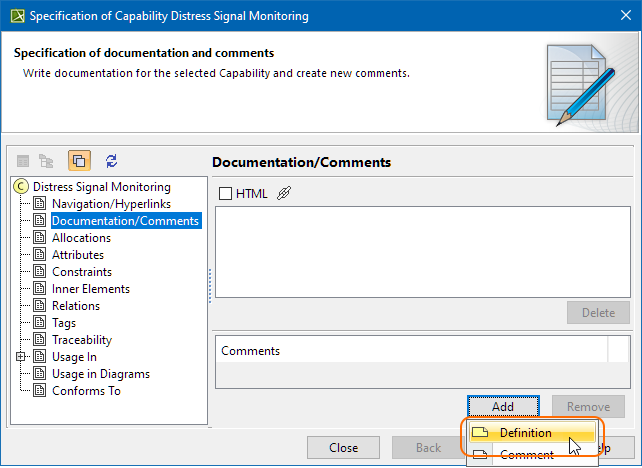
- You can now create a Definition and Comment for any UAF element in their Specification window > Documentation/Comment property group.
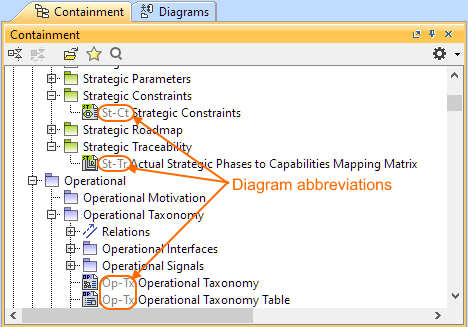
- The new Project option Show Diagram Abbreviations has been introduced. Set this option to true to show diagram abbreviation in the Containment tree. Learn more >>>
With the new Project Option Show default documentation for UAF Packages, you can choose to show the default UAF Package documentation. Turning the option on will display the documentation in:
- The viewpoint package element's Specification window, Documentation/Comment property
- The selected viewpoint package element's Documentation tab, which is located in the Model Browser.
Learn more >>>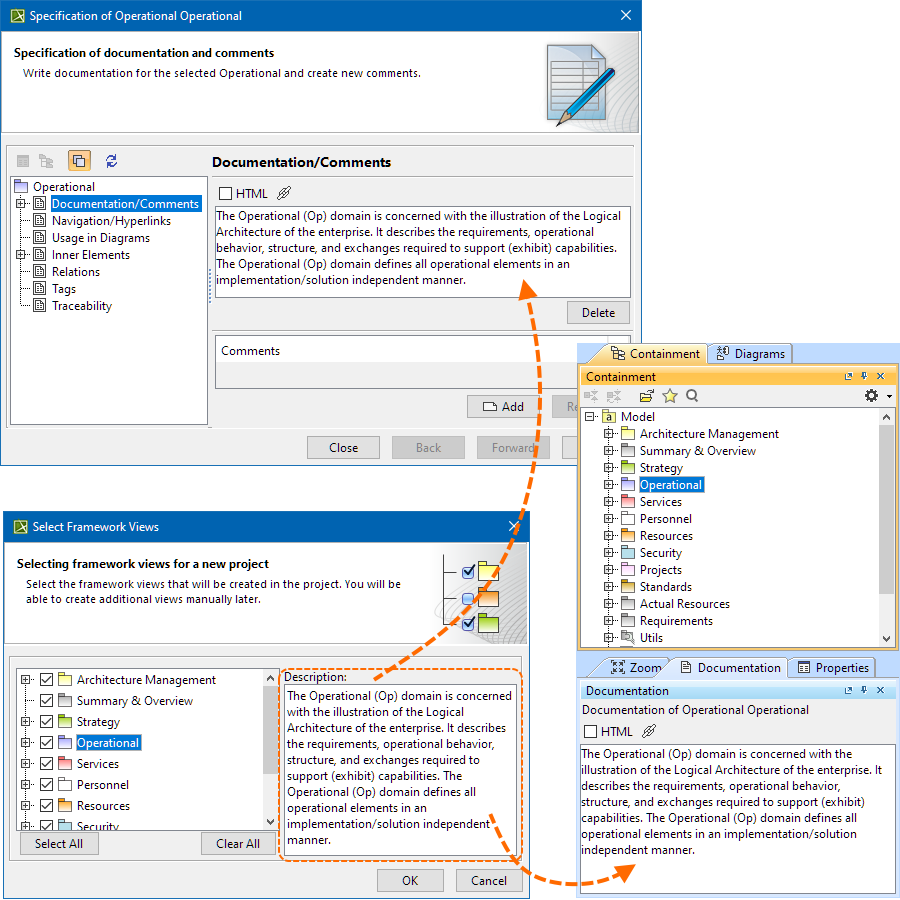
- The Strategic Motivation Table has been improved. Now when you click the Add New or Add Nested button, the SysML Requirements are collapsed and you can focus only on UAF requirements - Enterprise Goal and Enterprise Objective.
- The creation process of UAF Instance Specifications was enhanced by enabling the creation of slots when one instance specification is dragged and dropped onto another from the diagram, diagram palette, or Containment tree when the structure of Instance Specification types is predefined.
- The role-based connectivity diagrams have been enhanced by adding a Context column to show the context of the element realizing the exchange.